How to Automate Paperbell
Paperbell sends a coaching practice's timed emails on its own: appointment emails, Reminder to Book, expiry notices, failed-payment retries and a testimonial ask after the final session. Following up the clients those emails did not move, blank intake surveys and renewals means reading each client record first, and an agent like WebRun can read them and draft the note.
 Written by
Marta Ellison
Automation strategist
Written by
Marta Ellison
Automation strategist
 Reviewed by
Priya Raghavan
Solutions lead
Reviewed by
Priya Raghavan
Solutions lead
A Paperbell package carries the contract, the sessions and the payment plan
Paperbell's own line is that it is the simple way to sell coaching online, and it is built for the coach or consultant who works alone. The practice runs from one Paperbell website. What that website sells is the package: a free discovery call, a block of six sessions, a monthly subscription or a group programme, with a payment plan when the price needs splitting.
A client picks a package on the coach's site, signs the contract before the purchase will go through, books a time from the coach's availability and gets the intake survey. From then on everything about them sits on one client record, in tabs that include Appointments, Packages, Contracts, Surveys, Notes and Message Logs, the last holding every email and text Paperbell has sent them.
For coaches working toward an ICF credential, Paperbell also keeps the coaching log, counting paid and pro bono hours as sessions happen.
The follow-up between sessions falls to the coach alone
A discovery call went well on Tuesday and deserves a note quoting what the person said about their manager, not a link to the packages page. A new client's first session is tomorrow and the intake survey is still blank.
Someone bought six sessions in March, booked two and went quiet, and two rounds of Reminder to Book have not moved them. A six-month engagement has two sessions left, and the renewal conversation needs to happen before the last one.
An instalment on a payment plan failed a fortnight ago and is still unpaid. A client promised a testimonial after the final session and never wrote it. And when an ICF application deadline comes round, the coach adds up hours that sit partly in Paperbell and partly in an older spreadsheet.
Paperbell's automatic emails run on the calendar
Each Paperbell package carries its own automated emails, on five triggers. Three fire around an event: before or after an appointment or a group session, and after a purchase. Reminder to Book goes to clients with unbooked sessions who have not booked in 30 days, and the Final Appointment email goes within 48 hours of the last session, which is where Paperbell suggests asking for a testimonial. Clients also get an email 30 days before the appointments in their package expire.
Paperbell retries a failed instalment for ten days and emails the client when it fails, on day seven and on day ten. Its Zapier integration can pass a new appointment, client, contact or purchase on to other apps.
Intake surveys cannot be made mandatory, so a first session can start with the questionnaire empty. After ten days Paperbell stops retrying and emails you both, but it leaves the client's access as it was, so the chase is yours. The ICF log cannot take hours from before Paperbell, which go into the exported CSV by hand. And the coach writes each automatic email once per package, so every client gets the same text on the same timer, with only smart fields such as the appointment time filled in, and no email can mention last week's session or notice that a client ignored the last two.
Paperbell's message logs show which clients the reminders did not move
A client who has let two Reminder to Book emails go by, as their Message Logs tab shows, gets a line from the coach that picks up where their last session ended.
The evening before a first session, the coach sends a two-line nudge, already drafted, to each new client who has left the intake survey blank, and reads the completed answers of the others as prep for the morning.
When an engagement reaches its last two appointments, the coach sends a renewal note built on the goals the client wrote at intake. A discovery call that has not turned into a purchase after a week gets a follow-up from the coach naming the package that fits what the person said on the call.
When Paperbell stops retrying an instalment, the coach knows how many sessions that client has left before deciding whether to pause their access. And the coach's ICF spreadsheet holds every month's export under the hours from before Paperbell, so the total is ready whenever an application opens.
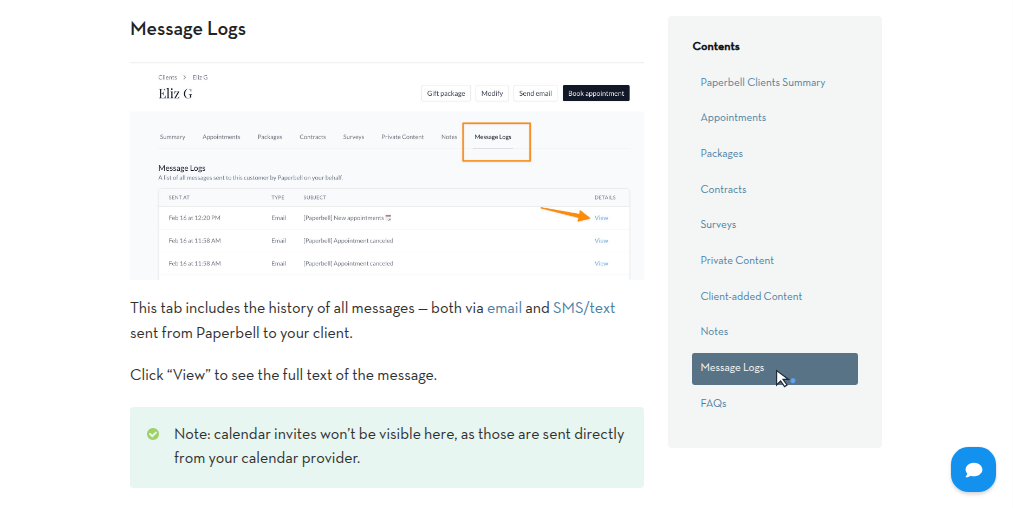
WebRun drafts each follow-up from the Paperbell client record
The coach opens the Paperbell client record for every one of those notes, client after client, usually once the last call of the day has ended.
WebRun is an AI agent that works a real Chrome browser, signed in as you. Each active client's Packages, Surveys and Message Logs tabs are its source after a coaching day, and the lists and drafts it builds from them go to Gmail or Google Sheets. Paperbell needs nothing installed and no API key.
You send each note yourself from Gmail. Appointments and expiry dates in Paperbell change only if you write a job that changes them, and the Notes tab can be left out of every run. The jobs below include a testimonial request for clients who let the Final Appointment email pass.
Questions people ask
Isn't Paperbell's own Reminder to Book email enough?
For the first nudge, yes. Reminder to Book goes out only if you have set it up and saved it on the package, and then it repeats every 30 days to clients with unbooked sessions until the package expires, in the same words each time. The agent picks out the clients it has not moved and drafts a note from you instead.
What happens when Paperbell stops retrying a failed payment?
Paperbell emails you and the client after ten days and stops retrying, but it does not cancel the client's access, and the client can still update their card. The agent lists that client with the sessions they have left and drafts a note; whether to pause access stays your decision.
Will it read my private session notes?
Only if you let it. Paperbell's Notes tab holds both private notes and notes shared with the client, and you can confine a run to the Packages, Surveys and Message Logs tabs so neither kind is opened.
Do group programmes work the same way?
Yes. Everyone who buys a group package is invited to its group sessions automatically, including sessions created before they bought, and each buyer is still a client with their own record, so a blank survey or a failed instalment is found person by person.
Sources
- Paperbell Automated Emails - Drip Sequences and Reminders Sets out the five automated email triggers set per package, including Reminder to Book for clients with unbooked appointments every 30 days until the package expires and the Final Appointment email within 48 hours of the last session, described as the testimonial ask.
- Package or Appointment Expiration - Paperbell Support States that the client receives an automated email 30 days before the appointments in their package expire.
- Paperbell Intake Forms, Surveys, and Questionnaires Explains when surveys are sent and states that completing a survey cannot be made mandatory before booking.
- Paperbell Payment Plans - Installment Payments for Coaches Describes a failed instalment being retried for ten days, with client emails on failure, day seven and day ten, after which Paperbell emails coach and client and stops retrying, without cancelling the client's access.
- Paperbell ICF Coaching Log - Track Your Certification Hours Establishes the automatically generated log of paid and pro bono hours, its CSV export, and that hours from outside Paperbell must be added to the exported file by hand.
- Paperbell Clients - Manage Your Client List and History Lists the client record tabs, including Appointments, Packages, Contracts, Surveys, Notes (private or shared with the client) and Message Logs of every email and text Paperbell sent.
- Group Coaching Sessions - Paperbell Support States that everyone who has purchased a package is invited to any group appointment the coach creates, whether it was created before or after they bought.
- Paperbell integrations | Zapier Lists Paperbell's Zapier triggers: New Appointment, New Client, New Contact and New Purchase.
9 ready-made Paperbell workflows
Each one names the apps it touches and the exact steps it takes. Open one to read what it will do, then turn it on.



Want one of these running on your own Paperbell?
Show WebRun the process once and it will run it on schedule, in your own private browser environment.