How to Automate Practice Better
Practice Better already automates reminders, forms, access rules, payment plans, past-due invoice reminders and Google review requests. What stays manual is reading each client's journal and history and writing a personal note: a check-in, a package reminder, a discovery call follow-up. An AI agent like WebRun can read those and draft the notes for you to send.
 Written by
Rosa Lindqvist
Operations editor
Written by
Rosa Lindqvist
Operations editor
 Reviewed by
Yara Haddad
Data operations
Reviewed by
Yara Haddad
Data operations
A Practice Better client lives in the portal between sessions
Practice Better is practice management and EHR software for dietitians, nutritionists, health coaches, naturopaths and functional medicine practitioners, people who often see clients online and sell care as packages or programs rather than one visit at a time.
The practitioner books sessions and charts in it. Between sessions the client works in the portal, logging meals and mood in the journal, which can pull in data from a Garmin, Oura, Apple Health or Fitbit, and messaging the practitioner. Packages and program modules are bought and delivered through the same account, and a program lets one practitioner run a challenge or a course alongside one-to-one clients. The practitioner sets daily nutrient and lifestyle targets for each client, and a program can run on fixed dates, with modules unlocking on schedule, or at the client's own pace.
Journals, packages and discovery calls pile up between sessions
A caseload of twenty clients logging meals means twenty journals to read before Monday, each broken down by food, meal and day, with the sleep and activity a wearable sent over. The useful comment is the one that notices a client stopped logging dinners or has not moved their step count in a week. A client who logs every day expects the practitioner to have noticed.
The client whose package has three sessions left and expires next month has not booked. A prospect whose discovery call went well two weeks ago never bought, and a client who finished a program in the spring has not been back since. The practitioner writes those notes at the end of a long day, if at all.
Practice Better's automations fire on bookings, purchases and forms
Practice Better sends appointment reminders on its own and can send forms automatically before or after a session. Rules set what content a client can reach from the service, package or program they bought, and tags move clients through their journey, creating tasks for the practitioner or the client along the way.
Automated payment plans and payment reminders handle most of the chasing over money, and review requests go to Google from inside Practice Better. Supplement protocols run through the Fullscript integration, and insurance claims through Claim.MD, which checks eligibility and tracks rejections; a superbill takes one click. The journal has an analysis tool for comparing entries and spotting trends.
Those automations run on a booking, a purchase, a completed form or a due date. The analysis tool shows a client's trends to whoever opens it; choosing which of twenty clients needs a note this week, and writing it around what they logged, is left to the practitioner. Anything outside the platform stays manual too, such as a lab portal Practice Better does not integrate with, or the inbox where discovery call requests arrive.
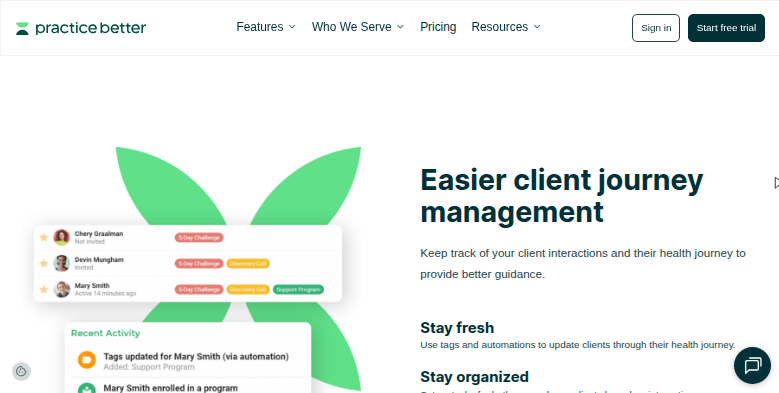
Check-ins can open on what a client logged last week
By Monday morning, the practitioner knows which journals to open first: clients who stopped logging, missed a target or changed their pattern come at the top, each with a two-line check-in drafted around the entries.
A client with sessions left on a package that expires next month gets a friendly note offering the next open times from the calendar. One who finished a program two months ago and has not booked gets a message about what they worked on.
Prospects who met the practitioner on a discovery call but did not buy hear back a few days later, in a follow-up written from their intake form answers. A new client whose intake form is still blank the day before the first session gets a polite reminder.
A practitioner who orders tests outside Practice Better's integrations hears the morning a result is posted on the lab's own portal.
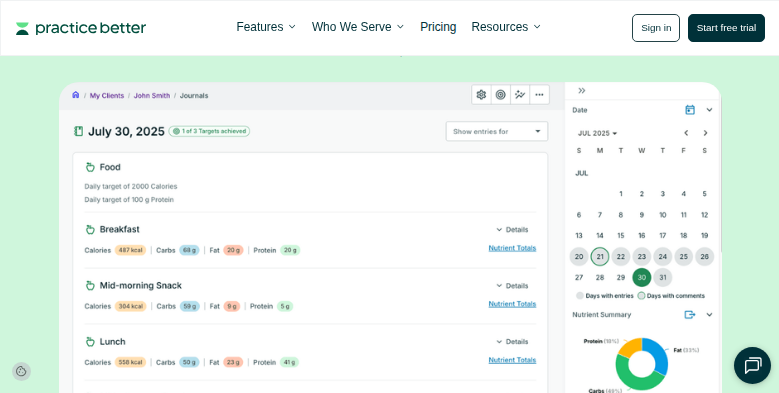
The agent reads client journals in Practice Better and drafts the check-ins
The journal reading, and the package and calendar checks around it, go to WebRun, an AI agent that works a real Chrome browser under the practitioner's Practice Better account. It reads the client list, each client's journal and the calendar, the screens the practitioner would otherwise click through one by one, and drafts each note from what that client logged.
The practitioner reads each check-in, rewrites what needs rewriting and sends it from Practice Better; the agent sends nothing to clients. Charts and protocols stay exactly as the practitioner left them.
The journal review, the package reminder and the discovery call follow-up are ready to switch on below.
Questions people ask
Does it give clients nutrition advice?
No. It points out what a journal shows, such as missed logging or a target not met, and drafts a check-in in your words. Any advice is yours to write or approve.
Can it read wearable data that clients sync to their journals?
Yes, as it appears in the client's journal in Practice Better, including data synced from Garmin, Oura, Apple Health or Fitbit: the sleep, activity and heart-rate figures next to the food and mood entries.
Can it follow participants in a group program?
Yes. It reads program enrollment and module completion, lists participants who have fallen behind, and drafts a nudge for each one for you to send.
Sources
- Automation Tools for Health & Wellness Practices | Practice Better Vendor page describing appointment reminders, forms sent automatically before or after sessions, access rules by service, package or program, tags, automated payment plans and Google review requests.
- Food, Mood, & Lifestyle Journal for Private Practices | Practice Better Describes client journals, syncing Garmin, Oura, Apple Health and Fitbit data, and the built-in analysis tools for comparing entries and trends.
- Client Billing & Insurance Software | Practice Better Describes the Claim.MD integration for eligibility, claims and rejections, superbills, payment plans and automated payment reminders.
- Reporting & Analytics for Your Private Practice | Practice Better States that reminders for past-due invoices can be sent automatically and that program reports include module completion rates.
7 ready-made Practice Better workflows
Each one names the apps it touches and the exact steps it takes. Open one to read what it will do, then turn it on.



Want one of these running on your own Practice Better?
Show WebRun the process once and it will run it on schedule, in your own private browser environment.