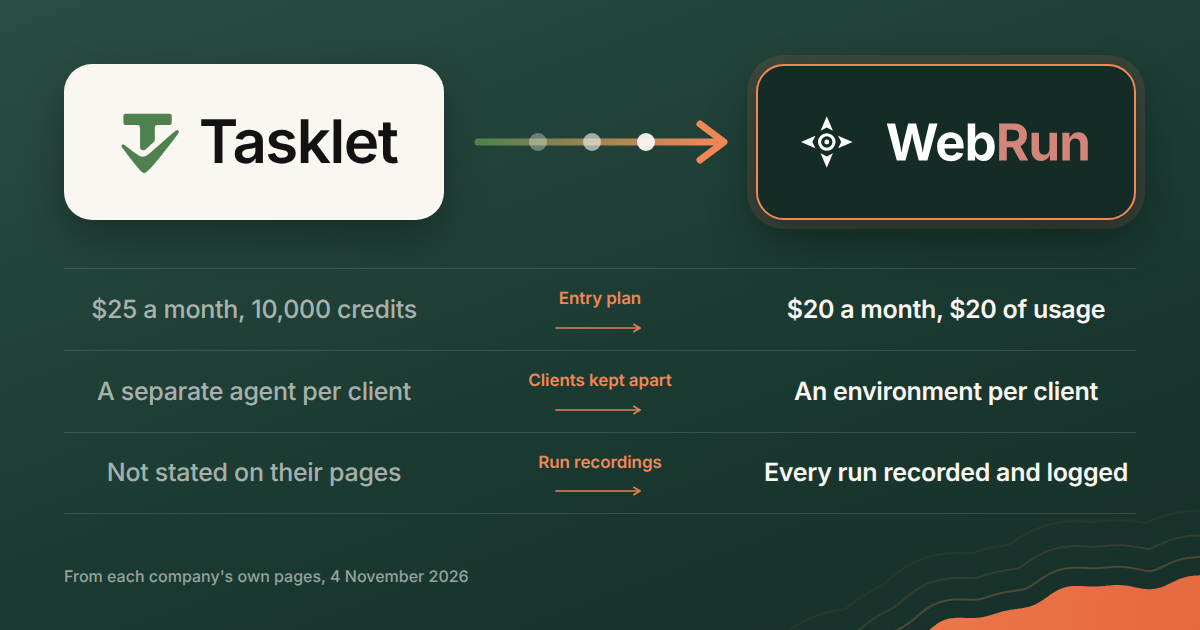
If you are shopping for a Tasklet alternative, start with two questions. How will you be billed, and how do you keep one client's work away from another's? Those decide the switch more often than any feature does.
Both products do the same core thing. An AI agent signs in to your web apps, does work there on a schedule, and tells you what happened. What follows compares them on what each company publishes about itself, read on 4 November 2026. Pages change, so the dates are here for you to check against the live ones.
Who each one is built for
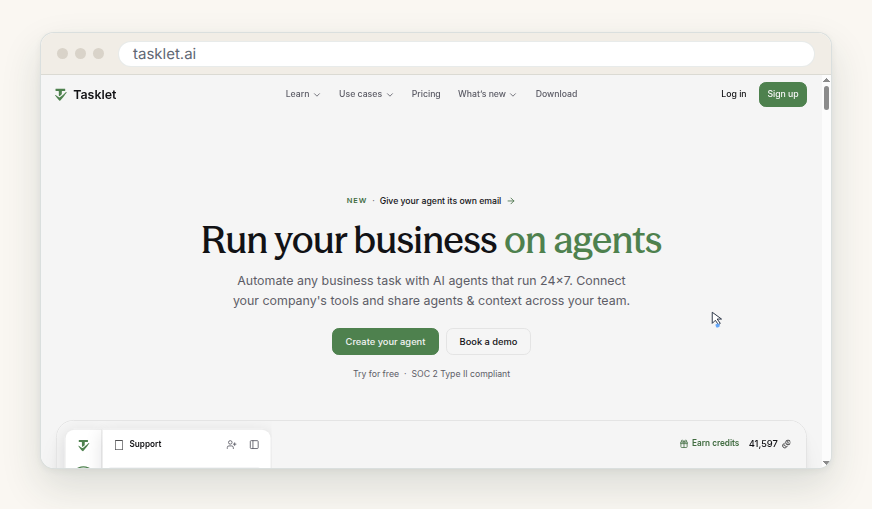
Tasklet opens with "Run your business on agents". The sections under it are about a team: "Get your whole team using AI. Today.", shared connections ("Connect your tools once and let the whole team build on them. Share access to APIs across the team without sharing the keys."), shared skills, files and memory, and "Everything IT needs to say yes", with "SOC 2 Type II compliant" sitting under the sign-up button (tasklet.ai, read 4 November 2026). It is pitched at a company putting its whole staff on agents.
WebRun opens with "Automate your business with AI" and the line "WebRun deploys AI agents that handle your daily operations inside the tools you already use". The page describes a job that repeats: WebRun "signs in to your tools and does the work in a real browser", "It runs on your schedule and sends you the result", and it keeps "a full session recording and action log for every run" (webrun.ai, read 4 November 2026).
One page is about a team adopting agents together. The other is about a recurring job with a record attached to it.
What the monthly fee actually buys
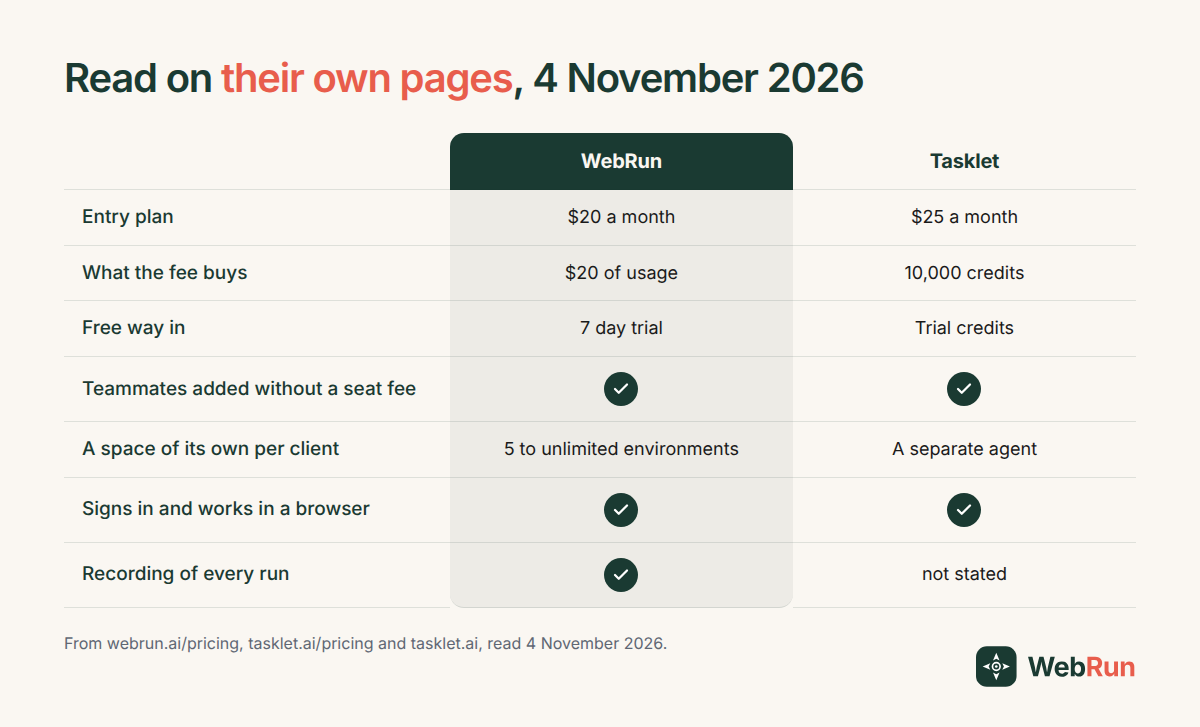
Tasklet sells credits. Its pricing page on 4 November 2026 lists a free start with "Limited trial credits" and "No payment required", Starter at $25 a month for "10,000 credits per month", Pro at $100 for 40,000, and Custom from $250 for 100,000, rising with the spend tier. You can buy one-time credits at $5 per 1,600, with a $25 minimum, valid for a year, and you can "Claim 600 free bonus credits daily by using Tasklet". Billing is at the organisation level: "Add unlimited team members at no additional cost and share one credit pool." Refunds are available within 14 days for amounts up to $250.
WebRun sells dollars of usage. On its pricing page the same day, Starter is $20 a month and includes $20 of usage, about 2,000 agent tasks, 3 agents running at once, 5 environments and 50 active workflows, after a 7 day free trial. Pro is $100 with $100 of usage, about 10,000 tasks, 10 agents at once and 20 environments. Business is $200 with about 20,000 tasks, 50 agents at once, unlimited environments and workflows, and an audit log. The page says there is "no per-seat pricing and no setup fee", and that extra usage is billed from pay as you go credits "so your agents keep running".
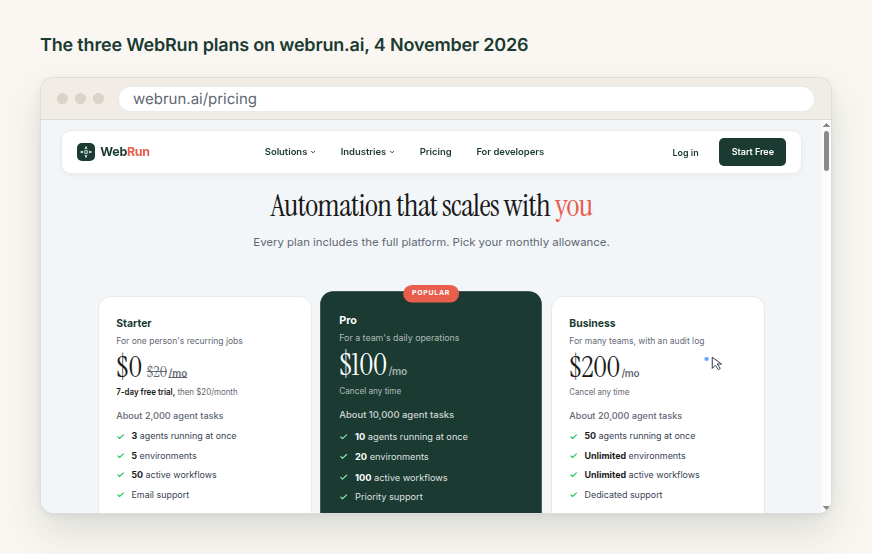
What this changes is how quickly you can answer "what did last month cost, and for what". A credit is a unit you have to learn before the invoice means anything. A dollar of usage you already understand. Credits do get cheaper in bulk on Tasklet's higher tiers, though, and 600 bonus credits a day is a real allowance while you are testing ideas.
Keeping one client's work away from another's
Agencies ask this first. A tool that sells shared agents and shared memory sounds like one pot everything goes into, and its teams FAQ says otherwise: "Agents are completely separate from one another. Threads, connections, and data within an agent are visible only to that agent's members", and it adds that this is "useful if you want separate agents for different business units, clients, or projects". Sharing on Tasklet is something you switch on per agent, not the default state of everything.
WebRun draws the same line in a different place. Its unit is an environment, which the documentation defines as "a named container that bundles a browser profile (cookies, local storage, extensions, cached credentials), persistent file storage, and optional triggers for scheduled automation". One client, one environment, with that client's logins and files inside it. The plan sets how many you get: 5 on Starter, 20 on Pro, unlimited on Business.
Both will keep ten clients apart. They differ in what sits between them. On WebRun that is a browser profile holding one client's saved logins. On Tasklet it is an agent holding its own threads and connections. If most of your work is signing in to each client's own tools, compare the browser profiles.
The browser is the integration, on both sides
Tasklet says it plainly on its homepage: "No API? Your agent has a browser", which can "Access older websites, internal apps, vendor portals, and more just like a human would". On 16 October 2026 it added saved logins, announced in Securely save browser logins in Tasklet: "Save a login once, and your agent can use it whenever it needs to get back in", "once your agent signs in to a site, it stays signed in across all its threads", plus 1Password access, imported authenticator codes, and the assurance that "Your password never reaches the AI model".
WebRun works the same way, and its homepage puts it in one line: "no API wiring is required", because the agent uses the site the way a person does.
If a vendor portal with no API is the reason you are looking, both qualify. That means it is not the thing to choose on.
What is left behind after a run
WebRun keeps a session recording and an action log for every run, and the plan decides how long you keep them: 7 days on Starter, 30 days on Pro, a year on Business, with an audit log on the plan written for many teams.
Tasklet's homepage and pricing page, read on 4 November 2026, do not mention recordings of a run. That is not proof it keeps none. It is a sign that it is not something they sell on, and if your work is client work that somebody may ask about in three months, it is worth asking their team directly before you move.
Where Tasklet is the better pick
If you want everyone in the company using agents this quarter, Tasklet is built for that: one credit pool, members added at no extra cost, shared connections and shared memory, and SOC 2 Type II compliance stated on the site. If a procurement form asks for that compliance line, it is on the page today.
Its use case library is also an easy way in, with 37 jobs listed on 4 November 2026 and the promise that each "comes with a video walkthrough, a prompt you can copy, and everything you need to set up your own in minutes". And you can start at $0 with trial credits and no card.
Where WebRun fits
WebRun suits the other shape of business: a few people, many clients or many recurring jobs, and a need to show what ran.
You get an environment per client with that client's logins in it, an invoice in dollars of usage rather than credits, a recording of every run, and hundreds of ready made workflows across sales, finance, support and operations to start from rather than a blank box. Starter is $20 a month.
No feature list settles this. Take the chore you would hand over first, one you do every week, and run it for a month on whichever tool you lean towards. Then look at the invoice and at the record of what actually ran.
If that chore is already clear in your head, the quickest start is to set it to run on a schedule and watch the first run end to end. Writing the instruction is most of the work, and our guide on describing a task an agent can finish covers the three parts that keep an agent from stopping to ask. If you would rather start from something that exists, the template library lists jobs by the apps they touch.
Where these numbers come from
Every figure above was read on 4 November 2026 from tasklet.ai, tasklet.ai/pricing, tasklet.ai/learn/teams-faq, tasklet.ai/use-cases, the Tasklet blog post of 16 October 2026, webrun.ai, webrun.ai/pricing and the WebRun documentation on environments. Prices and features move, so check anything you are about to decide on against the page itself.