
Airtop is shutting down on 13 November 2026. Its homepage has carried the banner for days, and the note on its customer portal is blunter than most goodbyes: new signups and upgrades to paid or higher tier plans have already stopped. If you have an account you can still sign in, and you can still downgrade or cancel.
If part of your week runs on an Airtop agent, that gives you about two weeks.
Why the company closed is not on any of its pages, so this piece does not guess at it. It covers what to pull out of the tool before the date, what tends to break when a browser agent moves house, and where the obvious replacements land, with every number taken from each vendor's own pages on 28 October 2026.
What Airtop's own pages say
The homepage carries a banner: "Airtop will be shutting down on November 13. Thank you for your support." The pricing page carries that banner above plans that are still listed, Free, Starter at $29 a month, Professional at $189 and Enterprise at $558. The note to the community gives the date in full, 13 November 2026, with the sentence that matters most this week: "we're no longer accepting new signups or upgrades to paid or higher-tier plans."
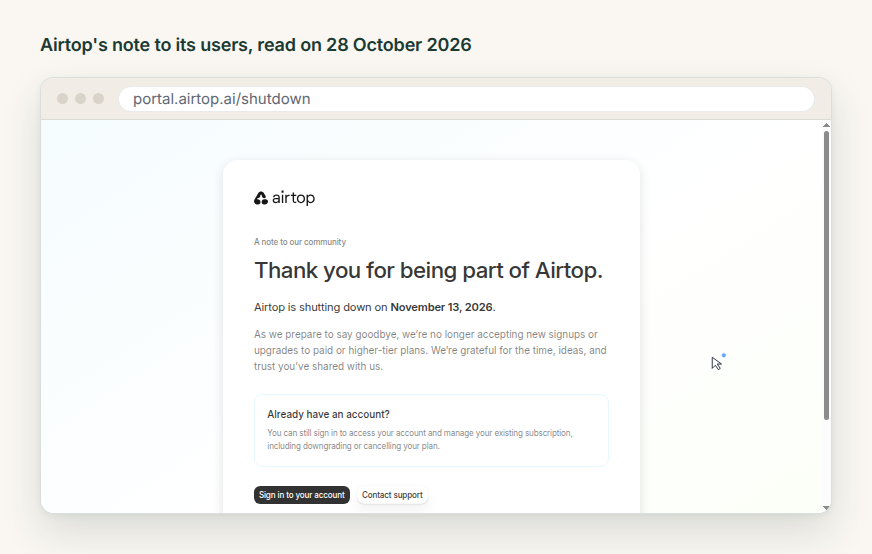
Read that last line twice. Part of the shutdown has already happened. If you were thinking of moving a job onto a bigger Airtop plan to get through the next month, that door is shut, and if you were planning to deal with the whole thing in the week of the 13th, you are planning around a tool that is already winding down.
Four things to take out while you can still sign in
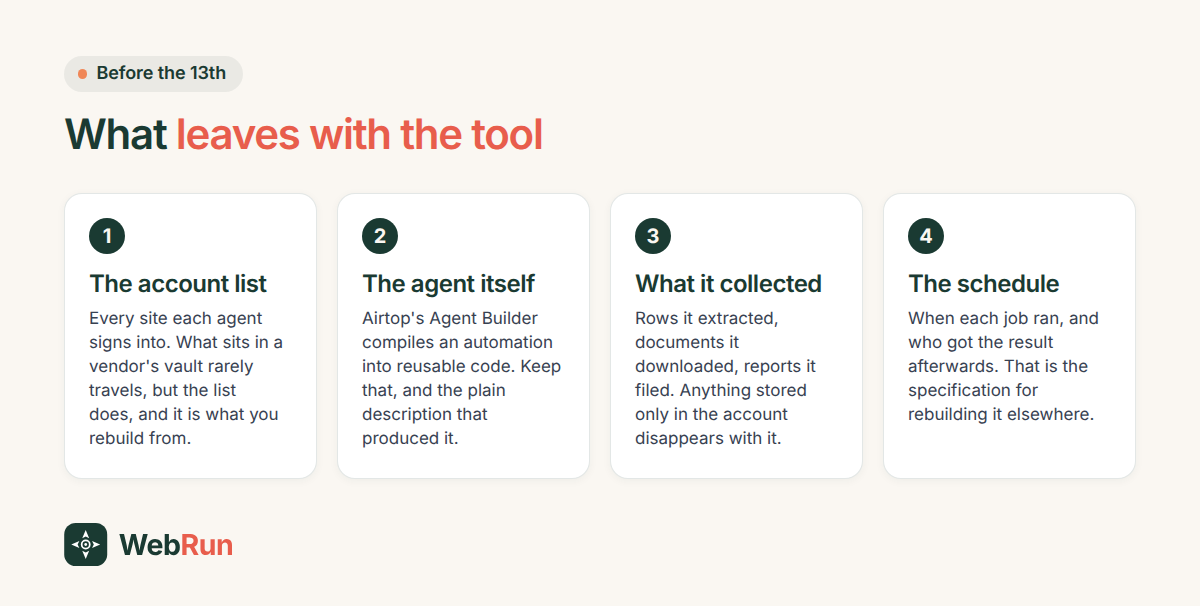
Start with the account list. An agent that signs into six portals is really a record of six account relationships, and what sits in a vendor's vault usually does not export in a form another tool can read. The list does. Write down which agent uses which site, and which inbox receives the password resets, because you will need both on the other side.
Then the agents themselves. Airtop's homepage describes Agent Builder as compiling automations into reusable code. Keep the code, and keep the plain description that produced it, because the description is what you hand to the next tool.
The output matters as much. Rows an agent extracted, documents it downloaded, reports it assembled: anything sitting only inside the tool goes when the tool goes.
Last, the schedules, and not only the times. What happened after each run? Which sheet received the row, who got the email, what the agent did when a page was down. That is the specification for rebuilding, and it is the part nobody writes down.
What actually breaks when a browser agent moves
A browser agent signs in as a person, and that one fact causes most of the trouble in a move.
The logins are the migration. Every candidate has some version of stored credentials and they are not equal. Skyvern lists two-factor and TOTP support on its Pro plan at $149 a month, with a 1Password integration at the same tier, on its pricing page. Browserbase sells Identity as one of its primitives. WebRun keeps the sign ins inside the environment the agent runs in. Whichever you pick, do the sign ins first and the logic second. A job that works in a demo and then meets a two-factor prompt at six in the morning is the ordinary way this goes wrong.
Something will also change on a page and nobody will tell you. Airtop's homepage said broken runs heal themselves, and every tool here promises a version of that. None of them promise it for a site that redesigns its login screen. So ask a replacement how you find out when a run stopped working, and who receives that message.
Then there is the handover, which is harder than the schedule. Almost anything can run a job at nine in the morning. What varies is how much the run may do on its own. If your Airtop agent sent invoices, filed claims or paid anything, decide now whether the next one does that unattended or asks a person first, and pick a tool that can hold that line.
Where three replacements land
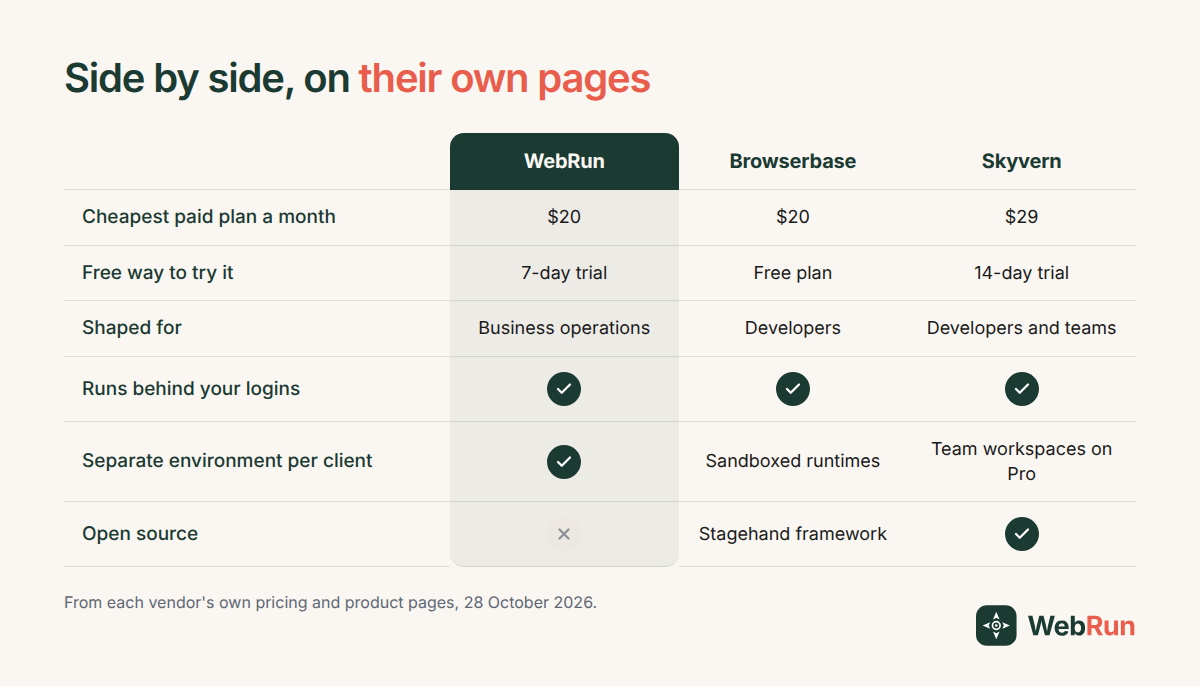
Browserbase is infrastructure. It sells browsers, identity, runtimes and observability as primitives, with the open Stagehand framework on top, and its plans read accordingly: a free tier, Developer at $20 a month with 100 browser hours and $0.12 an hour after that, Startup at $99, and custom pricing above it, all from its pricing page. If your Airtop work was the compiled code and you have engineers who liked it, this is the closest thing in spirit. If nobody on your team writes TypeScript, it is the wrong shape.
Skyvern is open source with hosted plans on top: Hobby at $29 a month for 30,000 credits and ten concurrent runs, Pro at $149 with team workspaces, the better captcha solver and 2FA, and an enterprise tier listing HIPAA and a SOC 2 report. The trial runs fourteen days. If you want the option of running the thing on your own machines, or you expect to be asked for those compliance documents, start here.
WebRun is ours, so weigh this paragraph accordingly. It is aimed at the operations side rather than the engineering side: you describe the job in plain English, it runs in a real Chrome browser inside the accounts you are already signed in to, and you can watch a run live or take it over partway. Plans on our pricing page start at $20 a month after a seven day trial, with Pro at $100 and Business at $200. The number worth holding against Airtop's old tier list is environments: five on Starter, twenty on Pro, and as many as you need on Business. One client's logins, files and memory stay apart from the next client's, which is the row in the table above that has nothing to do with price.
Where WebRun is the wrong answer: you cannot host it yourself, and if what you valued in Airtop was compiling an automation into code you own, Skyvern and Browserbase respect that instinct more than we do.
Moving one job this week
Do not plan the whole migration. Pick the single agent whose silence would cost you most on 14 November and rebuild that one first, this week, while the old one is still running beside it. Running both for a few days costs very little, and it is the only reliable way to find out what the old agent was doing that nobody wrote down.
Then do the second. It is easier, because the sign ins are already sorted.
If you want to try that first job on WebRun, describe it in plain English and set it to run on a schedule: set up your first scheduled run. The automation library has starting points for the common ones, including the invoice and portal jobs that tend to be missed until the morning they stop.