xAI launched Grok Bot in early beta on August 11, 2026. The coverage was real: every major AI newsletter covered it within the week. If you are evaluating browser automation tools right now, Grok Bot will come up in your results. Here is what it actually is.
What Grok Bot does
Grok Bot's tagline is "AI teammates you can give real work to." The core idea is the same as every browser automation tool: a piece of software signs into your tools and uses them on your behalf, without requiring an API on the other side. Bots handle support queues, update CRM records, run outbound research, fill forms.
Two things distinguish Grok Bot from earlier automation tools.
The first is demonstration-based learning. You walk through a workflow once. Grok Bot records your actions, saves them as a routine, and runs them autonomously the next time. For teams that find visual builders or configuration files intimidating, that reduces setup to a single walkthrough.
The second is multi-bot collaboration. You can create multiple bots, assign each a specific role, and put them in the same thread where they pass work between themselves. One bot handles outbound research, another logs results in your CRM, a third drafts the outreach. Bots keep shared context across sessions and refine their behavior from feedback over time.
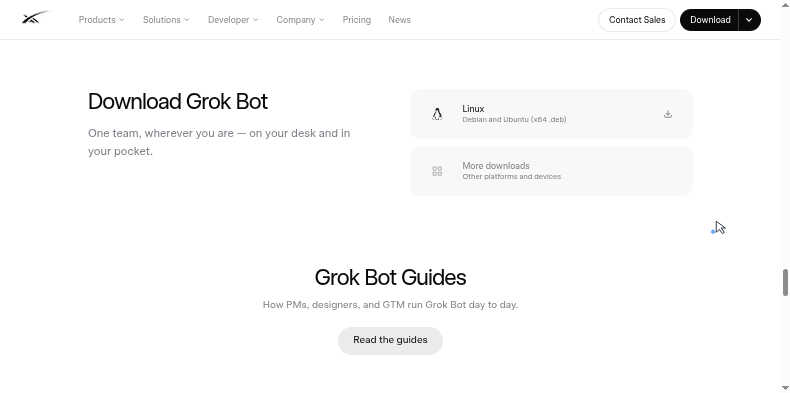
Grok Bot guides on x.ai target "PMs, designers, and GTM teams," the same non-technical operators that browser automation has always courted.
What Grok Bot costs
Grok Bot rolled out across subscription tiers through August 2026. As of August 26, it is available on all SuperGrok plans and all Cursor Pro plans:
| Plan | Monthly price | Grok Bot |
|---|---|---|
| Free | $0 | No |
| SuperGrok | $30 | Yes |
| SuperGrok Plus | $100 | Yes |
| SuperGrok Heavy | Contact sales | Yes |
| Cursor Pro | $20 | Yes |
| Cursor Ultra | $200 | Yes |
At the SuperGrok tier you also get Grok 4.6, image generation, video generation, and real-time web search. Grok Bot is one feature inside a broader AI subscription. If you already pay for SuperGrok or a Cursor plan, Grok Bot is included at no extra cost.
What early beta means in practice
Grok Bot carries a visible "EARLY BETA" tag on x.ai/bot as of August 31. The primary call to action is "Download for Linux," Debian and Ubuntu x64 (.deb), with Windows, macOS, iOS, and Android listed under "More downloads."
The download is a client interface. The actual sessions run on a managed cloud VM that xAI hosts for your account. That VM persists between sessions — your files, browser state, and credentials stay in place on xAI's infrastructure between runs, and bots can keep working while your laptop is closed.
One architectural detail matters for teams running multiple bots: all of your bots share a single cloud computer. Files, browser sessions, and credentials are pooled at the account level. xAI's own security documentation says "Do not use separate Bots as a security boundary." For teams running automations across different clients or credentials at the same time, that is a meaningful constraint.
The early-beta label brings a second set of considerations: feature stability, reliability, and support response are all still moving targets.
How WebRun works
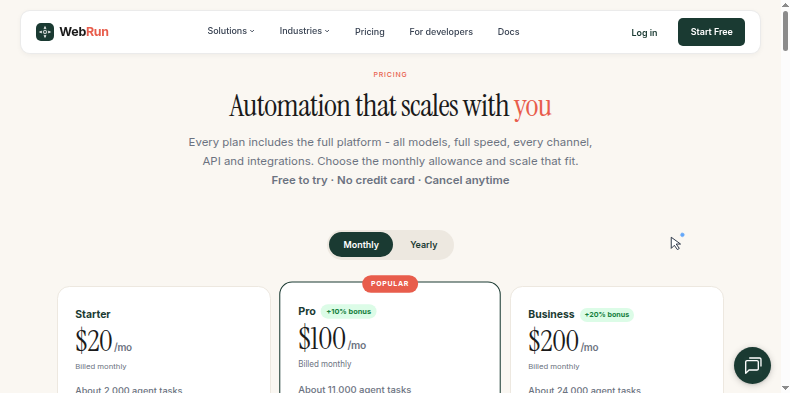
WebRun is a cloud browser automation service. Nothing installs on your machine. You sign up, connect your accounts once through the WebRun interface, and automations run from any browser. Workflows keep running whether your laptop is open or not.
Workflow creation works differently from Grok Bot. Instead of demonstrating a task, you select from a library of pre-built templates: data extraction from a portal, form submission flows, multi-step research sequences. The template defines the task; you supply the credentials and schedule. The workflow runs the same way every time.
WebRun is in production. Three plans start at $20 per month:
| Plan | Monthly price | Agent tasks |
|---|---|---|
| Starter | $20 | ~2,000 per month |
| Pro | $100 | ~11,000 per month |
| Business | $200 | ~24,000 per month |
Pricing is based on the volume of automation tasks, not bundled with an AI chat subscription. Free to try, no credit card required.
The comparison
| Grok Bot | WebRun | |
|---|---|---|
| Status | Early beta | Production |
| Infrastructure | Managed cloud VM (client app required) | Cloud, no install |
| Workflow creation | Demonstrate once, becomes a routine | Pre-built template library |
| Starting price | $20/month (Cursor Pro, includes coding tools) | $20/month (automation only) |
| Multi-bot | Yes, bots collaborate in the same thread | Single agent per workflow |
| Bot isolation | No, all bots share one cloud computer | Isolated per task |
| Always-on | Yes, runs on xAI's cloud VM | Yes, cloud-native |
| Free trial | Free tier (Grok Bot not included) | Yes, no credit card |
| Target user | PMs, designers, GTM teams | SMB operators, non-technical teams |
Which tool fits which situation
Grok Bot and WebRun target the same operator. Three questions narrow it down.
If you need browser automation running reliably in production now, WebRun is the answer. Grok Bot is in early beta, which means the product is real but reliability metrics are unproven and core behavior is still changing. If you already subscribe to SuperGrok or Cursor Pro, it is worth trying at no extra cost.
The bot isolation model is the less obvious difference. WebRun runs each workflow in its own session. Grok Bot's bots all share one cloud computer: the same files, browser cookies, and credentials. For a solo operator running one context that works fine. For a team running automations across multiple clients or credential sets at the same time, the shared VM is a real constraint that xAI's own documentation flags.
The workflow creation model is the last fork. Demonstration-based learning (Grok Bot) has lower setup friction for one-off tasks. Template-based workflows (WebRun) run the same way every time and are easier to hand off when someone else needs to run the same automation.
WebRun offers a free trial with no credit card. Grok Bot access is included with Cursor Pro ($20/month) or SuperGrok ($30/month); the free tier does not include it.