Flowise goes dark today. The homepage now greets visitors with "We're sunsetting Flowise." The GitHub repo was archived on August 13: "This repository was archived by the owner. It is now read-only." The code has been frozen since July 29. Workday acquired the company a year ago, promised to double down, and shuttered the community edition on schedule. (Both notices checked live on flowiseai.com and github.com/FlowiseAI/Flowise, August 31.)
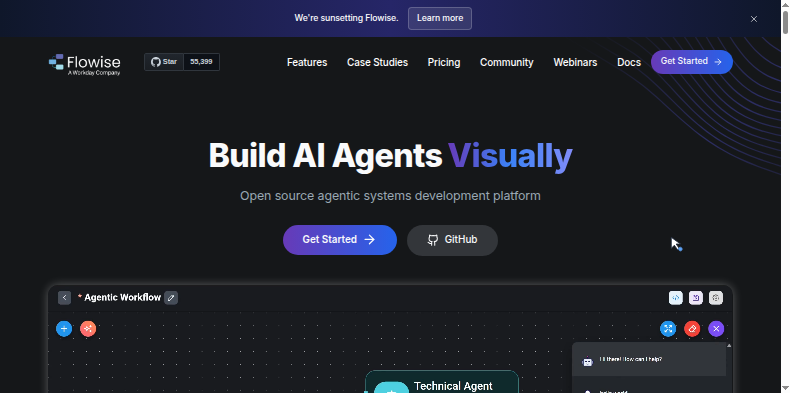
The Flowise homepage on August 31 2026. The banner at the top reads "We're sunsetting Flowise." The GitHub repository was archived the same day.
If you are still running Flowise, you are running software that will not receive security fixes, including a CVSS 10.0 remote code execution vulnerability (CVE-2025-59528) that was actively exploited across over 12,000 exposed instances in April. The exploit is public, the codebase is frozen, and Flowise will never patch it.
That is the deadline. The part of the migration the other guides have skipped is the browser layer.
What the guides cover well
Flowise had three types of users, and most migration content addresses only one.
Most Flowise users built LLM pipelines: RAG systems, chatbots, vector store ingestion, multi-step agent chains. For that group, Langflow is the natural destination. Similar drag-and-drop visual builder, active open-source community, no licensing concerns. n8n works if your AI steps were always embedded inside broader business automation. Dify covers the productized AI app case. These are real recommendations and they are mostly right.
What none of them address: Flowise had two features that had nothing to do with LLM orchestration.
The two features nobody is migrating
The Playwright Web Scraper node. This gave Flowise agents a real browser, not an HTTP client pretending to be one. An actual headless Chromium that navigated to a page, waited for JavaScript to render, and extracted structured content. It ran on your own infrastructure, which meant your own IP getting blocked at scale, but it worked. Agents could pull data from any site regardless of whether that site had an API, and the data flowed directly into RAG pipelines or processing chains.
The Web Browser tool. Simpler: it gave an LLM agent live web access during a run. Ask the agent a question, it opens a browser, reads the page, includes the content in its context. Unlike a web fetch that returns raw HTML, this was a full browser session that rendered JavaScript, cleared consent banners, and waited for dynamic content before returning anything.
Engineers who built workflows around these two features were not building LLM pipelines. They were building data extraction systems that Flowise happened to orchestrate. The LLM was incidental; the browser was the mechanism.
Flowise's visual canvas before the August 2026 shutdown: the drag-and-drop interface that let teams wire together AI agents, browser nodes, and LLM chains without writing Python. The Playwright Web Scraper and Web Browser tool nodes, which gave those chains real browser access, have no equivalent in the standard migration guides.
What the alternatives give you
The migration guides all stop at the same place: a table comparing which tools "support AI agents." None of the alternatives ship real browser execution as a first-class feature.
Langflow covers RAG pipelines, visual agent orchestration, and vector stores, but has no real browser execution. An HTTP request node gets you raw HTML from JavaScript-heavy pages, which is not the same thing. n8n has strong operational automation and over 400 integrations, but it is an API-to-API tool. Automated browser sessions are not part of its model. Dify covers productized AI apps, also with no browser execution. Gumloop has scraping features but does not offer full real-browser sessions with login handling, multi-step navigation, or form submission.
If your Flowise workflows touched sites with login walls, multi-step forms, or JavaScript-rendered content, none of the migration guides published this week cover your situation.
What WebRun does
WebRun is not a Flowise replacement, and the overlap is narrow.
WebRun runs a real cloud browser: a full Chrome desktop environment with persistent sessions, not a headless Chromium or an HTTP client spoofing browser headers. Agents navigate to any URL, authenticate with stored credentials, fill forms, handle CAPTCHAs, download files from gated portals, and extract content from pages that block every API and scraper available.
Where WebRun covers the gap in a Flowise migration:
| Flowise capability | Coverage in standard migration | WebRun |
|---|---|---|
| Playwright Web Scraper node | No equivalent in Langflow or n8n | Cloud browser with anti-detection |
| Web Browser tool (agent web access) | Dropped; HTTP nodes are not browsers | Browser session callable from any agent |
| Login-gated data extraction | Manual workaround or abandoned | Authenticated persistent sessions |
| Form submission to portals with no API | Blocked in every alternative | Native |
Flowise's Playwright node ran on your own infrastructure. WebRun runs in a managed cloud environment: no headless Chromium to maintain, no IP rotation to configure, no requests blocked at home-connection rates. Sessions stay logged in across workflow runs.
Connecting WebRun to your new orchestrator
WebRun ships an MCP server and a REST API, so any tool that can make an HTTP call or speak the Model Context Protocol can use WebRun as its browser-execution layer.
The migration path:
- Move your LLM pipeline to Langflow, n8n, or whichever orchestrator fits that work.
- Identify the steps that touched a real browser: Playwright nodes, Web Browser tool calls, login-gated data extractions.
- Replace those steps with a WebRun API call or an MCP tool call from inside the new orchestrator.
Pick whichever pipeline tool fits the LLM steps. Add WebRun for the steps that need a real browser.
The security case for moving this week
The frozen codebase changes the calculation from "old tool is deprecated" to "active security liability with a known, exploitable CVE." CVE-2025-59528 is a CVSS 10.0 remote code execution in Flowise's API, exploited at scale in April 2026 before the shutdown. No patch is coming. Every new vulnerability discovered from today on is permanent.
Running Flowise past today means running an unpatched, publicly exploitable web service for as long as you keep it running. The deadline is the attack surface, not the deprecation notice.
What to do
If you ran Flowise only for LLM pipelines, the migration is covered. Move to Langflow or n8n, import your flows, and shut Flowise down.
If any of your workflows ran a browser (scraped a site, logged into a portal, filled a form, or gave an agent live web access), the browser steps are unresolved in every guide published this week. Those are the steps WebRun replaces.
Move orchestration first, then replace the browser steps. Get your LLM pipelines on a maintained tool, identify what broke, and wire in WebRun API calls for the browser work.
WebRun is free to try. Sign up at webrun.ai.