How to Automate SmartMoving
In SmartMoving, let the rules engine, the Job Reminder and Smart Reputation handle customers and crews. Certificates of insurance, elevator bookings, parking permits and lead-provider credits sit with insurers, buildings, cities and lead providers, and an AI agent like WebRun can fill those in from each booked move for the office to approve.
 Written by
Devon Ruiz
Workflow engineer
Written by
Devon Ruiz
Workflow engineer
 Reviewed by
Yara Haddad
Data operations
Reviewed by
Yara Haddad
Data operations
SmartMoving turns a cube sheet into a booked move
Moving companies buy leads from several providers and get calls and web enquiries at all hours, and SmartMoving is the CRM that gathers every one of them in one place. It is built for moving companies and nobody else. Each lead goes to a salesperson by branch, state or service type. The estimator takes the inventory on a tablet on site, or the customer fills it in through the portal, and the estimate is priced from the company's own rules: crew rates by day of the week, trip and truck fees, extra time for stairs and elevators, and 400N-style tariffs for interstate moves.
Once the customer signs and pays the deposit in the portal, the move lands on the resource calendar. Dispatch drags trucks and movers into its slots, the crew sees the job in the Crew App, and on the day they walk the customer through a digital bill of lading and take payment. Clocked hours feed payroll, and invoices sync to QuickBooks.
Move day depends on paperwork that never touches the CRM
The customer's apartment building wants a certificate of insurance naming its management company before the truck can use the loading dock. The elevator has to be booked for a two-hour window, and the building confirms by email, eventually. Some cities want a temporary parking permit for the truck, which the move coordinator applies for on the city's website a few days ahead, and the destination building has rules of its own.
Two of yesterday's purchased leads were wrong numbers, and each lead provider has its own form for claiming a credit. The salesperson who marked them bad is meant to file the claims and rarely does, because there is always another lead to call. The provider's invoice for the month then charges for the bad ones too.
SmartMoving's automatic messages go to customers and crews
SmartMoving's rules engine creates sales tasks and reminders from trigger events, and email and SMS templates cover each step of the sale.
Customers get three messages without anyone in the office typing: a Job Reminder a day ahead of the move, a Crew En Route message with the crew's names and photos when the crew taps En Route in the app, and a Move Review request once the job is complete. Smart Reputation helps answer the reviews that come in, and crews get their jobs when dispatch publishes the day's schedule.
On the lead side, the Bad Leads Report pulls every bad lead from one provider for a given month, which is the evidence a credit claim needs.
The insurance agent who issues a certificate, the building manager who needs it and the city's permit page are outside SmartMoving, and the Bad Leads Report ends with a list that a salesperson types into each provider's credit form.
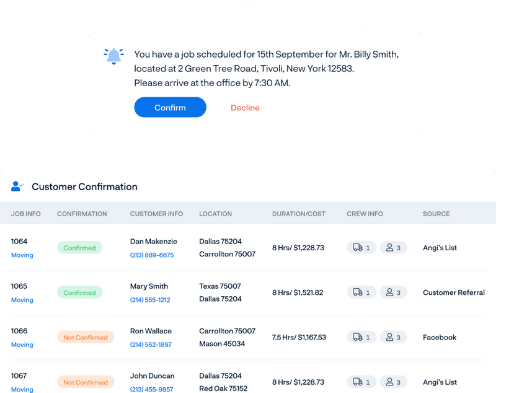
Every booked move can have its certificate, permit and elevator sorted before the truck leaves
For a downtown move, the operations manager approves a certificate request a week out, already filled in on the insurance agent's portal with the building's exact certificate-holder wording. When the certificate comes back, the email that forwards it to the building manager is waiting for the same approval.
Two days before the move, dispatch rings each building that has not confirmed the elevator or the loading dock by email, working from a message that lists them.
In a city that wants a parking permit for the truck, the move coordinator opens the city's form already filled in from the move's address and date, and pays the fee.
Before paying a provider's monthly invoice, the sales manager has its credit form filled in from the Bad Leads Report and the invoice set against the leads that actually arrived.
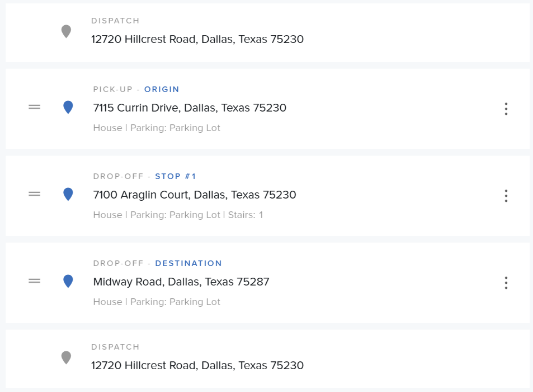
The office pays every permit fee and sends every certificate
Certificates of insurance are the job to hand over first, because a building with no certificate on file can keep the truck off its loading dock.
WebRun is an AI agent that works a real Chrome browser, signed in as you. From the booked move in SmartMoving, the agent completes what the insurance agent's portal, the building's email, the city's permit form or the lead provider's credit form asks for.
The permit form stops at the city's payment page for the move coordinator, the operations manager sends the certificate email from the office's drafts, while the sales manager presses submit on each credit claim. In SmartMoving it reads the booked move and edits nothing. The certificate job is the one a mover working mostly downtown apartments would switch on first.
Questions people ask
Will it pay for parking permits?
No. The application gets the move's address and date, and the agent stops at the payment page so the move coordinator can check the details and pay.
Can it request certificates from an insurance agent who works by email, not through a portal?
Yes. A request email with the building's certificate-holder wording and the move date goes into drafts, and when the certificate comes back the agent matches it to the move.
Does it use the Bad Leads Report?
Yes. Each provider's report for the month is the starting point, with the bad lead reason your salesperson chose, and the agent copies it into that provider's credit form.
SmartMoving has an Open API. Why not use that instead?
Use it where it fits. The Open API comes with the Growth plan, SmartMoving leaves the building of integrations to your own team, and a city permit form, a building manager's inbox and a lead provider's credit form have no connection to SmartMoving for an API to reach.
Sources
- Grow Your Moving Company Revenue | SmartMoving SmartMoving's sales features: leads from providers and the website in one place, automatic assignment by branch, state or service type, email and SMS templates, and a rules engine that creates follow-up tasks and reminders from trigger events.
- Streamline Your Moving Company Operations | SmartMoving Describes the resource calendar with Google Calendar sync, drag-and-drop crews and trucks, automatic crew texts, customer confirmation the day before the move, the crew app and digital bills of lading.
- Boost Your Reputation and Local SEO | SmartMoving Smart Reputation requests reviews automatically after completed jobs and helps reply to them with AI and automation.
- Make Moving Company Accounting Effortless | SmartMoving Confirms the QuickBooks integration for invoices and transactions and automatic payroll from clocked crew hours.
- Smart Estimates for Your Moving Company | SmartMoving Estimate pricing from crew base rates by day, trip and truck fees and handicaps for stairs and elevators, 400N-style tariffs for interstate moves, and estimates signed and deposits paid in the customer portal.
- Automated Email Notifications | SmartMoving Support Lists SmartMoving's automatic notifications, including the Job Reminder sent the day before a move, the Move Review sent when the crew completes a job, and the Crew Job Notification sent when the day's schedule is published.
- Crew En Route Notifications | SmartMoving Support The customer gets an email or SMS, with the crew's names and photos, when the crew selects En Route in the Crew App.
- Bad Leads Report | SmartMoving Support Finds all bad leads for a given provider and month, as the data to pass to lead providers for refunds; SmartMoving does not file the claims.
- SmartMoving's Open API | SmartMoving Support The Open API is available on the Growth plan, and implementation is the customer's own responsibility.
9 ready-made SmartMoving workflows
Each one names the apps it touches and the exact steps it takes. Open one to read what it will do, then turn it on.



Want one of these running on your own SmartMoving?
Show WebRun the process once and it will run it on schedule, in your own private browser environment.