How to Automate Smart Service
Smart Service automates the day around the job. The Dispatch Board assigns and moves work, Route Optimization orders the stops, Service Agreements generate the next visit, and estimates flow through to invoices in QuickBooks. Warranty portals, permit sites and home warranty systems stay outside it. WebRun signs into those and reports back.
 Written by
Samuel Adeyemi
Integrations writer
Written by
Samuel Adeyemi
Integrations writer
 Reviewed by
Nora Whitfield
Editorial lead
Reviewed by
Nora Whitfield
Editorial lead
Smart Service is the schedule bolted onto QuickBooks
Smart Service, from My Service Depot, is field service software built around a decision most of its competitors did not make: it does not replace the accounting system, it extends it. The customer, the invoice and the payment stay QuickBooks records. Smart Service adds what QuickBooks was never going to have: a calendar, a dispatch board and a work order.
The trades on it are the ones where a van and a technician are the whole product: HVAC, plumbing, electrical, appliance repair, pest control, pool and spa, garage doors, chimney sweeps. Technicians carry iFleet, the mobile companion, which pushes the day's jobs to a phone and syncs the finished work order, the photos and the signature back.
For a shop with four trucks and one person in the office, that arrangement is the business: the schedule on one screen, the books already carrying the result.
Every finished job leaves a tail of small chores
The job itself is the short part of the day. What follows it is the office's whole afternoon.
An inspection found a cracked flue liner, so a repair quote has to be built and emailed with the photos while the customer remembers the conversation. Yesterday's completed jobs need checking against QuickBooks, because a sync that missed one is how work gets done and never billed. A three-week-old invoice is unpaid and somebody has to write the polite version of the reminder.
Then the outside world. The failed part is under manufacturer warranty and the claim lives on that brand's portal. The gas work needs a permit, and whether the municipality approved it sits on a site with its own login. A third of the week's work came through a home warranty company, whose work orders and authorisation numbers sit on its system.
None of it takes long. All of it takes somebody.
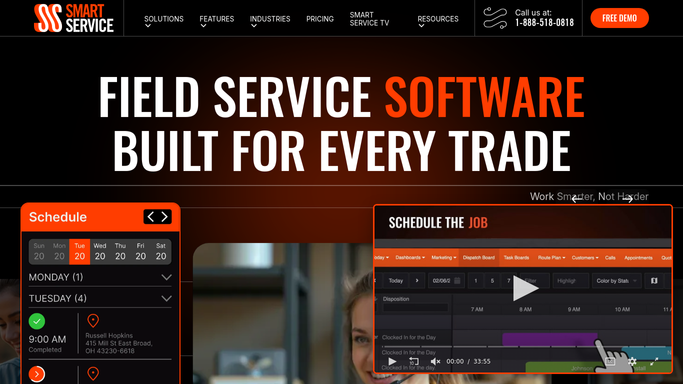
Smart Service automates the job it was told about
Smart Service covers the office side properly, and a shop should switch all of it on before adding anything.
The Dispatch Board is the centre of it: jobs assigned, moved and reassigned across technicians and crews on one screen, with Route Optimization ordering the day's stops and Crew Scheduling covering jobs needing more than one pair of hands. Service Agreements carry recurring maintenance contracts and generate the next visit rather than relying on a note in a diary. Smart Notifications and two-way text messaging keep a customer informed ahead of arrival. Estimates convert into work orders and then invoices without being keyed again, and the QuickBooks integration carries the result across.
That is a well-built loop, and every part turns on something already inside Smart Service. A job exists, so it can be scheduled, routed, notified, completed in iFleet and invoiced.
The chores above are not that shape. A warranty claim's status is a fact on a manufacturer's website. A permit approval is held by a municipality. A home warranty company's authorisation and work order live on its own portal. None of those has a reason to tell a dispatch board anything, and none will build an integration for a four-truck shop.
Warranty status and permit approvals arriving before the truck does
A service shop's work originates in Smart Service and then has to be squared against systems that have never heard of it.
Manufacturer warranty claims checked on each brand's portal, so no technician is sent to fit a part approved on Tuesday and shipped nowhere. Permit applications checked with the municipality, because a crew waiting on an inspector is the most expensive hour of the week. Home warranty work orders pulled off the third-party portal each morning and put on the board with the authorisation number attached, rather than found on Friday when the payment fails.
Completed jobs compared against QuickBooks overnight, so a dropped sync shows up as a line on a sheet, not a gap at month end. Service agreements expiring inside thirty days turned into a drafted renewal, the invoice staged and the reminder written. Unpaid invoices gathered into one list of who owes what and for how long. Inspection reports assembled with the photos into the email the customer is waiting for.
The customer-facing line stays where a small shop needs it. Checking, comparing and drafting run unattended. Anything a homeowner will read is written and then waits for a person, because at four trucks the office is the brand.
A one-person office cannot open twelve portals a morning
That list is one person's entire morning, and in most shops it happens at nine at night or not at all.
WebRun is an AI agent that works a real Chrome browser, signed in the way your office signs in. It opens the manufacturer's warranty portal, the municipal permit site, the home warranty company's system or QuickBooks, reads what is there, and brings the answer back as a note against the job in Smart Service or a list of what needs a decision.
You set the schedule, it runs in your own private environment, and any run can be watched and stopped. Nothing reaches a customer without you reading it first.
The workflows below are already built, and each one names what it opens.
Questions people ask
Our books are in QuickBooks. Will any of this touch the accounting?
Only in the ways you allow. Reading is the default: completed jobs compared against what was invoiced, unpaid balances listed. A drafted invoice or renewal is staged for you to review inside QuickBooks, so nothing posts to the books unless you post it.
Home warranty portals log us out constantly. Does that break a run?
No. It signs in the way your office does each time, and a session that drops is a retry rather than a failure. Those sites are the reason for driving a browser at all: they publish no feed and will never build an integration for a shop your size.
Will a quote or an inspection report go to a customer before I see it?
No. Every message to a homeowner is written and then held. The quote is built, the report is assembled with the photos, the reminder is drafted, and each one waits in your queue until you read it and send it yourself.
12 ready-made Smart Service workflows
Each one names the apps it touches and the exact steps it takes. Open one to read what it will do, then turn it on.





Want one of these running on your own Smart Service?
Show WebRun the process once and it will run it on schedule, in your own private browser environment.