How to Automate Skimmer
Skimmer sends the service email after every stop, raises Office Alerts for bad readings, late starts and skipped stops, and bills through AutoPay. What an alert leaves for the office, the apology, the rebooked visit, the return trip for a bad reading, is what an AI agent such as WebRun can draft for someone to approve.
 Written by
Nora Whitfield
Editorial lead
Written by
Nora Whitfield
Editorial lead
 Reviewed by
Priya Raghavan
Solutions lead
Reviewed by
Priya Raghavan
Solutions lead
Skimmer runs the weekly route a pool company lives on
Pool service is the same visit every week: skim, brush, vacuum, empty the baskets, test the water, dose it and drive to the next backyard. Skimmer is pool service software designed around that route.
In the Skimmer app, each stop carries the gate code, the pet's name and the equipment. The tech enters readings and dosages in a few taps, with the LSI & Dosing Calculator suggesting the dose, or lets LaMotte test results arrive over Bluetooth. A checklist can refuse to let a stop finish until the required photo is taken.
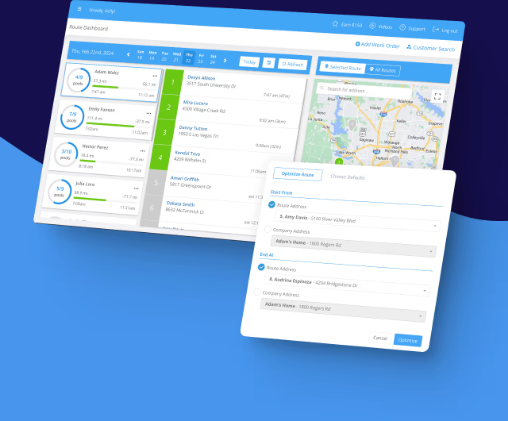
In the office, someone plans the week with the route optimizer and follows it on the route dashboard, adding one-off work orders such as a green-to-clean or a pump swap. When the stop is done, Skimmer emails the customer the readings, the dosages, the finished checklist and the photos.
A skipped stop turns into three phone calls
A tech finds a locked gate and skips the stop. The office has to tell the homeowner, find a slot this week and move the visit, ideally before the customer notices a cloudy pool and rings first.
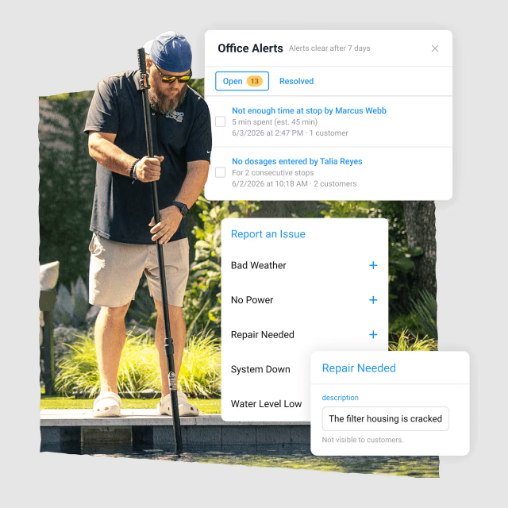
A reading comes back with chlorine near zero at a pool the family uses every afternoon, and the office manager decides between a return visit and a phone call. A tech files an Issue about a leaking filter housing, with photos, and the repair quote waits on the office manager.
In spring every customer on a seasonal plan needs an opening booked, and in autumn a closing, with the replies arriving by email, text and voicemail over several weeks.
Office Alerts report the problem and go no further
Office Alerts report readings out of range, late starts, skipped stops and failed payments in a panel in the top navigation, and by email if you choose. Each work order type carries its own rules, such as alerting the office when one is added, requiring a photo, or notifying the customer when it is finished. Skimmer Billing generates invoices in bulk from the work done, dosed chemicals included, AutoPay collects, reminders go out on overdue invoices, and every paid transaction syncs to QuickBooks Online.
For customers in bulk, Broadcast Emails segment by tag, service date, service day or technician, and the Marketing Suite, a bundled add-on, asks for Google reviews automatically.
An alert says that the stop at 14 Palm Drive was skipped. Writing to that customer, choosing a new day and moving the visit are left to whoever reads it, and so is deciding what a chlorine reading of zero calls for. Broadcast Emails send the opening-season invitation, and the replies come back to an inbox where someone reads each one and books the opening by hand.
The office manager gets each skipped stop with the apology already written
For the skipped stop at 14 Palm Drive, the office manager reviews a drafted apology to the homeowner that offers two new times, and the dispatcher sees in Slack which route has space this week.
After the route closes, the service manager gets an alert for every reading outside your ranges, naming the pool, the tech, the value and the dose added, with a return visit or a note to the owner drafted for each. When a tech files an Issue about a noisy pump, the office opens a repair quote already started from the photos and the equipment on file, ready to price and send.
In opening season, the owner sees each yes to the invitation turned into an opening for the office to confirm, with a running count of how full each week is getting. A Slack digest gives each tech the day's stops before the morning drive, with the access notes worth knowing and the pools that had problems on the last visit.
The office rebooks a skipped stop the same afternoon
Each alert in the panel ends in a phone call or an email written by the office. WebRun is an AI agent that works a real Chrome browser, signed in as you. It turns each problem that reaches the alerts panel or the route dashboard during the day into a drafted message or a proposed new visit.
Readings and dosages are the tech's record of what was found and what went in the water, so the agent reads them and never edits them. A visit moves on the route dashboard only if you allow it; otherwise the agent proposes the day and the office makes the change. The apology for 14 Palm Drive sits in the office manager's email drafts.
Questions people ask
Does it edit the readings and dosages my techs enter?
No. Readings and dosages are the tech's record of what they found and what they added, so the policy keeps them read-only. WebRun reads them to spot problems and leaves them exactly as entered.
Can Office Alerts email us instead of sitting in the panel?
Yes. Office Alerts appear in a panel in the top navigation and, if you switch it on, by email. They report what happened; the apology to the customer and the new day on the route are still written and chosen in the office, and that is the part WebRun drafts.
Whose ranges does it use for chlorine and pH?
Yours. It uses the ranges you give it, or the out-of-range readings Skimmer's Office Alerts already flag, so there is one set of thresholds rather than two.
Does the Marketing Suite cover review requests?
Yes. The Marketing Suite is one bundled add-on of Campaigns and Reviews, and Reviews asks customers for Google reviews automatically and drafts responses to them. The route-side follow-up, skipped stops, bad readings and seasonal bookings, sits outside it.
Can it book pool openings from the replies to our Broadcast Email?
It can read the replies as they arrive and list each yes with the week the customer asked for, so the office adds the opening work orders in one sitting and sees which weeks are filling up.
Sources
- Skimmer Pool Service Software - Back Office Features Describes the route optimizer, the route dashboard, and Office Alerts for readings out of range, late starts, skipped stops and failed payments, shown in a panel in the top navigation.
- Skimmer Pool Service Software Features for Clients Describes the automatic service email with readings, dosages, checklist items and photos, Broadcast Emails segmented by tag, service date, day or tech, invoice reminders and failed-payment notices.
- Skimmer- Pool Service Software Features for Pool Techs Lists gate codes, pet names and equipment on each stop, the LSI & Dosing Calculator, required checklist items with photos, and LaMotte results syncing over Bluetooth.
- Marketing Automation for Pool Service | Skimmer Describes the Marketing Suite as a bundled add-on with campaigns and automatic Google review requests.
6 ready-made Skimmer workflows
Each one names the apps it touches and the exact steps it takes. Open one to read what it will do, then turn it on.




Want one of these running on your own Skimmer?
Show WebRun the process once and it will run it on schedule, in your own private browser environment.