How to Automate ComplySci (COMPLY)
ComplySci, now sold as COMPLY, already automates the employee side: broker feeds into trade monitoring, preclearance rules, restricted lists, attestations and a compliance calendar. What stays manual is gathering from everywhere else, especially across several client firms at once. An agent such as WebRun does that collecting and leaves the sign-off alone.
 Written by
Marta Ellison
Automation strategist
Written by
Marta Ellison
Automation strategist
 Reviewed by
Devon Ruiz
Workflow engineer
Reviewed by
Devon Ruiz
Workflow engineer
The compliance calendar became the real to-do list
ComplySci is the platform investment advisers, broker-dealers and private funds run their compliance programme on. The company behind it now trades as COMPLY, having brought ComplySci, RIA in a Box and NRS under one name: the platform is Comply Platform, the adviser product is Comply for RIA and the consulting arm is ComplianceGuardian. Plenty of people still say ComplySci, and they mean the same software.
What sits inside it is the programme in working form. Employee brokerage accounts and the trades running through them. Requests to buy something, waiting on approval. A restricted list. Certifications and attestations with names against them. A calendar of dates the firm set for itself, and the annual review those dates lead up to.
Two sorts of people touch it. The chief compliance officer and whoever helps them, who are in it daily. And everybody else in the firm, who is in it twice a year and finds it inconvenient both times.
Most of the quarter goes on reminding people twice
The part of compliance that takes judgement is not the part that fills the week. The week fills with fetching and reminding.
Somebody pulls the list of employees carrying an unfinished certification and works down it writing near-identical emails. Somebody spots that the restricted list moved this morning and tells the desk. Somebody copies a run of dates out of the calendar into a status note. Somebody opens a state registration site to see whether anything has changed. And a consultant looking after twelve advisory firms does all four of those twelve separate times, through twelve separate logins, before lunch.
None of it is hard. All of it is hours, and they land on the same days every quarter, which is why nobody ever gets round to fixing them.
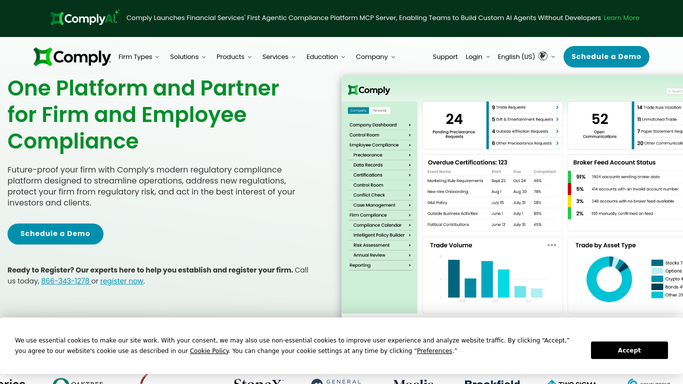
Trade monitoring watches the accounts it has been given
The platform does a great deal on its own, and a firm that has not switched all of it on should do that before buying anything else. Employee trading is recorded and monitored from direct broker feeds, and preclearance requests run through workflows that apply the firm's own rules and its restricted lists, with parameters set so routine requests can clear without somebody reading each one. The code of ethics work sits beside it: certifications, attestations, gifts and outside business activities, with a view of who has not answered yet. The compliance calendar holds the firm's dates, risk assessments and the annual review hang off those dates, and reporting turns any of it into something you can put in front of a board.
Every one of those works on what has been connected to it.
The custodian portal a smaller adviser actually logs into, the state's own registration lookup, the marketing piece sitting in a shared drive waiting to be looked at, the public record on a relationship an employee just disclosed: none of that reports in by itself. And a consultant with a dozen client firms gets a dozen separate views, because the platform is scoped to a firm rather than to the person minding twelve of them.
The gathering ahead of a review can finish overnight
Most of what fills the week before an annual review is fetching, and fetching does not have to happen in office hours.
A dozen client firms can be read in a single pass each morning, with everyone carrying an unfinished certification pulled onto one named list, sorted by how long it has been outstanding, and the reminder written but not sent. Restricted list changes can be caught in the hour they happen: today's list against yesterday's, the names added and the names removed, filed where your records live and put in front of the desk.
Dates behave the same way. Everything in the calendar can be counted down, so the next thirty days are one page instead of a monthly hunt through each firm in turn. Preclearance requests sitting past your own turnaround can be surfaced with the requester and the age. A registration status can be read off the state's own site and set beside what the platform holds. The documents somebody has asked to see can be gathered into one folder, with the ones that are missing named rather than discovered later.
None of that needs an API or a slice of somebody's development time. It needs a login, a schedule and a list of what may be opened.
The sign-off belongs to the compliance officer
Gathering and deciding are two different jobs, and only one of them can safely be handed over.
WebRun does the gathering. It signs into ComplySci and whatever else you use in a real browser, under your own logins, on a schedule, with a written list of what it may open. It reads, compares and prepares: a list, a difference, a folder, a draft. Nothing is attested, certified, filed or approved by it, and nothing goes to an employee, a client or anybody else until a qualified person has read it and sent it themselves.
The cards below are the gathering jobs that already run this way.
Questions people ask
Can it approve a preclearance request or mark an attestation complete?
No. It reads what is outstanding, sorts it and writes the reminder, then stops. Approving a request, completing an attestation, signing anything or making a filing is work for a qualified person, and the agent is set up so it cannot do those things by accident.
Our adviser clients each sit in their own tenant. Does that mean a run per client?
It signs into each one in turn, the way you do, and puts the results side by side. The output is one list across all of them, so you stop rebuilding the same picture twelve times before a Monday meeting. Nothing crosses between client records.
Employee brokerage data sits in there. Is signing something into it sensible?
It uses the login and permissions you give it, so it sees exactly what that user sees and nothing more. Give it a read-only account where one exists. You also write down what it may open, and it works inside that, in a browser, with a record of what it did.
10 ready-made ComplySci (COMPLY) workflows
Each one names the apps it touches and the exact steps it takes. Open one to read what it will do, then turn it on.



Want one of these running on your own ComplySci (COMPLY)?
Show WebRun the process once and it will run it on schedule, in your own private browser environment.