How to Automate AGRIVI
For pests and weather, AGRIVI does its own watching: pest alarms seven days ahead for more than 200 crops, custom weather alarms and TrapView counts on the farm map. Spray windows against your own limits, payroll hours, machinery service, scouting routing and pesticide record checks are jobs WebRun runs from the same AGRIVI records, hourly, daily or on Mondays.
 Written by
Owen Hartley
Workflow engineer
Written by
Owen Hartley
Workflow engineer
 Reviewed by
Julian Adeniyi
Retail operations
Reviewed by
Julian Adeniyi
Retail operations
AGRIVI 360 ties each work order and spray record to a field
Enterprise farms and the growers who supply food companies keep their field records in AGRIVI 360 FMS. It handles more than 200 crop types and several farms under one holding, with role-based access so each farm manager, agronomist and field worker sees only their part.
Farm managers issue work orders that say which workers go out, with which machinery and inputs, with photos and instructions attached, and each work order records the hours the crew put in. Field workers log an activity on a smartphone, in their own language, in under a minute.
Every crop protection application becomes a record with the field, crop, target pest, product, dose, treated area, date and time, and operator. Those records feed traceability and the reports an audit asks for. Costs run against the season's budget, down to the field and the hectare.
Forty pickers' hours sit in the work orders until payroll copies them out
A crew of forty seasonal workers spends the week across six fields, and every work order in AGRIVI records who worked and for how long. On Monday the payroll processor reads those hours back out, worker by worker, totals them, and checks who went past 40 hours before submitting payroll.
Spraying waits on the weather. Each morning the farm manager reads the forecast for the next two days and works out, crop by crop, whether wind, temperature and rain leave a window for the sprayer.
In the workshop, someone compares each tractor's and sprayer's hours with its service interval, so the service falls before harvest rather than in the middle of it.
A scout who finds aphids in a block logs them in AGRIVI, and the agronomist who covers that block learns of it on their next look at the scouting reports. Restricted-use pesticide records need every required field, the applicator's certification number and the product's EPA registration number among them, before the state's deadline.
AGRIVI's pest alarms give seven days' warning for more than 200 crops
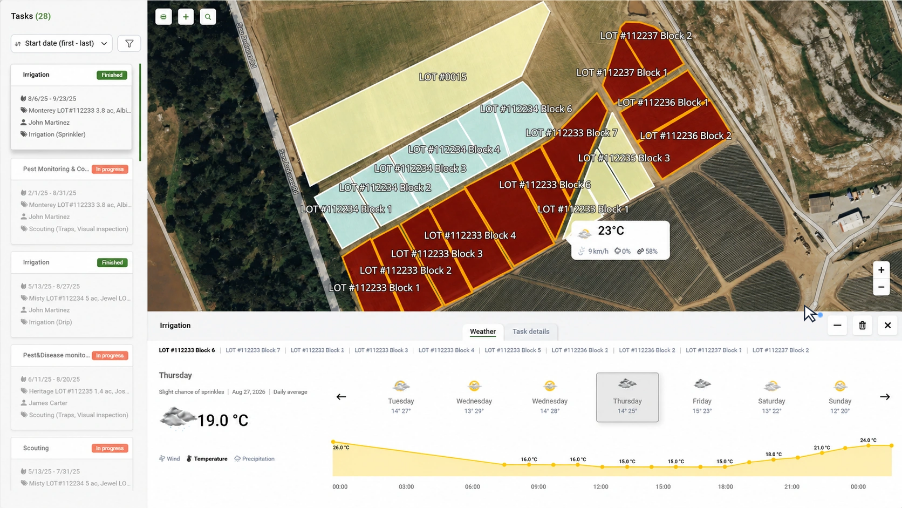
Based on each field's location, AGRIVI raises pest alarms seven days ahead for more than 200 crops, and farms can set custom weather alarms on top of a forecast for each field that warns of rain, hail and strong wind.
Satellite monitoring shows crop health field by field, and the Enterprise Farms edition adds a Pest Traps module that puts TrapView trap counts on the farm map beside the scouting reports. Work orders can recur for regular maintenance and send alerts and notifications to the team. AGRIVI's enterprise page also lists an AI Companion as a private beta, for entering data, pulling up records and asking questions over the farm's data by text or voice.
The farm's own limits live elsewhere: the wind and temperature it will spray in, crop by crop and product by product; the overtime rule its payroll follows; each machine's service interval; which agronomist covers which block. Matching those against AGRIVI's records is a weekly job for the office.
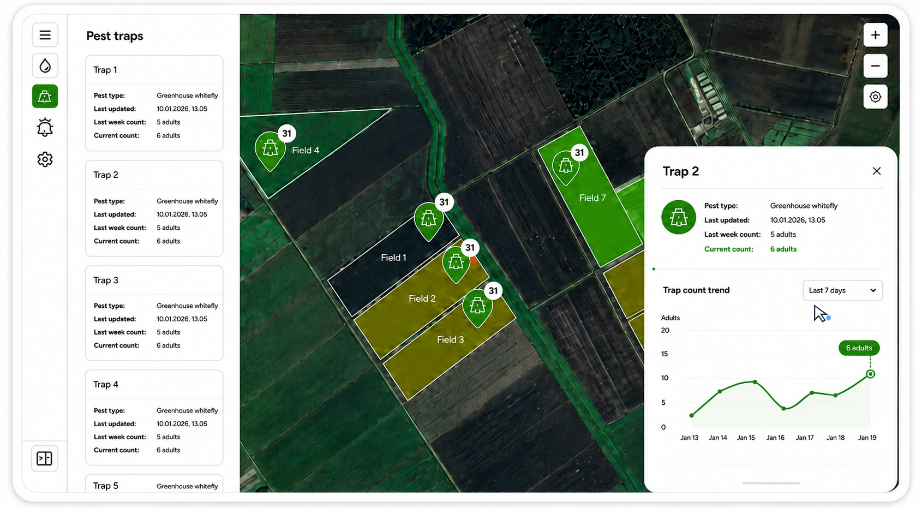
Aphids logged on block 14 at ten show up in the agronomist's Slack by eleven
Aphids logged on block 14 at ten are in the scouting channel by eleven, with the block's agronomist tagged, the crop and severity listed and a link to the scouting record. Critical issues lead the message, and nothing already sent goes out twice.
At six each morning the farm manager's Telegram shows whether the coming two days hold a spray window: each one with its start and end, wind speed, temperature and rain-free hours, and the fields or crops it suits, or a short message saying there is none.
On Mondays the workshop sees every machine within ten percent of its service interval or past it, overdue ones first, each added to the maintenance log. The payroll processor reads last week's hours by worker, task and field in a Google Sheet, with anyone over 40 hours flagged before payroll goes in. The same morning, the farm office sees restricted-use pesticide records with a missing field and any state reporting deadline in the next 30 days, with a draft summary ready for review.
Spray windows and scouting alerts carry no treatment advice
AGRIVI's AI Companion answers when someone asks it inside AGRIVI; these jobs run on a clock and end outside it, in Telegram, Slack and Google Sheets. WebRun is an AI agent that works a real Chrome browser, and for them it needs an AGRIVI user account that can open the weather, labour, machinery, scouting and spray records.
A Telegram spray window sends nobody to the field, the scouting message names no product or treatment, payroll goes in only when the payroll processor submits it, and the farm files any state report itself. Farms already running AGRIVI's custom weather alarms can still use the spray-window check, since it applies their own limits for each crop and product.
Questions people ask
Whose forecast does the spray-window check use?
Yes. The check takes AGRIVI's forecast for the coming two days and tests each window against the wind, temperature and rain-free thresholds in your criteria sheet, one row per crop or product. When no window qualifies, a short no-window message still arrives on Telegram, so you know the check ran.
Which rules does the pesticide record check follow?
The ones you give it. It checks each restricted-use record for the applicator's certification number, the EPA registration number, date, field, target pest, rate and total product, and uses the deadline you enter for your state. USDA dropped its federal recordkeeping rule for private applicators on 11 July 2025; state rules and other federal rules can still require the same records.
Who gets the scouting alert when two agronomists share a farm?
Whoever the routing sheet names for that field and crop. You map each field to an advisor and their Slack name, and change the sheet when assignments change.
How does the payroll summary handle overtime?
It flags any worker over 40 hours in the week for the payroll processor to confirm, and a different threshold goes in the sheet's configuration tab. Workers with no hours logged appear with a zero and a flag, so missing work orders surface before payroll is submitted.
Sources
- Farm Management Software for Enterprise Farms | AGRIVI AGRIVI 360 FMS for enterprise farms: work orders, workforce and machinery, crop protection application records (field, crop, pests, product, dose, treated area, date and time, operator), more than 200 crop types, multi-farm structures and role-based access, workers logging an activity in under 60 seconds in their own language, and the AI Companion in private beta.
- Efficient Work Execution during High Season on Coffee Plantation Describes AGRIVI's Work Order feature: tasks assigned to team members with deadlines, recurring tasks for regular maintenance, alerts and notifications, attachments, and tracking of workers, work hours, machinery and inputs.
- Preventing Yield Loss and Increasing Farm Productivity with FMS AGRIVI's account of its pest alarms for more than 200 crops, triggered seven days in advance, its custom weather alarms and its field-level forecasts warning of rain, hailstorms and strong wind.
- Pest Trap Integration in Farm Management | AGRIVI Announces the Pest Traps module in AGRIVI 360 Farm Enterprise, which syncs TrapView traps onto the farm map in Risk Management, alongside Scouting.
- USDA rescinds federal restricted use pesticide recordkeeping requirement for private applicators University of Illinois Extension, 29 May 2025: the federal requirement ends on 11 July 2025, and other state or federal regulations may still require similar records.
5 ready-made AGRIVI workflows
Each one names the apps it touches and the exact steps it takes. Open one to read what it will do, then turn it on.


Want one of these running on your own AGRIVI?
Show WebRun the process once and it will run it on schedule, in your own private browser environment.