Follow up on open fabrication quotes before they go cold
Every Monday, WebRun opens Fulcrum, identifies quotes that were sent but have not been accepted or declined, drafts a polite follow-up email for each prospect, and queues the drafts in Gmail for you to review and send before any follow-up goes out.
- No credit card
- Under $0.01 per run
- Cancel anytime
How do I automatically follow up on open fabrication quotes from Fulcrum?
WebRun checks Fulcrum every Monday for quotes sent but not yet answered, then drafts a polite follow-up email for each prospect in Gmail. Every draft is held for your review before anything goes out, so you stay in control of every customer communication while no quote goes cold.
- No open quote goes more than a week without a follow-up
- Follow-up drafts are ready in Gmail before Monday morning
- Zero prospect emails sent without human review
Built for welding shop owners · fabrication estimators · job shop sales teams · custom metal shops
What does WebRun do on every run?
The exact actions WebRun takes, in order - in plain language, so you can adjust anything.
-
WebRun signs in and gets to work
Opens
app.fulcrumpro.comin a real browser with your saved login - no setup, no API keys. -
1
Fulcrum - find open unanswered quotes
fulcrumpro.com How to Automate Fulcrum
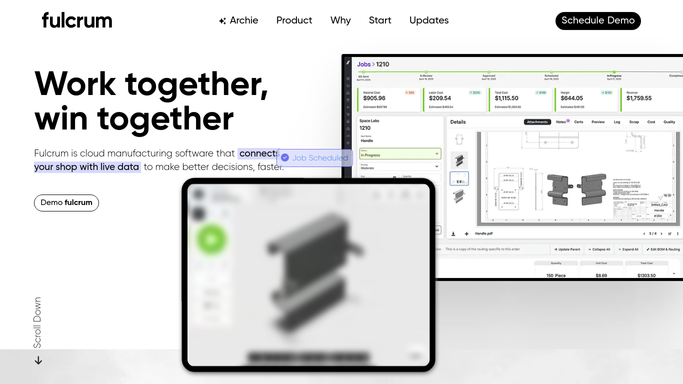
WebRun opens Fulcrum to find open unanswered quotes. - Open Fulcrum and navigate to the Quotes section
- Filter to quotes with status Sent that have not been accepted or declined
- Capture the prospect name, quote number, total value, and date sent for each
- Note any quotes older than 7 days as high priority for follow-up
Done when Every unanswered quote is listed with its details and age.
-
2
Gmail - draft follow-up email for each prospect
gmail.com How to Automate Gmail

WebRun opens Gmail to draft follow-up email for each prospect. - Draft a short, professional follow-up email for each unanswered quote
- Reference the quote number and value in each draft
- Save every draft as a Gmail draft for your review
- Do not send any email without your approval
Done when A follow-up draft is ready in Gmail for every unanswered quote.
How is each run configured?
Secure by default
Connect once, stays signed in
WebRun signs in once and keeps each session in a persistent environment, so every run picks up right where it left off.
Every action is checked against this policy before it runs.
Questions, answered
Will it send emails to prospects without my approval?
No. Every follow-up is saved as a Gmail draft and held for your review. Nothing is sent until you open the draft, check it, and click Send yourself.
How does it know which quotes still need a follow-up?
It reads the live status in Fulcrum each Monday, so quotes already accepted, declined, or converted to jobs are skipped automatically.
Can I customize the follow-up tone?
Yes. Give WebRun a sample email or a tone description during setup and it will write every draft to match your shop's voice.
Related templates
Put this on autopilot.
Turn it on in minutes - or have our team set it up for you.