How to Automate Fulcrum
Fulcrum automates the inside of a job shop. Autoschedule rebuilds the production plan from labour and machine time captured live, purchase planning works out what to buy and when, job costing moves as work is booked, and quality control is built in. Chasing what suppliers and outside processors are doing stays manual.
 Written by
Hannah Vogel
Finance operations
Written by
Hannah Vogel
Finance operations
 Reviewed by
Tom Kessler
Field operations analyst
Reviewed by
Tom Kessler
Field operations analyst
A job shop lives on the date it promised
Fulcrum is cloud manufacturing software for precision CNC shops and sheet metal fabricators: the shops that cut, bend, weld and machine parts to somebody else's drawing.
Everything in the business is in there because everything in the business is a job. The quote that won the work, the bill of materials, the routing that says which operation runs on which machine, the material allocated against it, the labour and machine time booked to it, and the date it was promised for.
That last one is the whole game. A fabricator is not selling machining, it is selling a part on a date. Quality is assumed. Price got the job. Delivery decides whether the customer sends the next one.
Which means the shop is judged on something it only half controls. The machines are in the building. The steel, the plating, the anodising and the freight are not.
Nothing on the floor moves until the material lands
Walk into the office of a fab shop at nine in the morning and somebody is on somebody else's website.
Checking whether the 304 plate ordered three weeks ago has a ship date yet, on the service centre's portal. Emailing the plater about the batch that went out Tuesday. Downloading a mill test report because the customer's quality clause wants it filed against the job. Signing into an OEM's procurement portal to see whether the purchase order was revised again, because nobody sends an email about that.
Then the same person opens Fulcrum and edits the dates, so the schedule reflects what they just found out.
It is a full job and nobody was hired to do it. It lands on the buyer, or on whoever owns the shop, and it eats the hours that were meant to go on quoting the work that keeps the place full next quarter.
Autoschedule reorders the shop around what it can see
Fulcrum does the inside-the-shop part properly, and a shop that has not turned all of it on should do that before adding anything else.
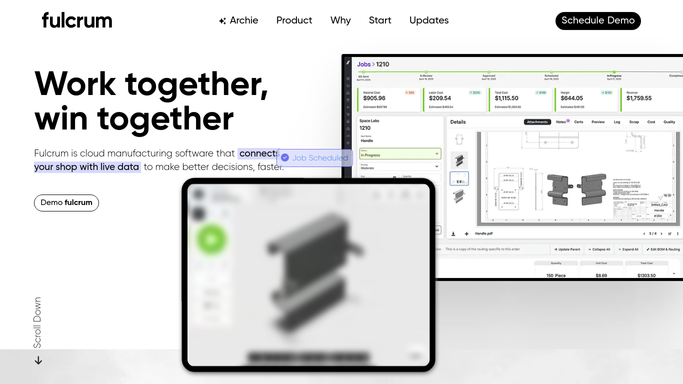
Autoschedule builds and rebuilds the production schedule, and because labour and machine time are captured live rather than written up later, it moves with what actually happened on the floor. Job tracking and job costing update off real bookings, so the margin on a job is visible while it is running instead of after it shipped. Purchase planning and demand planning work out what material is needed and when, from the bill of materials and the routing. Quality control is built for shops holding AS9100D or ISO 9001, so inspections and certificates stay with the job.
All of that reasons from what Fulcrum has been told.
The schedule assumes a purchase order arrives on the date the purchase order gave. It has no way of knowing that the service centre pushed it a fortnight, that the plater is running four days behind, or that the customer revised the drawing on a portal nobody opened. Those facts exist. They are on other companies' websites, and they are precisely the facts that decide whether the promised date holds.
A due date can be defended a week early
Work in a shop begins as a job in Fulcrum and immediately depends on people outside it. Give something the ability to go and look at those people, and the schedule can be built on what will really arrive.
Every open purchase order checked each morning on the supplier's own portal, with anything that slipped flagged against the jobs it feeds, so the schedule gets reworked days after the date moves rather than the week the job was due out. Parts out at heat treat, plating or powder coating tracked on the vendor's site and treated as the operation they actually are.
Customer procurement portals watched for the things nobody ever emails about: a new request for quote, a revised purchase order, a changed delivery schedule. Missing an RFQ sitting in a portal is how a shop loses a customer without ever being told.
Mill test reports and certificates of conformance collected from each supplier's site and filed against the job before the quality clause is invoked. Freight followed to the customer's dock, so the conversation about a late delivery is one you start.
The shop side of all this is already in Fulcrum. This is the other half of the same date.
Chasing a purchase order is not a trade
The person making those calls every morning is, in most shops, the estimator, and the morning is gone before a single quote is written.
WebRun is an AI agent that works a real Chrome browser, signed in as you. It opens the service centre, the plater's site or the customer's procurement portal, reads the dates and documents there, and brings them back against the Fulcrum job they belong to.
It runs on your schedule in your own private environment, and you can watch a run and stop it. Anything going to a customer, a late notice or a quote follow-up, is written and left for a person to send, because in this trade what you say about a date is what you are trusted on.
The workflows below are already built, and each one names what it opens.
Questions people ask
Does this replace what Fulcrum already schedules?
No, and it should not. Autoschedule, job costing and purchase planning are the right tools for what happens inside the shop. This covers the supplier portals, outside processors and customer sites Fulcrum has no way to open.
Will it email customers about late jobs?
Only after you have read it. A late order notice or a quote follow-up is drafted and held, because a shop is sold on its dates and a wrong message about one costs more than the delay did.
Do we need the Fulcrum API or an integration built first?
No. It works the browser signed in as your own user, so it uses the access you already have. That is also why it reaches supplier portals which have no API to integrate with in the first place.
15 ready-made Fulcrum workflows
Each one names the apps it touches and the exact steps it takes. Open one to read what it will do, then turn it on.




Want one of these running on your own Fulcrum?
Show WebRun the process once and it will run it on schedule, in your own private browser environment.