How to Automate SimpleConsign
Markdowns by tag color, category or schedule, bulk payouts by SimpleACH, check or store credit, and monthly vendor rent run inside SimpleConsign. Telling consignors their balance is ready, reminding customers before store credit expires and asking for reviews still take someone writing; WebRun, an AI agent, drafts those from the Back Office for staff to send.
 Written by
Grace Okafor
Healthcare operations
Written by
Grace Okafor
Healthcare operations
 Reviewed by
Nikhil Bhatt
Automation strategist
Reviewed by
Nikhil Bhatt
Automation strategist
SimpleConsign keeps the books on stock the shop does not own
Most of what hangs on a consignment rack belongs to someone who is not in the shop, and SimpleConsign keeps track of whose it is. Each item carries its consignor, split, tag color and expire date, and when it sells, the consignor's share lands in a balance the shop owes. The same system runs the register for consignment boutiques, buy-outright resale shops, estate sale operators and the vendor and antique malls that rent out booths.
On the Standard and Professional plans, consignors log in to Consignor Access to see what has sold, check their balance, read store-wide messages and, if the owner allows it, add or withdraw their own items and print labels. Behind the counter, the owner or the manager handles intake and payout day, and on the Professional plan the totals flow to QuickBooks Online for the bookkeeper.
Consignors ask the counter when their balance will be paid
Intake brings new people as well as new stock. A consignor signs up at the counter with three bags of clothes, and somebody explains the split, the consignment period and how drop-offs are booked.
A few weeks later the same consignor calls to ask when the money arrives. The answer depends on the shop's payout minimum and cutoff, and on whether they ever finished SimpleACH setup in Consignor Access or still want a check.
Customers hold store credit from returns, and from consignors who took credit instead of cash, and a credit with an expire date can lapse unused. Nobody asked the buyer who left delighted with a designer bag to write a review, and nobody thanked the consignor who earned the shop the most last month.
Every sale also adds to the balances the shop owes, and the owner tracks that total along with yesterday's takings.
Tag-color markdowns and bulk ACH payouts come built in
Automatic discounts apply at checkout by category, discount schedule, tag color or consignor, so last month's tags drop in price without anyone re-tagging the rack. On the Professional plan, AI item entry fills in an item's record from a photo, up to 2,000 times a month per location. Bulk payouts pay every consignor above a minimum balance in one run, and SimpleACH direct deposit, which starts at Standard, sits beside checks and store credit as a way to pay. Vendor malls can have rent deducted from vendor balances every month.
SimpleConsign also lists an add-on called SimpleConnect, for review requests, store-credit reminders, win-back messages and consignor communications, with plans from $49 a month. In October 2026 its page still said coming soon.
Until it ships, staff write those messages by hand. A consignor sees a new balance only by logging in to Consignor Access, a store credit's expire date sits in the account history where staff can read it, and the earnings reports list last month's top consignors for whoever opens them.
A balance that crosses the payout threshold gets a note the same morning
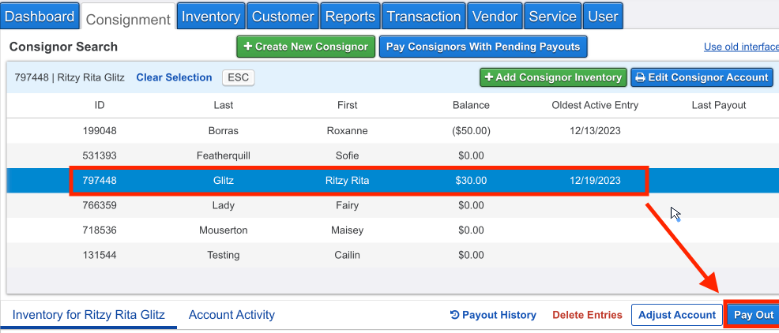
The manager sends a payout-ready note to every consignor whose balance has reached the shop's threshold, drafted in Gmail with the balance and how the shop pays out, while Slack shows what the morning's notes add up to and flags any unusually large balance. The same channel carries yesterday's revenue, transactions, top categories and the payout liability those sales added, and a running sheet marks any day 20 percent below the seven-day average.
Every month, the owner goes through thank-you notes drafted for the top consignors by the last 30 days' earnings, and a list of last month's top earners whose sales fell away.
Whoever did the intake sends a new consignor a welcome the same day, drafted with that consignor's own split and consignment period. Customers whose store credit expires in the next week or two get a reminder with the balance and the date, and a buyer above the shop's minimum, or a consignor just paid, gets a review request no more than once in 90 days.
Only users given the SimpleACH permission can complete a payout
Payout notes, welcomes, credit reminders, requests for reviews and the monthly thank-yous all start in SimpleConsign's Back Office reports. WebRun is an AI agent that works a real Chrome browser, signed in as you. Every message it writes goes into the shop's Gmail as a draft, and a member of staff sends each one.
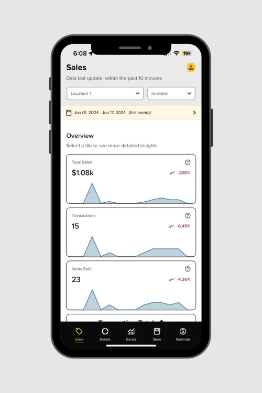
Back Office access needs the Manager user type or above, which is what WebRun's user gets. Its profile has no SimpleACH payout permission, so it can read balances but cannot complete a payout, and Manager Overrides such as Adjust Consignor Account or Override Price at Point of Sale are not given to it.
Questions people ask
Will SimpleConnect replace these workflows once it launches?
Partly. SimpleConsign describes SimpleConnect as an add-on for review requests, store-credit reminders, win-back messages and consignor communications, from $49 a month, and in October 2026 still listed it as coming soon. The morning sales post and the monthly top-consignor list are separate jobs either way.
Could a workflow run a bulk payout by mistake?
No. Its user has no SimpleACH payout permission, and SimpleConsign lets only approved users complete payouts. The payout-ready notes tell consignors their balance has reached the threshold; the owner runs the payout.
Does store credit in SimpleConsign expire?
Only if the shop gives it an expire date, which account entries such as store credit can carry. The reminder workflow reads that date, so credit without one never appears on its list.
Can the morning sales post cover two shops?
Yes, for the locations its user can see, either as one line per shop or as a combined total.
Sources
- Automatic Discounts | SimpleConsign Help Center Lists the discounts applied automatically at checkout by category, discount schedule, category discount schedule, tag color and consignor, and which inventory types each applies to.
- Consignor Payouts | SimpleConsign Help Center Describes individual and bulk payouts with a minimum payout amount and cutoff date, paid by SimpleACH, check or store credit.
- Marketing & Reputation Management for Consignment | SimpleConsign Describes SimpleConnect, an add-on for review requests, win-back flows, store-credit reminders, automated campaigns and consignor communications, priced from $49 a month and still marked coming soon in October 2026.
- Vendor Mall Rent Collection | SimpleConsign States that rent can be configured per vendor and deducted automatically from vendor balances each month.
- Pricing | SimpleConsign Plan by plan: ACH consignor payments, the consignor access portal and consignor scheduling from Standard; AI item entry and the Shopify and QuickBooks integrations on Professional.
- Consignor Access & Vendor Portal | SimpleConsign Consignors add and withdraw inventory, check its status, print labels and read store-wide messages; Consignor Access is included on the Standard plan.
- SimpleConsign 2025 Year in Review AI-powered item entry on the Professional plan, expanded to 2,000 uses a month per location.
6 ready-made SimpleConsign workflows
Each one names the apps it touches and the exact steps it takes. Open one to read what it will do, then turn it on.


Want one of these running on your own SimpleConsign?
Show WebRun the process once and it will run it on schedule, in your own private browser environment.