Launch a new Amazon product with every step tracked and nothing missed
When you trigger a new product launch run, WebRun opens Helium 10 to check listing optimization scores and keyword coverage, reviews the new listing in Amazon Seller Central, builds a structured launch checklist in Google Sheets covering listing, PPC, and review strategy, and adds key launch milestones to Google Calendar so nothing falls through the cracks.
- No credit card
- Under $0.01 per run
- Cancel anytime
 Amazon Seller Central
confirm listing status, images, and A+ eligibility
Amazon Seller Central
confirm listing status, images, and A+ eligibility
How do I automatically create an Amazon product launch checklist for a new ASIN?
WebRun audits a new Amazon ASIN in Helium 10 and Seller Central when you trigger a launch run, then builds a structured checklist in Google Sheets covering listing optimization, PPC setup, and review strategy, and adds Day 7, Day 14, and Day 30 review milestones to Google Calendar so every launch step is tracked from day one.
- Every launch task from listing to PPC to review strategy is in one sheet from day one
- Three milestone reminders are on the calendar so no post-launch check is missed
- Listing gaps are flagged before launch so they do not hurt early rank velocity
Built for Amazon private-label sellers · FBA brand launchers · Amazon product managers · ecommerce growth teams
What does WebRun do on every run?
The exact actions WebRun takes, in order - in plain language, so you can adjust anything.
-
WebRun signs in and gets to work
Opens
helium10.com/tools/listing-analyzerin a real browser with your saved login - no setup, no API keys. -
1
Helium 10 - audit listing optimization score and keyword coverage
helium10.com How to Automate Helium 10
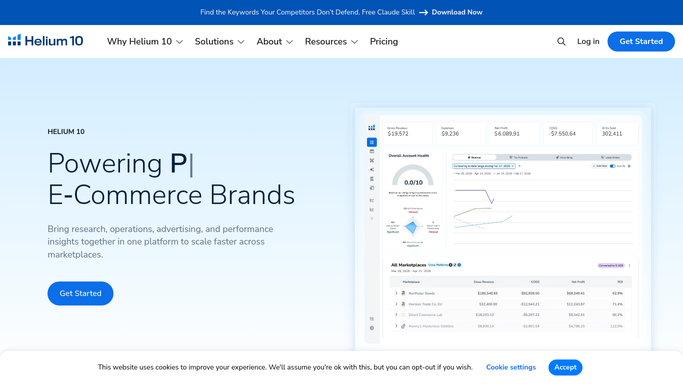
WebRun opens Helium 10 to audit listing optimization score and keyword coverage. - Open Helium 10 and run Listing Analyzer on the new ASIN
- Note the listing quality score and any fields flagged as incomplete or under-optimized
- Check Keyword Tracker to confirm the target keywords are being tracked from day one
Done when Listing score and keyword tracking status are confirmed for the new ASIN.
-
2
Amazon Seller Central - confirm listing status, images, and A+ eligibility

WebRun opens Amazon Seller Central to confirm listing status, images, and A+ eligibility. - Open Seller Central and find the new ASIN in Manage Inventory
- Confirm the listing is Active and not suppressed
- Check image count and confirm at least one lifestyle image and one infographic are present
- Note whether the ASIN is eligible for A+ Content and whether a Sponsored Products campaign has been created
Done when Listing status, image review, and PPC setup status are confirmed in Seller Central.
-
3
Google Sheets - build the structured launch checklist
google.com How to Automate Google Sheets

WebRun opens Google Sheets to build the structured launch checklist. - Create a new tab in the launch tracking sheet for this ASIN
- Populate the checklist with pre-launch tasks (listing optimization, images, A+ Content), launch-week tasks (PPC campaign live, keyword tracking active, review request sequence configured), and post-launch tasks (rank check at Day 7, Day 14, Day 30)
- Set the Status column to Open for every task and assign a due date based on today's launch date
Done when Full launch checklist is in Google Sheets with every task dated and status set to Open.
-
4
Google Calendar - add launch milestones and review checkpoints
calendar.google.com How to Automate Google Calendar

WebRun opens Google Calendar to add launch milestones and review checkpoints. - Add a calendar event for Day 7 keyword rank check and PPC performance review
- Add a Day 14 review-velocity and Buy Box check event
- Add a Day 30 full launch review event with a link to the Google Sheets checklist
Done when Three launch milestone events are on Google Calendar with checklist links.
How is each run configured?
Secure by default
Connect once, stays signed in
WebRun signs in once and keeps each session in a persistent environment, so every run picks up right where it left off.
Amazon Seller Central
Sign in once
Every action is checked against this policy before it runs.
Questions, answered
Will it create the Amazon listing or PPC campaign for me?
No. WebRun audits the existing listing and flags gaps in the checklist. Creating or editing a listing and launching a PPC campaign require human review to ensure the content and budget are correct before going live.
Can I use this for a Walmart listing launch too?
This template is designed for Amazon FBA/FBM launches using Helium 10 and Seller Central. Helium 10 also supports Walmart sellers, so a Walmart-focused variant can be set up as a separate run.
What if the listing is already partially set up when I trigger the run?
WebRun checks the current state of each item (listing score, images, PPC status) and marks already-completed tasks as Done in the sheet so the checklist only shows what still needs action.
Related templates
Amazon Seller Central›Amazon Seller Central›Amazon Seller Central›Put this on autopilot.
Turn it on in minutes - or have our team set it up for you.