How to Automate Helium 10
Helium 10 automates the watching. Cerebro pulls the keywords competitors rank for, Keyword Tracker follows your rank daily, Alerts flags hijackers and listing changes around the clock, and Profits shows what a sale actually earned. Acting on all that, against costs Helium 10 never sees, is what WebRun takes on.
 Written by
Nora Whitfield
Editorial lead
Written by
Nora Whitfield
Editorial lead
 Reviewed by
Clara Bennett
Revenue operations
Reviewed by
Clara Bennett
Revenue operations
Helium 10 is the research desk behind the listing
Helium 10 is the suite an Amazon seller keeps open in the tab next to Seller Central. It is where the decisions get made rather than where the orders arrive.
The finding tools come first: Black Box for products, Xray in the browser extension for sizing up a page, Cerebro and Magnet for keywords. Then the writing tools, Listing Builder and Scribbles, for turning those keywords into a listing. Then the running tools, which is where most sellers actually live day to day: Keyword Tracker, Alerts, Profits, Inventory Management and Refund Genie. Sellers, brands and agencies all use it, and it now covers Walmart and TikTok Shop alongside Amazon.
Everything below is about your own account and your own subscription, read at the pace a person reads. That distinction matters on marketplaces, and it is worth stating before anything else.
Every answer it gives has to be carried somewhere
The tools report. The seller is the transport.
The morning goes: open the rank tracker, look at the twelve keywords that pay for everything, compare them against a memory of last week. Export a Cerebro run into a spreadsheet to compare two competitors properly. Read the alert email about a title change and go and look at whether it matters. Copy four numbers into the launch checklist.
Then the decision needs figures that are nowhere in the suite. What the last container cost to land. What the factory quoted this week. What the freight forwarder says about the shipment due in eleven days. What the third party warehouse still has on the shelf. Those live in four other logins, so the seller becomes the join between a dashboard and a business.
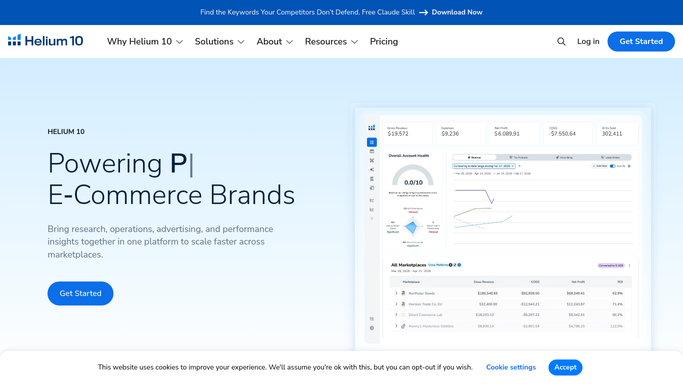
The dashboards report, and then they wait for you
It is a serious toolkit and most of the monitoring problem is genuinely solved inside it.
Cerebro takes a competitor's product and shows the keywords it ranks for, which is the fastest honest answer to why they are outselling you. Keyword Tracker follows your own rank on the terms you chose, refreshed daily, with a boost to hourly when you are watching a launch. Alerts runs around the clock on your listings and raises a flag for a hijacker on your offer, a changed title or image, a lost buy box or a new one-star review. Profits puts the fees, the cost and the ad spend against the revenue so you can see what a sale left behind.
Each of those answers its own question on its own screen. Nothing joins them up, and none of them do anything about the answer. An alert is a notification: it does not open the case, gather the offer's details, or work out whether the hijacker is worth fighting this week.
They are also scoped to the marketplaces Helium 10 has built for. Your supplier's portal, the freight forwarder's tracking page, the warehouse dashboard, the bank and your own website are outside all of it, and they hold half of every decision you are trying to make.
A price change with every number already on the table
The seller stops being the transport between those screens and starts being the decision.
Before a price moves: the current buy box holder and their price, your rank on the keywords that actually convert, yesterday's ad spend on that product, and the landed cost from the quote your factory sent this month, in one list. A change made against all four is a different act from one made against a hunch at eleven at night.
A hijacker alert that arrives already carrying the storefront name, the offer price, whether they are shipping it themselves, and a case written up ready to read. A restock forecast put next to the factory's lead time and the container's current tracking status, so the reorder is a decision with both halves in front of it.
A weekly rank digest that also says what the competitor above you is charging and whether they went out of stock, because rank on its own explains very little. A suppressed listing caught in the morning with the missing field named.
None of it should publish. A price you did not mean to set is live in seconds and a message from your account is your account speaking, so the writing gets prepared and a person decides what leaves.
Nobody is paid to sit and watch a dashboard
The watching is solved. The walking between screens, and the joining of what they say, is still an hour of somebody's morning.
WebRun is an AI agent that works a real Chrome browser, signed in as you. It opens your Helium 10 dashboards and your own Seller Central, reads what each screen says, then opens the supplier or freight portal that holds the other half, and assembles the one list you would have made by hand.
It runs on your schedule in your own private environment, at the pace a person browses, and you can watch a run and stop it. Prices, cases and buyer messages are drafted and wait for you.
Each workflow below is already built, and spells out the screens it opens before you turn it on.
Questions people ask
Does this scrape other sellers' data?
No. It signs into your own Helium 10 subscription and your own seller account and reads the screens you already pay to see, at the pace a person browses. Market research at volume is what Helium 10 itself is for, and nothing here adds a second collector.
Will it change a price or send a case without me?
No. Price changes, Seller Support cases, review responses and buyer messages are drafted and left for a person, because a published price and a sent message cannot be recalled. Reading, comparing and listing are the parts that run unattended.
Do we need the Helium 10 API or a higher plan?
No. It reads the same dashboards you read, in a browser, on the plan you already have. Nothing is registered, no key is issued, and a layout change on a page is handled the way a person handles it rather than breaking an integration.
13 ready-made Helium 10 workflows
Each one names the apps it touches and the exact steps it takes. Open one to read what it will do, then turn it on.

 Amazon Seller Central›Amazon Seller Central›Amazon Seller Central›Amazon Seller Central›Amazon Seller Central›Amazon Seller Central›Amazon Seller Central›
 Amazon Seller Central›Amazon Seller Central›Amazon Seller Central›Amazon Seller Central›Amazon Seller Central›
Want one of these running on your own Helium 10?
Show WebRun the process once and it will run it on schedule, in your own private browser environment.