Triage storm damage leads the morning after a storm
Every morning, WebRun checks the National Weather Service for severe wind or hail alerts issued for your service area in the last 24 hours, matches the impacted zip codes against your leads and customers in DripJobs, and posts your sales team a prioritized Slack call list of who likely has storm damage.
- No credit card
- Under $0.01 per run
- Cancel anytime
How do I automatically find and prioritize storm damage leads after a storm?
WebRun checks the National Weather Service each morning for wind, hail, and severe thunderstorm alerts in your service area, matches the impacted zip codes against your DripJobs leads and customers, and posts your sales team a prioritized Slack call list ranked by gutter age. Reps start the day calling the homes most likely to have real storm damage first.
- Sales reps get a prioritized call list the morning after every storm, not days later
- Only genuine wind, hail, and severe storm alerts trigger a list, cutting noise
- Leads inside yesterday's storm zone never wait for a manual weather check
Built for gutter installation companies · storm restoration crews · exterior contractors · gutter sales teams
What does WebRun do on every run?
The exact actions WebRun takes, in order - in plain language, so you can adjust anything.
-
WebRun signs in and gets to work
Opens
www.weather.govin a real browser with your saved login - no setup, no API keys. -
1
National Weather Service - check overnight storm alerts
weather.gov
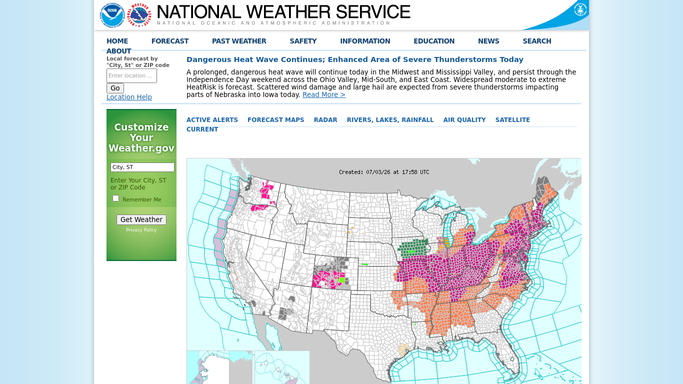
WebRun opens National Weather Service to check overnight storm alerts. - Check alerts issued for your service area in the last 24 hours
- Pull out wind, hail, and severe thunderstorm warnings only
- Note the zip codes and counties each alert covers
Done when Every storm alert touching your service area in the last day is listed with its zip codes.
-
2
DripJobs - match leads in the impacted area
dripjobs.com How to Automate DripJobs

WebRun opens DripJobs to match leads in the impacted area. - Match the impacted zip codes against your existing leads and customers
- Pull each match's address, gutter age, and last service date
- Sort matches by how long it has been since their last gutter work, oldest first
Done when Every lead or customer inside an impacted zip code is listed with their details.
-
3
Slack - alert the team with a call list
slack.com How to Automate Slack

WebRun opens Slack to alert the team with a call list. - Post a prioritized call list to the sales channel, oldest gutters first
- Flag the storm type and zip code next to each name
Done when Your sales team has this morning's storm-damage call list in Slack.
How is each run configured?
Secure by default
Connect once, stays signed in
WebRun signs in once and keeps each session in a persistent environment, so every run picks up right where it left off.
Every action is checked against this policy before it runs.
Questions, answered
Will it contact homeowners about storm damage directly?
No. WebRun only posts an internal Slack call list for your sales team to work. It never emails, texts, or calls a homeowner on its own.
How does it know which storms actually matter?
It reads National Weather Service alerts for wind, hail, and severe thunderstorm warnings only, and drops anything milder than that.
What if the same storm was already worked yesterday?
It only pulls alerts issued in the last 24 hours, so a storm already triaged and worked won't generate a second call list.
Related templates
Put this on autopilot.
Turn it on in minutes - or have our team set it up for you.