Keep every farm-call record synced and complete
Every evening, WebRun opens ThoroVet, reviews the day's farm-call visits, confirms records captured offline on the iPad have synced on reconnect, flags any visit missing exam notes, treatments, or charges, logs the day's activity to a Google Sheet, and posts your team a short end-of-day summary in Slack.
- No credit card
- Under $0.01 per run
- Cancel anytime
How do I make sure every farm-call visit record is complete before billing?
WebRun reviews ThoroVet every evening, confirms offline farm-call records synced on reconnect, and checks each visit for missing exam notes, treatments, or charges. It logs the day to a Google Sheet and posts your team a Slack summary of what still needs finishing, so nothing goes to billing half-entered.
- Incomplete visits get caught the same day, not at month-end billing
- Offline barn records are confirmed synced every night
- Your team opens Slack to a clear list of what to finish
Built for equine veterinarians · ambulatory vet practices · mobile veterinary teams · practice managers
What does WebRun do on every run?
The exact actions WebRun takes, in order - in plain language, so you can adjust anything.
-
WebRun signs in and gets to work
Opens
app.thorovet.comin a real browser with your saved login - no setup, no API keys. -
1
ThoroVet - review the day's synced farm-call visits
thorovet.com How to Automate ThoroVet
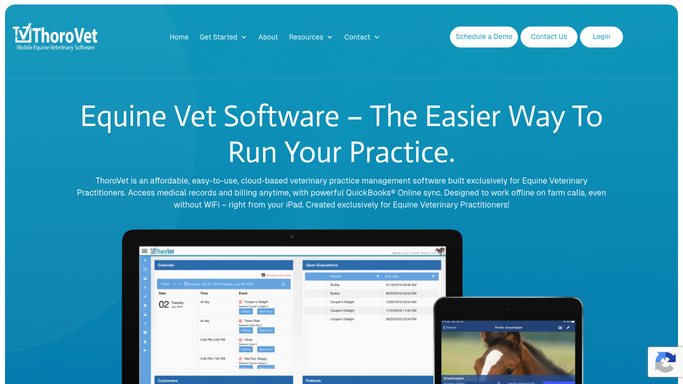
WebRun opens ThoroVet to review the day's synced farm-call visits. - Open ThoroVet and list all farm-call visits dated today
- Confirm records captured offline on the iPad have synced back after reconnect
- For each visit, check that exam notes, treatments given, and chargeable items are present
- Note any visit that is missing notes, a treatment entry, or a charge line
Done when Every one of today's farm-call visits has been reviewed and its completeness recorded.
-
2
Google Sheets - log each visit and its completeness
google.com How to Automate Google Sheets

WebRun opens Google Sheets to log each visit and its completeness. - Open the farm-call log sheet
- Add a row per visit with the horse, owner, veterinarian, and sync status
- Mark each visit complete, or list exactly what is missing
- Keep a running count of complete versus incomplete visits for the day
Done when The log sheet holds one accurate row for every visit made today.
-
3
Slack - post the end-of-day summary
slack.com How to Automate Slack

WebRun opens Slack to post the end-of-day summary. - Post a short end-of-day summary to your practice channel
- Lead with how many visits are fully complete and how many need attention
- List each incomplete visit with the horse, owner, and what is missing so it can be finished before billing
Done when Your team has a clear end-of-day list of what still needs finishing in Slack.
How is each run configured?
Secure by default
Connect once, stays signed in
WebRun signs in once and keeps each session in a persistent environment, so every run picks up right where it left off.
Every action is checked against this policy before it runs.
Questions, answered
Does it change any records in ThoroVet?
No. WebRun only reads your farm-call visits and reports what is complete or missing. It never edits a record, adds a charge, or contacts a client. Your team finishes each flagged visit by hand.
How does it handle records taken offline in the barn?
It waits for ThoroVet to sync the iPad on reconnect, then reads the synced visit. If a record has not yet synced by run time, it is flagged as pending so nothing gets silently dropped.
Where does the summary go?
The end-of-day summary posts to an internal Slack channel your team chooses, and the full log lives in a Google Sheet. No client sees it, and no client information leaves your practice.
Related templates
Put this on autopilot.
Turn it on in minutes - or have our team set it up for you.