How to Automate GitHub
GitHub Actions covers most of it: workflows that run on any repository event or on a schedule, plus built-in project workflows and pull request reminders in Slack. Anything outside GitHub has to call its API before a workflow hears about it, so checking dashboards and pages without one falls to a person or an AI agent like WebRun.
 Written by
Dimitri Vasilev
Logistics analyst
Written by
Dimitri Vasilev
Logistics analyst
 Reviewed by
Priya Raghavan
Solutions lead
Reviewed by
Priya Raghavan
Solutions lead
A GitHub repository holds the code and the reasons it changed
A software team keeps its code on GitHub, one repository per project, with every change since the first commit. Changes go in through pull requests: a developer pushes a branch, a colleague reviews the diff, and the author merges it once the checks from GitHub Actions pass. A solo developer on a free account works the same way as a company on GitHub Enterprise.
Around the code sit issues for bugs and feature requests, and a Projects board that turns them into a plan. Each release marks a version that shipped, with notes on what changed.
Support checks the latest release before telling a customer a fix is live, and an agency owner writes the week's client report from the merged pull requests.
A review request is one notification among dozens
A developer opens a pull request and asks a colleague to review it. The request joins everything else in that colleague's GitHub notifications, so the author asks again in chat on day two, and once more on day four. Meanwhile main goes red at two in the morning, and nobody notices until the first person pulls it after breakfast.
On release day, a developer rewrites GitHub's generated list of merged pull requests, whose titles were written for other developers, into notes a customer could follow. Whoever deployed opens the hosting dashboard to confirm the new build is the one serving traffic.
Between releases, one engineer keeps an eye on the payments provider's changelog, since a deprecated endpoint there would break checkout.
Actions automates anything that can call the GitHub API
GitHub Actions runs a workflow on GitHub's hosted runners whenever something happens in the repository, such as a push or a newly opened issue. The schedule event runs a workflow on a timer instead, as often as every five minutes.
Projects has two built-in workflows switched on from the start: GitHub sets an item's status to Done when its issue or pull request closes, and when a pull request merges. Scheduled reminders send a team's open review requests to its Slack channel at a set time. A release can generate its own notes, listing the merged pull requests and contributors with a link to the full changelog.
Activity outside GitHub reaches a workflow through repository_dispatch, which fires only when another system calls the GitHub API. A vendor's changelog page never makes that call, and neither does a hosting panel without a GitHub integration. The people who most need the news, support staff and clients, do not read GitHub notifications. To reach those pages from an Action, a developer writes a browser script and keeps a login for it in the repository's secrets.
GitHub also runs scheduled workflows on a best-effort basis. They can be delayed when Actions is busy, which includes the start of every hour, and when the load climbs high enough some queued jobs can be dropped.
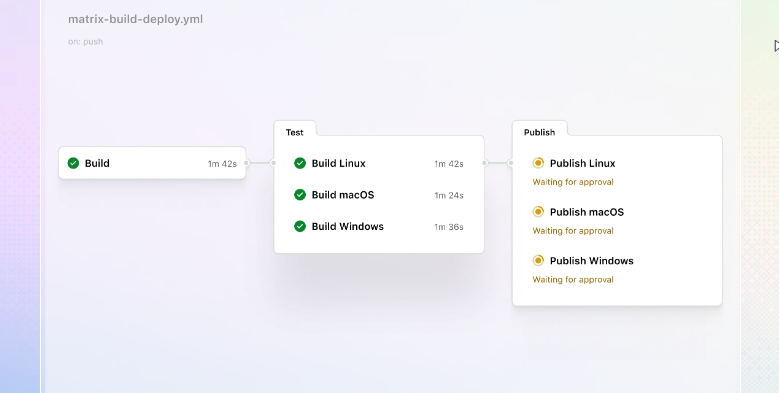
A release can be checked on the server it went to
When a release has not reached the hosting panel, the developer who cut it hears the same afternoon, from an issue in the repository that quotes what the panel reported and when. When the payments provider announces it will retire an endpoint your code calls, the team reads about it the next morning in an issue that links the notice and quotes the paragraph. Whoever holds the registrar account gets an issue like it when a domain is a month from renewal.
Each agency client can get a plain-English Friday note about what shipped that week, written from the merged pull requests, which goes out once the account manager has read it.
A reviewer who has left a pull request for two days gets a direct message with its link and the author's name. The lead walks into standup knowing last night's failures on main, grouped by workflow and failing job, with the author of each commit named.
The agent reads the hosting panel and opens the issue in GitHub
A developer could write an Action that logs into the hosting panel. It would stop working the first time the panel redesigned its sign-in page, and it would stay that developer's code to fix.
WebRun is an AI agent that works a real Chrome browser, signed in as you. It logs into the hosting panel and reads the vendor's changelog at the hours you choose, then opens the issue in the repository or posts the digest to Slack.
The Friday note goes to the account manager, not the client, and merging, pushing code and publishing a release stay with the team. Each card below sets up one of these GitHub jobs on its own schedule.
Questions people ask
Couldn't we build this with GitHub Actions ourselves?
Where the hosting panel or the vendor has an API, yes, and an Action is usually the better tool there. Where it only has a login page, the Action turns into a browser script with a stored password that a developer has to keep working, while the agent logs into that page in Chrome and reads the deploy status off it.
Personal access token or GitHub App: which does it use?
Neither. It signs in to GitHub in the browser as whichever account you give it, with exactly that account's access. An account added only to the repositories it works on keeps the rest out of reach.
Will it merge pull requests or push code?
Not if its account has GitHub's Triage role. That role can open, label, assign and close issues and pull requests and request reviews, but it cannot push to the repository or merge a pull request.
Can it write release notes our customers can read?
Yes, as a draft: it writes plain-language notes from the merged pull requests and leaves them on a draft release for a person to edit and publish. If your pull request titles already read well, GitHub's generated notes may be enough, sorted into categories by label through a .github/release.yml file.
Will a quiet repository switch the checks off?
Not the agent's. GitHub disables scheduled workflows in a public repository after 60 days without activity, but the agent keeps its own schedule outside the repository, so a quiet stretch does not stop it.
Sources
- GitHub Actions GitHub's Actions page: workflows kicked off on any GitHub event, hosted Linux, macOS and Windows runners, and a Marketplace of actions.
- Events that trigger workflows The schedule event runs at most every five minutes, can be delayed at high load and is disabled after 60 days without activity in a public repository; repository_dispatch brings in activity from outside GitHub through the API.
- Using the built-in automations Projects' default workflows set an item's status to Done when its issue or pull request is closed or merged.
- Managing scheduled reminders for your team Scheduled reminders send a team's open review requests to Slack at a set time.
- Repository roles for an organization The Triage role can apply labels, close, reopen and assign issues and pull requests and request reviews, but cannot push to the repository or merge a pull request; the Read role can open issues.
- Automatically generated release notes Generated notes list the merged pull requests, the contributors and a link to the full changelog, and a .github/release.yml file sorts pull requests into categories by label.
4 ready-made GitHub workflows
Each one names the apps it touches and the exact steps it takes. Open one to read what it will do, then turn it on.


Want one of these running on your own GitHub?
Show WebRun the process once and it will run it on schedule, in your own private browser environment.