How to Automate VoiceQ
VoiceQ automates the sync itself: script import, adaptation in VoiceQ Writer, cueing and take management in VoiceQ Pro, the digital Rythmoband for the performer, and VoiceQ Cloud for a distributed team. Picture drops, director notes and signed releases live elsewhere, which is the reading an agent like WebRun does.
 Written by
Tom Kessler
Field operations analyst
Written by
Tom Kessler
Field operations analyst
 Reviewed by
Rosa Lindqvist
Operations editor
Reviewed by
Rosa Lindqvist
Operations editor
A dubbed episode is a few thousand lines that must fit a mouth
VoiceQ is media localization software: the tool a post-production studio uses to dub a film into nine languages, record ADR on a series, write audio description, and cut subtitles and captions against the same picture.
The work is more exacting than it looks from outside. Every line has to start when a mouth opens and stop when it closes. The translated sentence is almost never the right length, so somebody rewrites it until it fits, keeping the meaning, the register and the character's voice intact. Then an actor performs it, in a booth, against picture, at that exact timing.
So VoiceQ holds the script and the characters, the cue timings against picture, the takes recorded and who recorded them, and the state of every language version as it moves from adaptation into the booth and on to the mix.
Between the booth and the mix, everything is chased by message
The recording is the visible half. The other half is finding out where things stand.
A producer emails asking whether the Portuguese version can deliver by the twelfth, and answering means counting recorded lines across four characters. The director reviewed episode three overnight and left nineteen comments on a review platform, each stamped with a timecode, and somebody has to turn those into a retake list an engineer can work from. Two actors booked for Thursday have still not returned a usage release.
Then the picture changes. A new cut lands in the shared drive on Tuesday, and every cue after the trim in reel two has moved. Nobody finds out until the session.
None of that is craft, and all of it happens while a booth clock is running.
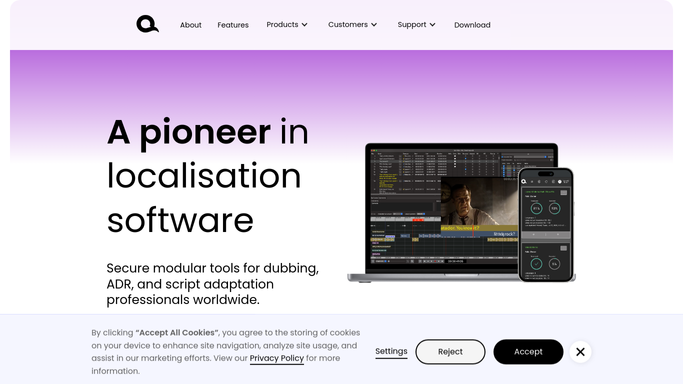
The Rythmoband keeps the actor on the picture
VoiceQ automates the exacting part, which is holding words, picture and performance together.
Scripts import from a long list of formats rather than being retyped. VoiceQ Writer is where a translated line gets adapted until it fits the timing and the lip-sync intent. VoiceQ Pro is the engineer's application for cueing, session setup and take management, with AutoSync to cue a project quickly, DAW integration into Pro Tools and video out through Blackmagic hardware. VoiceQ Actor puts the digital Rythmoband in front of the performer, scrolling dialogue in sync with picture so a take lands on the mouth without anyone counting. VoiceQ Cloud carries the same project across a distributed team with permissions, real-time collaboration and reporting, and cue sheets and reports export out of it.
All of that operates on the project as it exists inside VoiceQ: its lines, its characters, its cues, its takes.
The rest of a dubbing job lives in other people's systems. Picture arrives in a shared drive or a client's transfer service. Director and client notes are left on a review platform as timestamped comments. Releases are signed in an e-signature tool. Delivery specs sit on the client's own portal, and the invoice and what has actually been paid sit in the accounting system.
Retake notes can arrive as line numbers, not timestamps
The facts a dubbing supervisor needs are all written down somewhere. They are written down in six different places.
A new picture cut landing overnight compared against the cues already locked, so the morning opens on a list of what no longer lines up rather than on an engineer discovering it with an actor already in the booth.
The director's comments lifted off the review platform and matched, by timecode, to the line and character they belong to, so what reaches the engineer is a retake list rather than nineteen notes and a video player.
The moment every line of a language version is marked recorded, the mixer and the scheduler told that same hour, instead of a finished version sitting unnoticed until somebody asks. Recorded progress compared against each character's due date and the booth time booked, so a version that will miss the twelfth becomes a Tuesday conversation rather than a Friday apology.
Usage releases and talent forms still unsigned three days before a session, listed by actor and by project. Approved episodes matched against what has been invoiced and what has actually been paid.
Anything reaching a client, a producer or an actor is drafted and waits. A delivery date is a commercial promise, and it should be made by somebody who can keep it.
The words still get chosen by someone who speaks both languages
A supervisor working through nineteen director notes against a new picture cut is doing clerical work at a specialist's rate, in the hour before an actor arrives.
WebRun is an AI agent that works a real Chrome browser, signed in as you. It opens the review platform, the shared drive, the e-signature tool, the accounting system or VoiceQ itself, reads what is on each screen, and returns one list with the exceptions named.
It runs on the schedule you set, in your own private environment, and you can watch a run and stop it. Nothing is delivered, approved or sent to a client without a person reading it first.
Each workflow below says which screens it reads.
Questions people ask
Every title we touch is embargoed. Does that rule this out?
No. It runs in your own private environment, on your own accounts, and reads the same screens your staff read. Nothing goes anywhere you did not send it, access is limited to what you sign it into, and you can watch a run and stop it mid-way.
Will it mark lines recorded or change a project in VoiceQ?
No. It reads state and reports it. Recording status, approvals and anything that alters a project stay with the engineer and the supervisor, because a line wrongly marked as recorded is a line that never gets recorded.
Our director leaves notes on a review platform, not in VoiceQ. Can it use those?
Yes, and that is the usual case. It reads the comments and their timecodes off the platform, matches each to the line and character it lands on, and returns a retake list. Whether a note becomes a retake is still the supervisor's call.
10 ready-made VoiceQ workflows
Each one names the apps it touches and the exact steps it takes. Open one to read what it will do, then turn it on.






Want one of these running on your own VoiceQ?
Show WebRun the process once and it will run it on schedule, in your own private browser environment.