Automated Bail Agency Daily Dispatch Digest
Every morning, WebRun opens Captira and assembles a complete dispatch digest: court dates today and tomorrow, defendants due for check-in, payment plan installments due today, new bail applications received overnight, and bonds flagged for forfeiture risk. It posts the full briefing to your agency Slack channel so every agent starts the day with a clear, prioritized action list.
How do I get a daily morning briefing for my bail bond agency?
Every morning at 7:30 AM, WebRun opens Captira and assembles a complete daily dispatch digest covering court dates, defendants due for check-in, payment plan installments due, new bail applications, and active risk flags. The full briefing posts to your agency Slack channel so every agent and manager starts the day with a clear, prioritized action list.
- Every agent starts the day with a full picture of court dates, check-ins, and risk flags before the first call
- No priority item is buried in Captira waiting for an agent to manually check
- Sections showing clear give agents confidence that the system checked and nothing is outstanding
Built for bail bond agency owners · bail agency managers · bail bondsmen · bail agency dispatchers
What does WebRun do on every run?
The exact actions WebRun takes, in order - in plain language, so you can adjust anything.
-
WebRun signs in and gets to work
Opens
app.captira.com/loginin a real browser with your saved login - no setup, no API keys. -
1
Captira - collect all daily priority items
captira.com
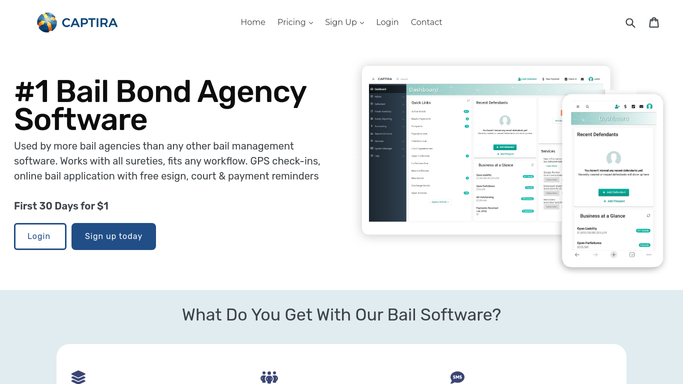
WebRun opens Captira to collect all daily priority items. - Open Captira and navigate to the court date calendar for today and tomorrow's scheduled hearings
- Pull the check-in schedule for defendants whose check-in is due today
- Review the payment plan section for installments due today and any that are now overdue
- Check the new applications queue for any bail applications submitted since yesterday's run
- Review the forfeiture and Defendant Watch sections for any active flags or re-arrest alerts received overnight
Done when All priority items for today are collected: court dates, check-ins due, payments due, new applications, and active risk flags.
-
2
Slack - post the daily dispatch digest to the agency channel
slack.com

WebRun opens Slack to post the daily dispatch digest to the agency channel. - Post the daily dispatch digest to the agency Slack channel, organized into clear sections: Court Dates Today, Check-Ins Due, Payments Due, New Applications, and Active Risk Flags
- List the count of items in each section and the top three priorities by name at the top of the digest
- Assign each item to the responsible agent by name where the Captira record shows an assignment
- Post the digest at 7:30 AM so agents have it before the day begins
Done when The agency Slack channel has a complete, organized daily dispatch digest with all priority items assigned to agents.
How is each run configured?
Secure by default
Connect once, stays signed in
WebRun signs in once and keeps each session in a persistent environment, so every run picks up right where it left off.
Every action is checked against this policy before it runs.
Questions, answered
Does this send anything to defendants or indemnitors?
No. The daily dispatch digest is entirely internal. It posts only to your agency Slack channel. No defendant, indemnitor, or external party receives any communication from this workflow.
Can different agents see only their own assigned items?
The main digest goes to the agency channel with all items. For agent-specific views, you can ask WebRun to also send a direct Slack message to each agent listing only their assigned items from the digest.
What if Captira shows no items for a given section on a quiet day?
WebRun posts the digest every morning regardless. Sections with no items are noted as clear so agents know the check was made and nothing is outstanding, not that the check was skipped.
Related templates
Put this on autopilot.
Turn it on in minutes - or have our team set it up for you.