How to Automate Gusto
Gusto automates the paying. Payroll on AutoPilot runs your regular payroll a day before the deadline, and payroll taxes are calculated and filed for you. Chasing missing timesheets, checking a run against the last one and reporting labour cost is the work around it, which an agent like WebRun handles. Approval stays yours.
 Written by
Marta Ellison
Automation strategist
Written by
Marta Ellison
Automation strategist
 Reviewed by
Rosa Lindqvist
Operations editor
Reviewed by
Rosa Lindqvist
Operations editor
Gusto turned payroll into something a small business can run itself
Gusto is payroll, benefits and HR software for small businesses, and its achievement is that a company of nine people can now run payroll without an accountant standing behind them.
Before it, payroll was either a bureau you emailed a spreadsheet to, or software that assumed somebody in the building knew what a 941 was. Gusto put the whole thing in a browser, worked out the taxes, filed the federal, state and local forms, and made it something an owner could do on a Tuesday afternoon.
It also became where the employee record lives. Salaries, contractor rates, PTO balances, benefit elections, W-2s, I-9s, the onboarding checklist a new hire signs. For a business with no HR department, and most have none, Gusto is the HR department.
Which means it holds the two things a small business is most afraid of getting wrong: what people are paid, and what the government is owed.
The week before payday is spent chasing people
Payroll is not difficult. Payroll is a deadline attached to other people's homework.
Three people have not submitted timesheets. One manager has not approved theirs. A new hire has not finished onboarding, so the I-9 is outstanding. Somebody worked eleven hours on Saturday and nobody has said whether that was authorised. A contractor's invoice is sitting in an inbox instead of in Gusto.
So the two days before every deadline are the same two days. Open Gusto, see who is missing, message them. Wait. Message them again. Check the time-tracking app against what actually came through. Put this run beside the last one and stare at any line that moved a lot, because that is how errors get caught, and nothing does the staring for you.
Then approve, in the final hour, rather faster than anybody would like.
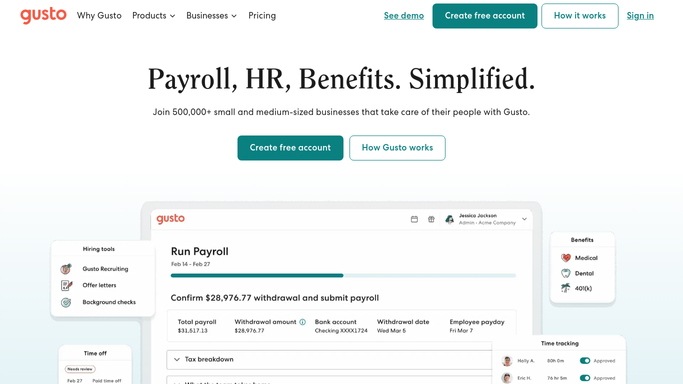
Payroll on AutoPilot runs what Gusto has already been told
Gusto automates a real share of this, and a business not using those settings is working harder than it needs to.
Payroll on AutoPilot processes your regular payroll on its own, one day before the deadline, so a stable salaried team genuinely does not need anyone to press a button. Payroll taxes are calculated, filed and paid across federal, state and local, with the forms e-filed and e-signed. Time tracking syncs hours, PTO and holidays into the run. Onboarding checklists send a new hire off to enter their own details and e-sign their W-4 and I-9, instead of somebody chasing paper around.
All of it operates on what is already inside Gusto, and that is the ceiling. AutoPilot runs the payroll it has. If three timesheets never arrived, it runs without them and somebody finds out afterwards. It does not go and ask.
It cannot open the scheduling app the shift managers actually use, or the job-costing system, or the inbox holding a contractor invoice. It has no way to tell you that this run is eleven percent above the last one before it goes. The paying is automated. The gathering and the checking, which is where the mistakes live, is still a person with two days and a list.
Payroll numbers are worth reading between pay runs
Payroll is the largest line in most service businesses, and it gets looked at twice a month for about ten minutes.
The chasing does not need anyone sitting on it. Who has not submitted with two days to go, who has not approved, whose onboarding is incomplete: listed and nudged while it is still routine rather than urgent. The checking does not either. Hours well outside somebody's normal pattern, a pay rate that changed since last time, a total that jumped against the previous run, all flagged for a human with hours left to investigate.
Then the numbers can leave the payroll system, which is where they finally earn something. Labour as a percentage of takings, put next to the revenue figure from the till or the practice system, weekly instead of quarterly. Overtime by team, so a rota problem is visible as a rota problem. PTO balances read before a holiday period, so cover gets planned in advance. Payroll tax deadlines tracked somewhere other than an inbox.
One thing stays exactly where it is. A pay run moves real money to real people and cannot be undone with a click, so nothing here approves or submits one. Everything around it can be prepared. The approval is a person, every time.
The paperwork gets gathered, the pay run stays yours
Chasing five timesheets and comparing this run against the last one is work. It is not the work that requires knowing whether a manager actually authorised that Saturday shift.
WebRun is an AI agent that works a real Chrome browser, signed in as you. It opens Gusto and the scheduling, time-tracking or job-costing systems around it, reads who is missing and what looks wrong, and puts the list in front of you before the deadline rather than during it.
It runs on your schedule in your own private environment, and you can watch a run and stop it. It never approves or submits a payroll, and messages to staff are drafted for you.
The workflows below are already built, and each one names what it opens.
Questions people ask
Will it run payroll on its own?
No, and it is built not to. It gathers the hours, chases what is missing and flags anything that looks wrong, then stops. Approving and submitting a pay run moves real money and stays a decision a person makes in Gusto.
Do we have to turn off Payroll on AutoPilot to use this?
No. The two fit together well: AutoPilot handles the processing, and this handles the two days before it, so the run AutoPilot processes is one somebody has already checked rather than one nobody looked at.
Can it read the time-tracking app we use instead of Gusto's?
Yes. It opens whatever scheduling or time-tracking system your managers actually use, reads the hours off the screen, and compares them against what reached Gusto, which is exactly where the gaps usually are.
17 ready-made Gusto workflows
Each one names the apps it touches and the exact steps it takes. Open one to read what it will do, then turn it on.





Want one of these running on your own Gusto?
Show WebRun the process once and it will run it on schedule, in your own private browser environment.