How to Automate ServeManager
ServeManager automates the job it already holds. Attempts are logged from the phone with GPS, the affidavit library and custom documents build the proof, clients watch updates in a free account, and invoicing sits alongside. Checking courts, addresses and approval portals is the layer an agent like WebRun covers.
 Written by
Julian Adeniyi
Retail operations
Written by
Julian Adeniyi
Retail operations
 Reviewed by
Rosa Lindqvist
Operations editor
Reviewed by
Rosa Lindqvist
Operations editor
Somebody has to put the papers in a defendant's hand
ServeManager is cloud software for process serving, used by three groups: the law firms that order service, the agencies that dispatch it, and the individual servers who drive out and knock. The job is what the whole system is built around.
A job holds the case, the court it belongs to, the documents, the person to be served and the address somebody believes they live at. Then it holds attempts, which is where the work actually shows: the date, the time, the GPS point the phone recorded and the note explaining why nobody came to the door. Eventually it holds a signed proof of service and an invoice.
None of that is administrative. Service of process is what gives a court authority over a defendant, so an attempt recorded badly, or an affidavit that says the wrong thing, can be argued over months later. The people in ServeManager all day are usually two: whoever runs the office, and whoever is driving.
The office spends its day answering where things stand
Serving papers takes twenty minutes. Everything around it takes the week.
A paralegal rings to ask whether the defendant has been served yet, because a response deadline is coming. A server has finished four jobs and uploaded no affidavits, and the client cannot file without them. An address turns out to be a house sold two years ago, so the job needs a better one before anybody drives back. A rush job lands at four and the nearest server has gone home.
Then the money. Invoices go out and sit. Contract servers submit their own numbers at month end, and somebody reconciles the two. None of that is process serving, and all of it decides whether the agency keeps the account.
ServeManager knows the attempt because the server logged it
Within the four walls of the agency, ServeManager has already taken out most of the retyping.
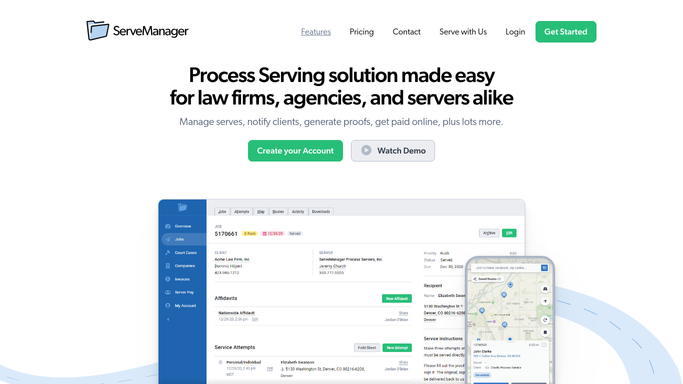
Attempts are saved from the mobile site with GPS data captured where the server is standing, which is the difference between a defensible affidavit and an argument. A library of affidavits and forms covers most work, custom documents cover the rest, and a saved electronic signature finishes them. Clients can be invited to a free account and watch job updates in real time instead of telephoning. Contract servers work the same job from their own login, with an accept or decline step on new work and an auto-share setting that passes their updates through. Invoicing, statements and server pay sit together, clients pay online from the invoice, and the API and Zapier carry the figures on to QuickBooks, Xero or FreshBooks.
Look at what starts each of those. A job somebody entered. An attempt a server logged. A document built from what the job already holds.
The court is not inside the agency. Neither is the clerk who accepts or rejects a filed proof, the sheriff's civil division handling the jobs routed there, the public records that would say the address is stale, or the client firm's own portal where an invoice waits to be approved.
The rounds can be made before the first server sets off
Put those sites on a morning schedule and the board starts correcting itself.
Every open job checked against the court's own record, so a case dismissed last Thursday or a hearing moved to November comes off the board before a server drives ninety minutes to a door that no longer matters. Proofs followed until they show accepted rather than merely submitted, because a proof bounced over a margin is not a proof and the deadline did not pause while it sat.
Addresses run against public records before the first attempt, so a property sold two years ago is a question at intake instead of three trips. The sheriff's civil division checked for the jobs handed to it, which otherwise go quiet for weeks. Invoices followed into a firm's approval portal, so a rejection over a billing code is fixed this month rather than found at ninety days.
Gathering and comparing can run before anyone is awake. Anything reaching a law firm, a court or a server is written and left for a person, because one badly worded note to a paralegal costs the account.
Reading a docket is not process serving
Opening a court's site, finding the case and putting what it says next to a job is clerical work with a deadline behind it. Working out where a defendant has actually gone is the part worth paying for.
WebRun is an AI agent that works a real Chrome browser, signed in as your office is. It opens ServeManager alongside the court's record, the clerk's system or the sheriff's page, reads what each one shows, and brings back a list: what moved, what was rejected, which address will not hold, which invoice is still unapproved.
It runs on your schedule in your own private environment, and a workflow can be limited to a named list of sites. You can watch a run and stop it partway. Nothing is filed, and nothing reaches a client unread.
The workflows below are already built, and each one names what it opens.
Questions people ask
Can it file a proof of service with the court for us?
No. It can tell you whether a proof you filed shows as accepted, rejected or still pending, and it can watch a case for activity that changes a job. Filing carries a signature and a deadline, so it stays with the person who signed the affidavit.
Do we need the ServeManager API or a Zapier plan for this?
Neither. It works a browser signed in as your office is, so it reads the same screens your staff read. That is also why it reaches a county clerk's site or a sheriff's page, which have no API for anyone to connect to.
Will it email our clients or chase our contract servers?
Only as a draft. Status notes, affidavit chasers and invoice queries are prepared and left for someone to send. Process serving runs on relationships with a handful of firms, and a message that lands wrong is not something an approval queue can take back.
11 ready-made ServeManager workflows
Each one names the apps it touches and the exact steps it takes. Open one to read what it will do, then turn it on.


Want one of these running on your own ServeManager?
Show WebRun the process once and it will run it on schedule, in your own private browser environment.