How to Automate Dropbox
Dropbox automates the sharing itself. File requests collect uploads from people with no account, shared links can carry an expiry date and a password, version history undoes a bad save, and Transfer sends a copy while the original stays put. Noticing what never arrived, and chasing whoever owes it, is the part WebRun takes.
 Written by
Hannah Vogel
Finance operations
Written by
Hannah Vogel
Finance operations
 Reviewed by
Rosa Lindqvist
Operations editor
Reviewed by
Rosa Lindqvist
Operations editor
Dropbox is the folder people outside the company can reach
Dropbox is where a business meets everyone who does not work for it. The client sending scans. The subcontractor sending site photos. The expert witness sending a report, the studio sending stems, the photographer sending four gigabytes nobody could ever email.
That is a different job from the drive your staff work in all day. The people on the other end have no account, no training and no reason to care where the file ends up. They get a link, they drag something on to it, and they consider the matter closed.
So Dropbox tends to be the boundary of a process rather than the middle of one. Work does not finish in the folder. Something has to happen because of what appeared there: a job gets invoiced, a case gets filed, a claim gets answered, an edit gets started. The folder is the handover point, and the handover is only as good as somebody noticing it happened.
Half the work is noticing what never turned up
Which is why the real Dropbox habit in most companies is refreshing it.
Somebody opens the client folder on Thursday to see whether the statements came in. Somebody sends a fourth polite email about the photos. Somebody renames four hundred files off a phone because they arrived as IMG_4471 and the archive is supposed to be readable. Somebody discovers a link made for one meeting years ago is still live, still public, and still pointed at a folder with payroll in it.
None of that is filing. It is watching, and remembering, and asking again. The people who do it well keep a list on paper, and the list is only ever as current as the last time they looked.
Dropbox watches files, not the people who owe you them
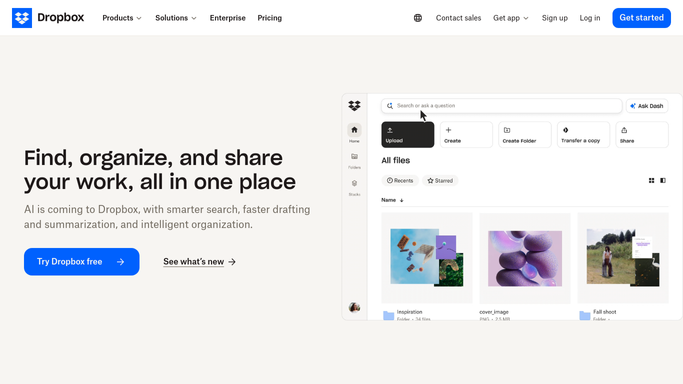
Dropbox is unusually good at the sharing mechanics, and a lot of teams use a fraction of it.
A file request gives you a simple upload page and one destination folder, and anyone can use it whether or not they have Dropbox. Shared links can be set to expire on a chosen day, carry a password, or allow viewing without editing. Version history keeps earlier copies, so a file saved over is a nuisance rather than a disaster. Dropbox Transfer sends a copy of something large while the original stays in your account. Sign handles the signature when a document has to come back agreed rather than just returned.
Every one of those begins the moment a file exists. Dropbox will tell you something arrived. Nothing in it can tell you something did not, because it has no idea what was owed.
That list lives somewhere else entirely: the case management system, the job board, a spreadsheet of open claims, the memory of the person who asked. And when a document is late because it is sitting in a portal nobody has downloaded it from, no amount of folder configuration will go and get it.
A folder that knows which documents are still missing
Join the folder to the list of what was expected and the whole thing turns around.
Every open matter checked against its folder before the working day starts, so the three clients who have sent nothing get a message naming the two documents outstanding, not a reminder to send their paperwork. Jobs marked complete on Friday with no site photos in the folder flagged before anyone invoices them.
A file that does land is renamed to the convention the archive uses, logged against the job it belongs to, and mentioned to the person who has to review it in the place they already work. The signed copy from the e-signature tool is filed against the client rather than left in a downloads pile.
Sharing gets the same treatment: a weekly sweep of live links, showing which are public, which have no expiry set and which point somewhere that should have closed months ago. And when the missing document is sitting in a portal, it can be fetched from there and dropped into the folder, so the gap closes without an email at all.
Chasing is where to be careful. A folder audit can run unattended every week. A message to a client who is already annoyed should be written up and read by a person first.
Watching a folder is not work for a person
The gap between what was expected and what arrived is the whole job, and it is the one thing nobody can hold in their head across every open matter at once.
WebRun is an AI agent that works a real Chrome browser, signed in as you. It opens Dropbox, compares the folder with the list of what was due, renames and files what came in, and writes the outstanding items into a message, a sheet or the channel your team already reads.
It runs on your schedule in your own private environment, and you can watch a run and stop it. Anything that goes out to a client is drafted and waits.
The workflows below are already built, and each one names the folders and sites it touches.
Questions people ask
How would it know a document is missing?
By comparing the folder with a list you already keep. The open matters in your case system, the jobs on your board, a column in a spreadsheet: whatever names what was expected. It reads that list, reads the folder, and reports the difference.
Will it move or delete files we are still working on?
No. Filing workflows write into the folders you name and leave everything else alone, and each one spells out what it moves before you turn it on. Version history in Dropbox is still there underneath if you want a second safety net.
Do we need a Business plan, the Dropbox API or a developer?
No. It opens dropbox.com in a browser with the account you already sign in with, so there is no app to register and no token to keep alive. It works the same way on the client portals it collects missing documents from.
13 ready-made Dropbox workflows
Each one names the apps it touches and the exact steps it takes. Open one to read what it will do, then turn it on.









Want one of these running on your own Dropbox?
Show WebRun the process once and it will run it on schedule, in your own private browser environment.