How to Automate Studio Hero
Studio Hero automates the operation you can see: scheduling rooms, crew and equipment without double bookings, a client booking portal, equipment checkouts, invoicing built from the schedule, and media asset records. Confirming a delivery was opened, a deposit landed or a mic came back is the outside half an agent like WebRun covers.
 Written by
Dimitri Vasilev
Logistics analyst
Written by
Dimitri Vasilev
Logistics analyst
 Reviewed by
Ben Kirkwood
Solutions engineer
Reviewed by
Ben Kirkwood
Solutions engineer
An empty room on Tuesday cannot be sold on Wednesday
Studio Hero handles the operations behind a production facility: recording studios and audio post houses, film and video companies, broadcast and podcast operations, photography studios, and the rental businesses attached to them.
What those places sell is a room, an hour at a time, with an engineer and a pile of equipment attached to it. The room is the product and the inventory is perishable. A Tuesday afternoon in Studio B that nobody booked does not carry forward. It is simply gone.
So the software is built around the resource calendar. Rooms, stages, edit bays, crew and equipment are scheduled in the same place, because in a working studio they are one booking: Studio A at ten does not exist without an engineer, a console and whatever the artist asked to be patched in.
Around that sit the productions and their deliverables, the crew and their rates, the equipment with its barcodes and its maintenance, and the invoice that comes out of all of it.
The session ends and the follow-up starts
A studio's admin is mostly what happens in the days after the red light goes off.
Stems went out on a transfer link and the client says they never arrived. The mix is on revision four and nobody is certain which revision was actually approved. The master has to be delivered before a release date a distributor set, not the studio. A freelance engineer's Saturday was confirmed by text and never reached the calendar. A microphone that went out on a location shoot has not come back. The deposit for next month's block has not been paid, and the artist who did not turn up on Thursday still has not been asked about the no-show fee.
None of that is creative work, and all of it lands on whoever is running the room. Studios are small, so that is usually the same person who is meant to be tracking a session at two.
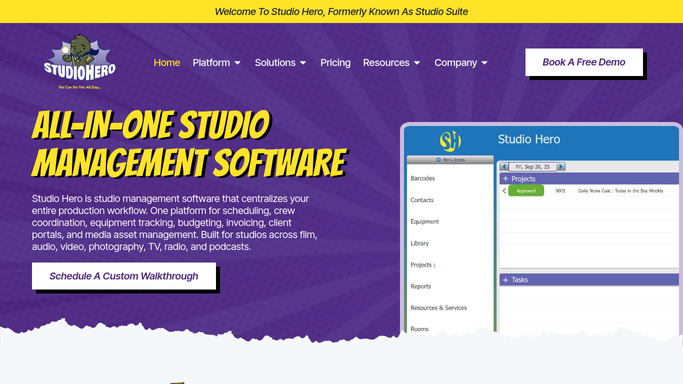
Studio Hero can see every room and none of the inboxes
The system covers the operational half of that properly, in one place rather than five.
Studio Scheduling puts rooms, crew and equipment on a single calendar with double bookings prevented rather than discovered. The Client Booking Portal lets clients submit requests for rooms, crew, equipment and services instead of texting them in. Equipment Tracking handles checkouts, returns, barcodes and maintenance, with Inventory Management behind it for kits and stock. Studio Invoicing builds an invoice from the schedule, the rates and the project it already holds. Media Asset Management organises deliverables by metadata with QC records against them, and Studio Reporting reads across projects, crew, equipment and finances.
Every one of those is a view of the studio's own operation, which is what it should be. What it cannot see is the client's half of the same job.
Whether a delivery link was ever opened. What the label's portal says the deadline is now. Which revision that approval email approved. Whether the deposit landed in the bank. Whether the hire company logged the microphone back in. The system knows what it was told, and none of those things were ever told to it.
Delivery, payment and the next booking can chase themselves
The days after a session stop needing somebody to drive them the moment those outside services can be opened without anyone remembering to.
Whether the stems were downloaded, checked on the delivery service itself rather than assumed, with the client who has not opened them chased before the mix notes are due. Mastering deadlines counted back from the release date the distributor is showing, so the final week is not a surprise.
Revision rounds tracked against what was quoted, so a mix on its fifth pass becomes a conversation about scope while it is still a conversation. Session payments checked against the bank, so a deposit that never arrived is known before the room is held again.
Equipment out past its return date reconciled with the hire company's own record. Rooms that sat empty last week put in front of whoever sets the rates, weekly rather than at quarter end. And block bookings coming up for renewal surfaced with the artist and the dates on them, in the month a regular is deciding where to work next.
The studio's word to a client stays the studio's
Nobody needs to be paid to find out whether a file was downloaded. Telling an artist their Thursday is being charged as a no-show is a different matter.
WebRun is an AI agent that works a real Chrome browser, signed in as you. It opens Studio Hero beside the file delivery service, the bank, a distributor's page or the hire company's site, reads what each one says today, and brings back the mismatches with the session and the client attached.
It runs on your schedule in your own private environment, and you can watch a run and stop it. It does not send an invoice, charge a fee or message a client on its own. A studio lives on a small number of people who book again, so every one of those messages is drafted for a human to send.
The workflows below are already built, and each one names what it opens.
Questions people ask
Will it charge a no-show fee or send an invoice by itself?
No. It finds the session that was missed and the invoice that has not been paid, drafts the message and stops there. Charging a client and sending an invoice are decisions the studio makes, because the relationship is worth more than the fee.
Can it tell whether a client actually downloaded their files?
Yes. It opens the transfer or delivery service you send from, reads what it reports about each link, and lists the clients who have not opened theirs, which is usually the real answer to a client saying the stems never arrived.
Our engineers are freelance and use their own calendars. Does that break it?
No. It reads whichever calendar or messaging tool the assignments actually get confirmed in, compares that against the sessions in Studio Hero, and reports the ones that do not match before someone turns up to an unstaffed room.
12 ready-made Studio Hero workflows
Each one names the apps it touches and the exact steps it takes. Open one to read what it will do, then turn it on.





Want one of these running on your own Studio Hero?
Show WebRun the process once and it will run it on schedule, in your own private browser environment.