How to Automate CleanCloud
CleanCloud automates the shop: barcode garment tracking with rack locations, Automatic Reminders for orders left waiting, Automated Campaigns, review requests and subscription billing. Outside it sit the commercial accounts paying through their own portals, marketplace dashboards, supplier price lists and processor payouts, none of which publish a connector. WebRun signs into those.
 Written by
Rosa Lindqvist
Operations editor
Written by
Rosa Lindqvist
Operations editor
 Reviewed by
Marcus Deleon
Support operations
Reviewed by
Marcus Deleon
Support operations
CleanCloud tracks a garment from counter to rack to door
A dry cleaner is one of the few businesses that takes custody of a customer's property, keeps it for three days, and has to hand back exactly the right item. That single constraint shapes the software.
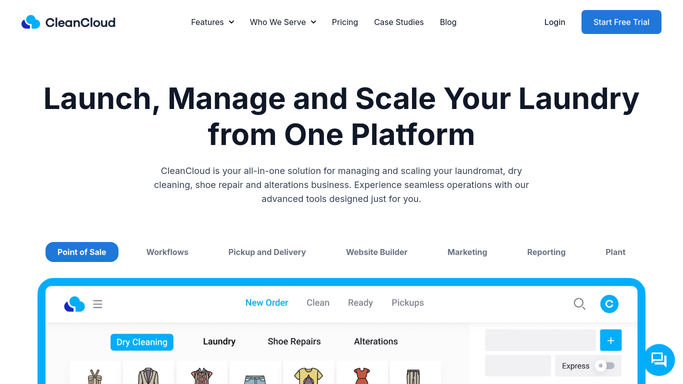
CleanCloud is the point of sale and management platform laundromats, dry cleaners, alterations shops and shoe cleaners run on, from one shop to chains running hundreds of sites.
An order is taken at the Point of Sale. Each garment gets a heat seal barcode label. Barcode scanning moves it through wash and fold or dry clean and then assembly, and Rack Location records which slot it is hanging in, so it can be found in seconds when the customer walks in.
Pickup and delivery adds a second front door. Route Planning sequences the driver's day, GeoFencing limits where collection is even offered, the driver app carries photos, signatures and a chat thread, and the customer watches the van on a live map.
The takings arrive through doors the till never sees
The retail counter is the easy part. Money and obligations reach a cleaner from several directions that never touch the point of sale.
Commercial accounts are the clearest case. A hotel, a gym, a restaurant group or a care home does not tap a card. It raises a purchase order, expects an invoice in a particular format, and pays through an accounts payable portal its own finance team controls, on its own timetable. Chasing that money means logging into their portal, not looking at yours.
Around it sits the rest. Orders placed through a third-party delivery marketplace land in that platform's merchant dashboard with its own commission and payout schedule. The card processor pays out on a delay that never quite matches the day's takings. Hangers, poly, solvent and detergent come from suppliers whose prices move quietly. Each shop has its own Google listing collecting reviews. And the utility bills, which for a laundry are not a rounding error, sit on an energy supplier's website.
Barcodes and Automated Campaigns already run the shop
CleanCloud automates its own domain well, and a store that has not switched this on is leaving easy money on the counter.
Automatic Reminders chase customers whose order has been sitting ready. Automated Campaigns run on customer behaviour, with prepared flows including First 30 Days, Loyalty Ladder and Pickup and Delivery Perks, so a new customer and a lapsing one get different treatment without anybody building it. Email and SMS campaigns and push notifications go out from the same place. 5-Star Review Requests ask for a Google, Yelp or Facebook review automatically after an order. Loyalty Points, Promo Codes and Referral Codes handle retention. Subscriptions bill a recurring plan and charge the overage. A branded app and a website builder give the shop its own ordering front end.
All of it runs on orders and customers that already exist inside CleanCloud.
None of it reaches a client's accounts payable portal, a delivery marketplace's merchant dashboard, a supplier's price list or the processor's payout screen. Those belong to other companies, and none of them was ever going to publish a connector for a dry cleaner.
The shop can know its own numbers before it opens
The inside of the shop reports itself every day. The outside of it can be made to report on the same schedule.
Every commercial account's payables portal checked weekly, so an invoice sitting unapproved is a line on a list rather than a surprise sixty days later. Purchase orders and delivery notes for contract work pulled out of a client's own system and matched against the volume CleanCloud recorded, since a hotel linen dispute is almost always a counting disagreement.
Marketplace orders and their commissions reconciled against the till, so what the platform says it owes and what the shop believes it earned are compared before the payout lands. Card processor payouts matched to the day's takings, per store. Supplier prices for hangers, poly and solvent read off each account and compared with the last order, so a quiet increase is visible before it is a year old. Reviews across every location collected in one place with a reply drafted for each. Utility usage per site tracked, which for a laundry is a real line of cost rather than an overhead nobody looks at.
Keep the customer end supervised. Reading a portal and reconciling a number can run alone. Anything sent to a customer about their own clothes should be drafted and read, because a wrong message about a missing garment becomes a one-star review.
The last hour of the day is all logins
Closing up is counting a till and then reconciling everything that did not go through it, which means opening one portal, then another, then another.
WebRun is an AI agent that works a real Chrome browser, signed in as you. It opens the marketplace dashboard, a client's accounts payable portal, the processor or the supplier account, reads what is there, and compares it with what CleanCloud recorded.
It runs on your schedule in your own private environment, and you can watch a run and stop it. Anything a customer would receive is drafted and waits for you.
Each workflow below is already built, and every one names the sites it opens.
Questions people ask
Can it chase a commercial account through their payables portal?
It checks the portal, reports what is approved, unapproved or scheduled for payment, and drafts the chase. Sending it stays with you, because a hotel or gym account is a relationship worth handling personally.
Do we need a CleanCloud integration or plugin for this?
No. It signs into the browser as you and uses the access you already have, so nothing is connected to your CleanCloud account and nothing has to be built first.
Will it move money or issue refunds?
No. It reads payout and statement screens and compares them with the till. Anything that moves money is left to a person, and a workflow can be locked to a named list of sites.
18 ready-made CleanCloud workflows
Each one names the apps it touches and the exact steps it takes. Open one to read what it will do, then turn it on.





Want one of these running on your own CleanCloud?
Show WebRun the process once and it will run it on schedule, in your own private browser environment.