How to Automate ElderSuite
ElderSuite automates an adult day center's own paperwork: attendance, care plans, USDA food program records and electronic claims all move through its six Centers without retyping. Checking a managed care plan's portal for an authorisation, an eligibility change or a denial reason is still a person opening websites, which WebRun can do instead.
 Written by
Marta Ellison
Automation strategist
Written by
Marta Ellison
Automation strategist
 Reviewed by
Owen Hartley
Workflow engineer
Reviewed by
Owen Hartley
Workflow engineer
Attendance and meals are what an adult day center sells
ElderSuite is adult day care software from MicroSolutions, a vendor that has been building for this one niche since the mid-nineties and has never wandered off it.
An adult day center is not a clinic and it is not a nursing home. Participants arrive in the morning, often on the center's own van, spend the day in activities, eat a meal that has to be recorded for the USDA food program, see a nurse if they need one, and go home in the afternoon. The building empties every night and fills again at eight.
That rhythm decides what the software has to hold. Attendance is not a courtesy record, it is the billable unit. The meal is not catering, it is a line on a food program claim. The van run is not logistics, it is the reason half the roster is in the building at all.
Every day at the center turns into a claim by Friday
Somebody at the front desk knows every participant by name, and also knows which of them is one absence away from a problem.
The work stacks up in a familiar order. Attendance has to be signed and matched against what each plan authorised. The van manifest has to reflect who actually rode. Meal counts have to be tallied for the food program. Care plan reviews and annual assessments come due on their own calendar, and no participant is going to remind anyone. Then the claims go out, the denials come back, and each denial has to be traced to whichever of those things was wrong.
Most of that tracing does not happen in ElderSuite. It happens by opening a managed care plan's website, finding the participant, and reading what the plan believes the authorisation says. Nine plans means nine logins and nine layouts, and the answer is different on each of them.
Six Centers cover everything inside the building
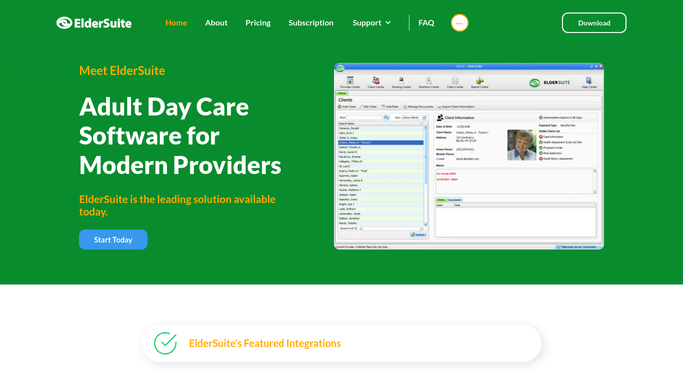
The product is split into six category-specific modules, and the split follows the jobs people in a center actually do rather than a database diagram.
Provider Center keeps the provider's own details, documents and employee records. Client Center holds assessments, attendance and the transportation log. Nursing Center carries health assessments, care and service plans, physician's orders, monthly nursing evaluations, medications, diagnoses, treatments and nursing notes. Nutrition Center exists for one thing, administering the USDA Food Program for Adults, down to food contract details, meal times, meal applications and meal records. Claim Center runs the electronic claim process with scrubbing and reconciliation, Report Center pulls reports back out across all of it, and Scan Manager attaches scanned paperwork throughout.
MicroSolutions also lets a center install it wherever the work happens, including a central billing office or somebody's home office, which is how small operators are genuinely organised.
Every one of those acts on the center's own file, and that is the right place for them to act. The health plan's authorisation, its eligibility record and its denial reason live on the plan's website. So does the state Medicaid portal the billing office works in every week, and the broker's site that books non-emergency transport.
The health plan's website knows before the claim does
The plan's website shows a denial days before it lands as a claim rejection, and reading a website is not coordinator work.
Authorisation status checked on each managed care plan's portal every morning, with any participant whose approved units run out inside two weeks raised at once, because a request for more units takes days to come back. Eligibility confirmed before the van goes out, rather than after a month of days nobody will pay for.
Denials and remittance gathered from every plan into one list, oldest appeal window first. Assessment and care plan review dates compared against what has actually been completed. Meal counts reconciled against attendance before the food program claim is filed. The transport broker's site checked for tomorrow's confirmed pickups against the center's own manifest, because a participant who is not collected does not attend, and a day that did not happen cannot be billed.
The line in a care setting is not up for debate. Looking things up, setting them beside each other and marking what does not fit can be left alone. Nothing is written into a participant's record, no clinical judgement is made, and anything reaching a family or a plan is drafted for a qualified person to read and send.
The director belongs in the activity room, not on a login screen
An adult day center is a small staff and a full room, and it is the same few people either way. The director working the plan portals at ten is not in the activity room at ten.
WebRun is an AI agent that drives a real Chrome browser, signed in the way your staff sign in. It opens each plan portal, the state site or the transport broker, reads what is on the screen, and brings back a list with the participant and the date attached.
It runs on your schedule in your own private environment, sessions are not shared between workflows, and a workflow can be locked to a named list of domains. You can watch a run and stop it.
The workflows below are already built, and each one names what it opens.
Questions people ask
Could a claim go out without a person seeing it?
No. It assembles and checks, then hands the result to your billing staff. Claims leave Claim Center when a person decides they should, and nothing is submitted, adjusted or written into a participant's file by an unattended run.
Our participants sit under nine different plans. Does that matter?
That is the reason to use it. Each plan portal is opened the way your coordinator opens it, read on screen, and the findings merged into a single worklist, so nine logins produce one list instead of nine browser tabs and a legal pad.
Is it safe to leave those payer logins connected?
Sessions stay inside your own private environment and are not shared between workflows, and a workflow can be restricted to a named list of domains. It sees only what the person signing in can see, and you can watch a run and stop it.
12 ready-made ElderSuite workflows
Each one names the apps it touches and the exact steps it takes. Open one to read what it will do, then turn it on.







Want one of these running on your own ElderSuite?
Show WebRun the process once and it will run it on schedule, in your own private browser environment.