How to Automate Versapay
Versapay automates the receivable itself. Invoices go out to a branded customer portal, cash application matches payments to invoices with machine learning, and collections outreach is prioritized by risk. What stays manual is everything on the buyer's side, and reading those portals is the job an agent like WebRun takes.
 Written by
Owen Hartley
Workflow engineer
Written by
Owen Hartley
Workflow engineer
 Reviewed by
Sofia Marchetti
Marketing operations
Reviewed by
Sofia Marchetti
Marketing operations
The AR ledger is a list of conversations, not numbers
Versapay is accounts receivable software for companies that sell to other companies, mostly in the unglamorous middle of the economy: manufacturers, wholesale distributors, professional services firms. It runs on top of an ERP such as NetSuite, Sage Intacct or Dynamics 365 Business Central and turns the receivable ledger into something the buyer can actually see.
In business-to-business selling an invoice is not a demand, it is the opening of a negotiation. The customer's accounts payable clerk has their own system, their own approval chain and their own opinion about whether the freight line was ever agreed. Versapay's answer is to put the invoice, the statement and the payment history in one branded portal and let both sides talk on the invoice itself.
The people living in it are a credit manager, two or three collectors, and a controller measured on days sales outstanding who knows which four accounts are moving the number.
The money arrives without saying what it is for
Ask a collections team where the week goes and almost none of it is the polite reminder email.
A payment lands for an amount matching no invoice. It is three invoices less a credit note, or one invoice less a deduction for damaged goods, and the remittance advice is a PDF in a shared inbox or on the buyer's supplier portal behind a login. Somebody opens that portal, finds the remittance, works backwards and writes the deduction up.
A customer promised to pay on the fifteenth. On the sixteenth, someone has to check whether they did. A large account drifts from thirty days to fifty and nobody sees it until month end. An invoice sits stuck in the buyer's approval workflow for want of a purchase order number, and the only place that shows is the buyer's system.
The chasing is the visible half. The looking things up is the half that consumes people.
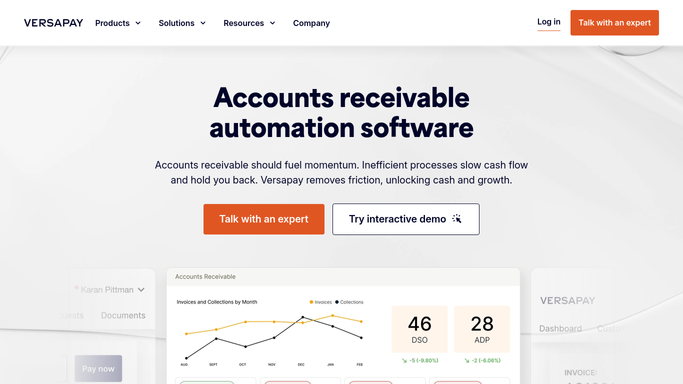
Versapay works the customers who come to your portal
Versapay automates a great deal of this, and a team paying for it should push the built-in features hard first.
Digital invoicing delivers the invoice to a customer portal where the buyer can see every open item, pull a statement and pay by ACH, card or wire. Cash application uses machine learning to match incoming payments against open invoices and push the result back into the ERP, which for payments made in the portal runs close to hands-off. Collections management drives outreach cadences, prioritizes accounts by risk and keeps a record of what was said and when. Reporting gives a live view of aging and days sales outstanding rather than a spreadsheet rebuilt each month.
The wall all of it meets is the same wall: it works your side of the transaction, and the buyer who agrees to use your portal.
Plenty of buyers never will. Large customers require suppliers to invoice through the buyer's own accounts payable system, publish remittance detail there, and show approval status there. Versapay cannot log into that. Nor can it read a customer's credit file, or check the bank for a wire not yet applied.
Short payments can arrive already explained
Two systems hold the answer between them, and the buyer owns one. Read both and the exception queue stops being research.
A short payment lands, and the remittance advice is fetched from the buyer's supplier portal and set next to it, so the deduction reaches the analyst already named: freight, a damaged pallet, a credit note applied twice. The invoice that has gone quiet is looked up in the buyer's accounts payable system, where its status sits in plain sight: approved and scheduled for the twenty-eighth, or rejected three weeks ago for a purchase order number nobody passed on.
Every promise to pay is checked against what actually landed the day after it was due, and the ones that were not kept lead the morning list instead of ageing in a comment field. Accounts drifting the wrong way are ranked by how far they have moved, not by how large they are, so deterioration is visible while it is still a conversation.
Credit hold candidates come with the evidence gathered: the trend, the broken promises, the open disputes. None of that decides anything. It puts the decision in front of the credit manager with the facts already assembled.
The first hour of collections should not be research
A collector who starts the day already knowing what happened is doing a different job from one who starts by looking things up.
WebRun is an AI agent that works a real Chrome browser, signed in as you. It opens Versapay, the buyer's supplier portal, the shared inbox and the ERP, reads what each one says, and puts the exception queue, the broken promises and the aging movement in one place.
It runs on your schedule in your own private environment, and you can watch a run and stop it. Anything reaching a customer is drafted and waits, and putting an account on credit hold stays a person's call, because stopping a customer's orders is a commercial decision rather than a collections step.
The workflows below are already built, and each one names the systems it opens.
Questions people ask
Will it email our customers or apply cash on its own?
Outreach is drafted and left for a person, and applying cash stays with your team. It gathers the remittance, matches it to the short payment and prepares the write-up, so the decision is made with the evidence already on the screen.
Our biggest customers make us use their AP portal. Does that work?
Yes, and that is the main reason to run this. It signs into the buyer's supplier portal the way your analyst does, reads invoice status and remittance detail there, and brings it back next to the Versapay record.
Is this a replacement for our ERP integration?
No. The ERP link stays exactly as it is. This covers the systems that were never connected to anything: buyer portals, a shared inbox full of remittance PDFs, and the bank screen somebody checks by hand.
12 ready-made Versapay workflows
Each one names the apps it touches and the exact steps it takes. Open one to read what it will do, then turn it on.



Want one of these running on your own Versapay?
Show WebRun the process once and it will run it on schedule, in your own private browser environment.