How to Automate Truckbase
Truckbase automates its own side well: an AI load importer builds the load from a rate confirmation, dispatch goes to drivers by text or email, ELD integrations show truck location, and settlements and invoices generate without typing. Broker billing portals, factoring sites and load boards need an agent like WebRun.
 Written by
Marcus Deleon
Support operations
Written by
Marcus Deleon
Support operations
 Reviewed by
Grace Okafor
Healthcare operations
Reviewed by
Grace Okafor
Healthcare operations
Truckbase is where a rate confirmation becomes a dispatched load
Truckbase is a transportation management system for small and growing trucking carriers: the fleet with nine trucks, the heavy haul outfit, the regional carrier running for four brokers and one direct shipper.
A carrier that size has no back office to speak of. The same two or three people book the loads, dispatch the drivers, chase the paperwork, invoice the customer, run the settlements and answer the phone when a shipper asks where the truck is. Almost everything they do starts with one document, a rate confirmation emailed by a broker, and ends with two, a signed bill of lading and an invoice.
Truckbase sits between those. Loads, drivers, trucks, stops, rates, documents and settlements in one place, with a dispatch calendar showing which truck is on what and when it comes free. The dispatcher works from it, and so does whoever bills on Friday.
The money comes from brokers who each want their own portal
A carrier's own systems are the easy half. The hard half belongs to everybody else.
Loads are found on load boards, so DAT and Truckstop sit open in a tab all day while somebody works out whether a lane pays enough to take a truck away from home. A new broker means a carrier packet on yet another onboarding platform, with the authority, the W-9 and a certificate of insurance uploaded again.
Once a load is moving, the broker wants status updates in their system, not yours. Once it delivers, the invoice and the signed bill of lading go into that broker's billing portal, where it is approved, short-paid or parked behind a missing document, and none of that comes back unless somebody looks. If the invoice is factored, the advance, the reserve and any chargeback sit on the factoring company's site instead.
Underneath all of it, the carrier's own safety record is published on a federal site that updates whether or not anyone watches.
The load importer reads the rate confirmation so nobody types it
Truckbase automates the parts of this that happen on its own side, and it is genuinely good at removing typing.
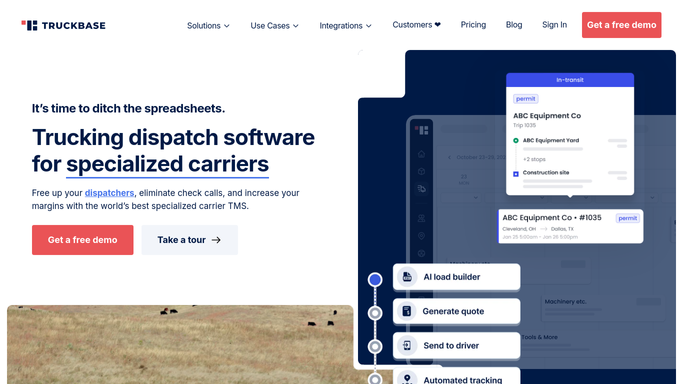
The AI-powered load importer reads a rate confirmation and builds the load from it, lifting the stops, the dates, the reference numbers and the rate rather than making a dispatcher key them in. Dispatch details go to the driver by text or email in one click, and the driver scans the bill of lading from a phone straight onto the load.
Truck locations arrive from the ELD, with integrations to Samsara, Motive, Geotab and around thirty others, so the dispatch calendar shows where equipment actually is. Driver settlements generate from the loads already dispatched, with stop pay and reimbursements added in a few clicks. Invoicing goes out immediately, including bulk invoices grouping one customer's loads over a date range, and Truckbase Intelligence breaks profitability down by load, truck, driver and lane.
The pattern is the one every dispatch system runs into. All of it acts on a load that is already in the system, and on trucks you own.
Every broker portal checked before the drivers start calling
The paperwork half of the job can run on its own, starting with the money.
Every unpaid invoice checked on the broker's own billing portal each morning, so approved, short-paid and held for a missing document become three lists by seven rather than one long guess at month end. Factoring advances and reserves read off the factoring site and matched to the loads they belong to, so a rejected invoice is fixed the day it is rejected.
Load boards watched for the lanes you actually want: a backhaul out of the market where a truck delivers on Thursday, at or above the rate that makes the week work, collected into a short list.
The carrier's own safety scores pulled from the federal site each month, because a roadside inspection on your record gets seen by a broker's onboarding platform before it is seen by you. Certificates and carrier packets tracked broker by broker, since the one that expires is always the one with a load booked for Monday.
Booking freight, arguing a chargeback and deciding what to do about a driver stay where they are.
A dispatcher's morning belongs to the trucks
Every one of those portals has a login somebody in the office already has. The only question is whether opening them one at a time is what a dispatcher's morning is for.
WebRun is an AI agent that works a real Chrome browser, signed in as you. It opens the broker's billing portal, the factoring site, the load board or the federal safety record, reads what is there, and hands back the list you would have built: what is really unpaid, the backhauls worth calling on, the certificate that expires in nine days.
There is no EDI connection to negotiate, which matters when half your brokers are small. It runs on your schedule in your own private environment, and anything that messages a broker, a driver or a customer is drafted for you to send.
The workflows below are already built, and each one names the sites it opens.
Questions people ask
Truckbase already imports our rate confirmations. Where does this start?
After the load is running. The importer, the dispatch text and the settlement all act on a load inside Truckbase. This covers the broker portals, the factoring site and the load boards, which are other companies' systems and have no reason to tell you anything.
Will it accept a load or send a rate to a broker?
No. Booking freight and quoting a rate stay with a dispatcher. It gathers the loads worth calling on, with the lane, the rate and the timing already set out, so the call gets made with the numbers in front of you.
Half our brokers are small and have no EDI. Does that matter?
No. It signs into each broker's website the way your billing clerk does, so a small broker with a basic portal is reachable on exactly the same terms as one with full EDI.
12 ready-made Truckbase workflows
Each one names the apps it touches and the exact steps it takes. Open one to read what it will do, then turn it on.





Want one of these running on your own Truckbase?
Show WebRun the process once and it will run it on schedule, in your own private browser environment.