How to Automate NexHealth
NexHealth automates the front office around an existing health record system. Online Booking, the Waitlist, One-Click Recalls and automatic insurance Verification run through the Synchronizer, which reads and writes the practice's own record. The chasing that happens on payer, lab and supplier portals is what still needs a person, or an agent like WebRun.
 Written by
Tom Kessler
Field operations analyst
Written by
Tom Kessler
Field operations analyst
 Reviewed by
Sofia Marchetti
Marketing operations
Reviewed by
Sofia Marchetti
Marketing operations
NexHealth is the patient's side of the practice
NexHealth is a patient experience platform for medical and dental practices: booking, forms, reminders, messaging, payments and insurance verification, sitting in front of whatever health record system the practice runs. Orthodontists, paediatricians, dermatologists and endocrinology clinics use it, along with many general dental offices.
Its position is the important thing about it. The record system holds the chart, the ledger and the schedule. NexHealth holds the relationship: the link a patient taps at ten at night, the text saying a slot opened, the form filled in before the visit, the card payment taken without anyone reaching for a terminal. The Synchronizer wires the two together, reading from the record system and writing back into it, so the two stay in step.
For the practice, the desk stops being the only route in. Patients book, fill in forms and pay without a phone call. What the desk keeps is everything a patient cannot do for themselves.
Booking is solved, the follow-up around it is not
The phone still rings, and the calls that get through are the hard ones.
So there is a person, usually more than one, working a list where every item lives somewhere else. An eligibility check the automatic run could not resolve. A prior authorisation submitted eleven days ago with no answer. The reason a claim came back denied, which is on the payer's own site and nowhere else. A result sitting in a lab portal that never interfaced. A supplier order for a patient's sensors that may not have shipped. A referral sent to a specialist in July that has gone quiet.
Each one is small: open a site, sign in, find one patient, read one field, write it somewhere useful. Each takes a few minutes, and there is a page of them every day.
And because the practice runs two systems, somebody reconciles the day's digital payments against what actually reached the bank.
Verification and recalls run on what the record already holds
NexHealth automates a genuinely large part of the front office, and a practice should see how far that reaches first.
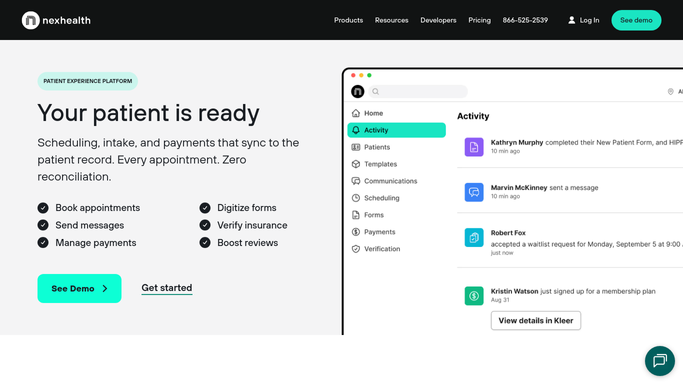
Online Booking lets a patient book without calling. The Waitlist offers a cancelled slot to the people waiting, and a patient can accept in one tap from a text or an email; the appointment then lands on the record system's calendar and staff are told. One-Click Recalls message patients who are due based on when they were last seen, with booking built in. Verification confirms insurance eligibility automatically ahead of the visit, reading the details out of the record system or a form the patient submitted, on a window the practice sets. Around those sit digital forms, reminders, campaigns, review requests and payments.
Underneath it all is the Synchronizer, reading and writing the practice's own record system so nothing is entered twice.
That is the boundary, and it is a clean one. Everything NexHealth automates concerns a patient the practice already has, an appointment already on the calendar, or an eligibility check it is wired to run. The payer's portal is not one of those places. Neither is the lab, nor the supplier shipping a box to somebody's house.
A practice that knows what it is waiting on
Most of what slows a practice down is not work in progress. It is work handed to somebody else that has not come back, and nobody has a list of it.
Prior authorisations checked each morning on every payer site, so a request sitting untouched for a week gets chased rather than found on the day of the procedure. Denials pulled off the portal with their reason codes and appeal windows attached, sorted by how soon they close. Lab and imaging results collected from systems that never interfaced, matched to the patient and the clinician who ordered them.
For a practice managing chronic conditions there is more. Supply orders followed on the supplier's own site, so the patient whose sensors have not shipped is called before they run out. Recall lists checked against what has actually been booked, so the family that ignored three messages gets a phone call instead of a fourth. Referrals sent out and never answered, listed by how long they have been silent.
The line in a clinical setting does not move. Gathering runs unattended. Anything that reaches a patient, or that changes a clinical or billing record, is prepared for a qualified person to read and send.
The systems with no Synchronizer still have a login
An eligibility answer sits on a payer's site until a person signs in and reads it. In most practices that person is also answering the phone and greeting patients at the desk.
WebRun is an AI agent that works a real Chrome browser, signed in as your staff are. It opens the payer portal, the lab, the supplier account or the referring practice's system, reads what is there, and brings it back beside the patient it belongs to.
It runs on your schedule in your own private environment, sessions are not shared between tools, and a workflow can be locked to a named list of sites. Anything that reaches a patient waits for a person.
The workflows below are already built, and each one names exactly what it opens.
Questions people ask
Will it message patients on its own?
No. It gathers and drafts, and a person sends. Anything that reaches a patient, or that changes a clinical or billing record, waits for someone qualified to approve it.
We already run the Synchronizer with our record system. Does this interfere?
No, and you should keep it. This covers the sites the Synchronizer has no connection to at all: payer portals, lab systems, supplier accounts and referring practices.
Is patient data safe if an agent is signing in?
Sessions stay inside your own private environment and are not shared with other tools in a workflow, and a workflow can be restricted to a named list of domains. It sees what the staff member signing in can see, and nothing else.
13 ready-made NexHealth workflows
Each one names the apps it touches and the exact steps it takes. Open one to read what it will do, then turn it on.



Want one of these running on your own NexHealth?
Show WebRun the process once and it will run it on schedule, in your own private browser environment.