How to Automate Neo.Tax
Neo.Tax automates the R&D tax credit study. Connected agents read engineering and payroll systems, qualify projects, calculate qualified research expenses, write project narratives and assemble an audit-ready study with Form 6765 support. Tracking state programs, evidence still owed by clients and whether an offset actually landed remains manual work.
 Written by
Rosa Lindqvist
Operations editor
Written by
Rosa Lindqvist
Operations editor
 Reviewed by
Owen Hartley
Workflow engineer
Reviewed by
Owen Hartley
Workflow engineer
Neo.Tax turns engineering work into a defensible credit
Neo.Tax computes and documents R&D tax credits by reading the systems where the research actually happened. It connects to the tools an engineering organization already runs, including Jira, Linear, GitHub and Confluence, and to the payroll and accounting side through ADP, Workday and NetSuite.
It is used by in-house tax teams and CFOs, and by the firms that run studies for them. The credit itself is one of the few genuinely large levers a company that is not yet profitable can pull, since a qualified small business can apply it against payroll taxes rather than waiting for taxable income.
The catch has always been evidence. A credit is only worth what it survives, and surviving means being able to show, years later, which people worked on which projects, what was uncertain about them, and how the numbers were built. That is a documentation problem far more than a math one.
The credit is calculated in days and evidenced over months
The calculation stopped being the slow part some time ago. Everything around it did not.
Somebody chases a client for a payroll export that never arrives in the format anyone asked for. Somebody reconciles contractor spend by opening a bill-pay system and reading invoices one at a time. Somebody rebuilds a spreadsheet of entities, years, amended returns and which credit went where, because last year's version is out of date and nobody trusts it.
Then there is the part after filing, which is where credits quietly disappear. A payroll offset has to appear on a quarterly return, handled by a payroll provider, and whether it did is a fact on that provider's site. State programs each have their own portal, their own application window, and in some states a cap that is awarded in the order applications arrive. Nobody in the process gets an alert when any of those move.
So the study finishes and the follow-through drifts, one week at a time, until somebody asks in October.
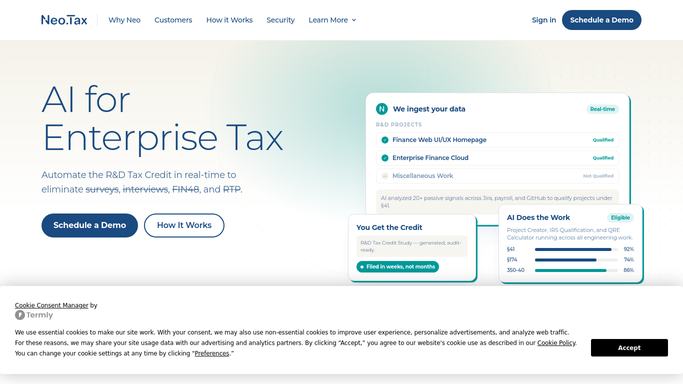
Neo.Tax reads the systems it is connected to
The platform automates the analytical work thoroughly, and it is worth knowing where that reach ends.
A set of named agents does the study end to end: project creation and IRS qualification, a quantifier and a QRE calculator for the expense side, a project narrative generator for the written record, and a QRE defender for the audit position. The output is an audit-ready R&D tax credit study with source tracing back to the underlying data, supporting Form 6765, alongside Section 174 capitalization documentation and software capitalization analysis under ASC 350-40. Because it reads passive signals from connected systems, it replaces the survey-and-interview round that used to consume an engineering team's week.
All of that depends on a connection existing.
A state revenue department's credit portal has no connection. Neither does the payroll provider's filing history, the client's bill-pay system holding contractor invoices, the grant agreement that might disqualify an expense, or the account transcript showing whether a refund was ever issued. Those are the places the follow-through lives.
State programs and payroll filings sit outside the study
Nobody needs to remember which state opened its window this month. The portal says so every morning, to anything that opens it.
Each state credit program checked on its own site for the application window, the remaining cap and the status of what was submitted, so a first-come program is entered while there is still money in it. The payroll provider's filing history read each quarter to confirm the offset actually appeared on the return, rather than discovering in month nine that it never did.
Contractor invoices and vendor detail collected from the client's own bill-pay system instead of by email thread. A weekly list of who still owes a payroll export or a project record, named by client and by how long it has been outstanding. Filing and amendment deadlines mapped across every entity and year the team is carrying.
The limit here is worth stating without hedging. Gathering, comparing and drafting runs unattended. No credit is claimed, no position is taken and nothing is submitted to a tax authority by an automated process. The study, the sign-off and the filing stay with a qualified preparer, who now starts from an assembled file rather than an empty one.
Assembling evidence is not the same as taking a position
Judging whether an activity qualifies is professional work. Finding out whether a state portal opened, or whether a client sent the payroll file, is not.
WebRun is an AI agent that works a real Chrome browser, signed in the way your team signs in. It opens the state portal, the payroll provider, the client's accounting system or the bill-pay tool, reads what is there, and puts the answer in front of the person who has to decide something.
It runs on your schedule in your own private environment, sessions are not shared between tools, and a workflow can be locked to an explicit list of sites. Anything that would leave your hands is drafted and waits.
The workflows below are already built, and each one names the systems it opens.
Questions people ask
Will it file anything with a tax authority?
No, and that is a deliberate limit. It gathers, compares and drafts. Every claim, position and submission stays with a qualified preparer, and nothing is sent to the IRS or a state agency by an automated process.
Can it pull data from a client system we only have a login to?
Yes, and that is the usual case. It signs in the way your team does and reads what is on the screen, so a client portal with no export and no API is still readable.
How is client financial data kept separate?
Sessions run in your own private environment and are not shared between tools in a workflow, and a workflow can be restricted to a named list of domains. It sees only what the person signing in can see.
12 ready-made Neo.Tax workflows
Each one names the apps it touches and the exact steps it takes. Open one to read what it will do, then turn it on.



Want one of these running on your own Neo.Tax?
Show WebRun the process once and it will run it on schedule, in your own private browser environment.