How to Automate Loyverse
Loyverse automates the counter itself: the free POS app, Back Office reporting, kitchen and customer display screens, employee permissions, a loyalty program, multi-store management, and the Advanced Inventory add-on with purchase orders, transfer orders and the Inventory Valuation Report. Supplier prices and delivery platform takings still need an agent like WebRun.
 Written by
Clara Bennett
Revenue operations
Written by
Clara Bennett
Revenue operations
 Reviewed by
Priya Raghavan
Solutions lead
Reviewed by
Priya Raghavan
Solutions lead
Loyverse put a full till on a phone somebody already owned
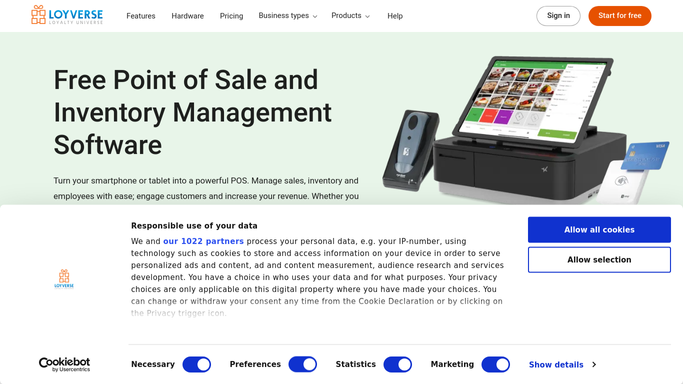
Loyverse is point of sale software that runs on a phone or a tablet. A cafe, a bar, a grocery, a clothing boutique, a salon: the sort of business that opens with one owner, two staff and no IT budget. The POS app itself is free, which is why it turns up on a market stall as readily as in a second location.
What lives in it is the day. Every receipt, every item and its stock level, the customers who joined the loyalty scheme, which employee rang what through, and the totals at close.
The people are the owner, who is usually also on the floor, and whoever is on shift. There is no back office in the sense a chain would mean it. The back office is a laptop at the kitchen table after closing, or the Loyverse Dashboard app on the same phone that took the orders all afternoon.
Everything the business decides gets decided from the numbers that till produced.
The back office happens after the shutters come down
The till tells you what sold. It cannot tell you what to do about it.
So somebody reorders. That means the wholesaler's site, the cash and carry account page, two suppliers who quote only by email, and a note on a phone about what the rep said on Tuesday. This week's price against last week's, line by line, to catch the one that moved.
Somebody checks the delivery platforms, because sales taken through a marketplace app never touch the till, and the day's real number lives in two other dashboards and one person's head.
Somebody looks at the shop down the road, or its listing, or its menu prices. Somebody answers the reviews. Somebody checks whether the supplier invoice matches what actually came off the van, and whether the case that was short ever got credited.
None of it is difficult. All of it happens at half past eleven at night, on a laptop, done by someone who was on their feet all day.
Advanced Inventory ends at the purchase order
Loyverse gives away a lot for a free product, and it is worth setting out what is already there before reaching for anything else.
The POS app runs the sale, and Loyverse Back Office holds the items, stock, employees and reports behind it, with the Dashboard app putting the day's sales on a phone. Employee management gives each person their own access and reports what they rang.
The paid Advanced Inventory add-on is where the stockroom lives. Purchase orders go out to suppliers with autofill on the reorder. The Inventory Valuation Report gives the cost of what is on the shelf against its retail value, and low stock notifications arrive daily.
All of that describes stock Loyverse was told about. What that stock costs to replace this week, who actually has it, and what the shop across the road charges for the same thing are facts living on other companies' websites.
Tomorrow's order can be priced before it is placed
Hand those sites to something that reads them after closing, and the late shift on the laptop gets a great deal shorter.
This morning's price at each wholesaler, read against the last invoice you actually paid, so a rise on a fast-moving line is named before the order goes in. Availability alongside it, because a purchase order for something out of stock is a wasted week and a gap on the shelf.
Delivery marketplace takings pulled from each platform's own back end and added to the till figure, so the day's real number is one number instead of three screens and an estimate.
The nearby competitor's published prices on the items you both sell, checked weekly, so a margin decision starts from a fact rather than something a customer mentioned. Reviews collected from the map listing and the delivery apps together, since a bad week usually shows up there before it shows up in the takings.
Supplier invoices and statements read against what the delivery note said, so a short-shipped case is a query while it can still be credited rather than a write-off at the end of the quarter.
The wholesaler's site does not have to be somebody's evening
Every one of those numbers sits on a screen behind a login, and the login belongs to the shop. The work is opening the page, reading it and writing it down, and nobody opened a cafe to do that.
WebRun is an AI agent that drives a real Chrome browser, signed in the way you sign in. It opens the wholesaler's account page, a delivery platform's back end, the map listing or a supplier portal, reads what is there, and sends back a short list: what changed, what is out of stock, and what the day actually took across everything.
It runs on your schedule. Sessions are not shared between workflows, a workflow can be locked to a named list of sites, and any run can be watched and stopped. Nothing is ordered and no review is answered in your name without you releasing it.
The workflows below each name what they open.
Questions people ask
Can it reorder stock without me approving it?
No. It builds the reorder list from what actually sold and what the supplier site says is available, then leaves it for you. Placing an order commits money, so that stays a decision you make.
Can it read a supplier site that has no export button?
Yes, and that is the usual situation for a small shop. It signs into the account page the way you do, reads the prices and availability off the screen, and reports them next to the prices on your own most recent order.
Does it change anything inside Loyverse?
Not on its own. The pattern is read and report: findings come back as a list, and any update to items, prices or stock in Back Office is prepared for you to apply yourself.
12 ready-made Loyverse workflows
Each one names the apps it touches and the exact steps it takes. Open one to read what it will do, then turn it on.


Want one of these running on your own Loyverse?
Show WebRun the process once and it will run it on schedule, in your own private browser environment.