How to Automate Parker
Parker handles ticketing, timed entry, waivers, memberships and group bookings on its own, and its automation acts on what has been sold through it. Weather calls, school district purchase orders, marketplace redemptions and review sites all sit outside. An agent such as WebRun opens those and checks them against the bookings.
 Written by
Nikhil Bhatt
Automation strategist
Written by
Nikhil Bhatt
Automation strategist
 Reviewed by
Julian Adeniyi
Retail operations
Reviewed by
Julian Adeniyi
Retail operations
A season pass, a field trip and a birthday party are one system
Parker runs the whole operation at a mid-sized attraction, not just the sale of admission. Its customers are water parks, zoos and aquariums, museums, indoor playgrounds, escape rooms, farms and botanical gardens: places where a single Saturday has gate admission, season pass holders, a school group, three birthday parties and a rented cabana all happening at once.
So one platform carries general admission, timed entry and session tickets, memberships and season passes with their renewals and perks, online waivers, group and field trip bookings, camps and classes, add-ons such as lockers and fast passes, and inventory-controlled resources: rooms, cabanas, tubes, anything there is a fixed number of. Guests check in against a mobile scanner, and staff sell from the same system at the window.
For a water park that produces a particular shape of week. The day is sold weeks in advance, then decided on the morning by the sky.
A rain day makes more work than a sold-out one
Nothing generates office work like a day that does not happen.
The forecast gets read before opening. If the call is to close, somebody pulls everyone booked for today, works out who paid what and through which channel, and starts refunding or reissuing dates one at a time while the phone keeps ringing. A storm arriving at two in the afternoon does the same thing to a day already half spent.
The quieter weeks are no shorter. A school district books a field trip and pays on a purchase order living in the district's own procurement portal, so somebody keeps checking whether it has been approved. Waivers come in half-signed: two hundred booked, a hundred and forty signed, and the difference turns into a queue at the gate. Season passes expire in batches and nobody notices until renewals fall off. Tickets sold through a deal site get reconciled against redemptions by hand, because that report lives on the deal site.
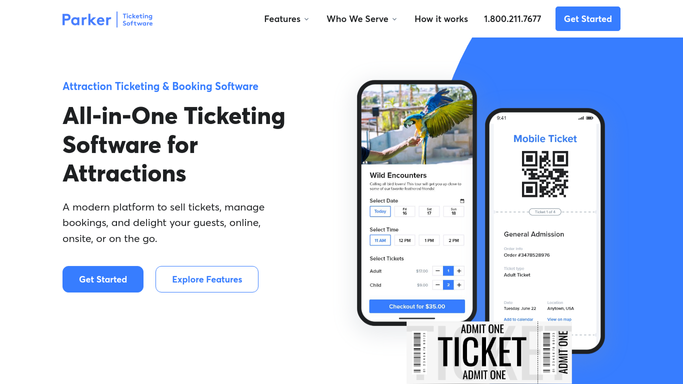
Capacity limits and waivers work on tickets Parker has taken
Parker covers a great deal of this on its own, and an operator who has not set it up should start there.
Capacity management puts timed ticket limits and real-time availability on the calendar, so a session sells out rather than overfills. Online waivers are signed before arrival and attached to the booking they belong to. Memberships and season passes handle renewals, perks and photo check-in. Add-ons and upsells put lockers, fast passes and meals into the checkout. Inventory control does the same job for cabanas, rooms and rentals, so two families cannot book the one gazebo. Groups, field trips, camps and birthday parties each get their own booking flow, and reports give live revenue, bookings and attendance.
The common thread is that all of it runs on transactions Parker has taken. The forecast belongs to a weather service. The purchase order is in a school district's finance system. The redemptions are on a marketplace's extranet. The reviews are on the sites guests use. Each of those has its own login, and none of them put themselves on the schedule.
A closure notice can be drafted before the first car arrives
Turn it around and start from the roster Parker already holds for tomorrow. The outside world stops being something to react to and becomes something checked against a list.
The forecast read at first light against the sessions on the books, so if the call is a closure, the affected bookings and a drafted message for each are waiting when the decision gets made rather than being assembled during it. Every booking for today checked against the waivers actually signed, so the fifty families still missing one are reminded the night before instead of meeting a clipboard at the gate.
Passes expiring this month gathered with a renewal note drafted for each, while there is still a season left to renew into. The district's procurement portal watched for the purchase order that has to clear before Tuesday's field trip. Redemptions on a deal site matched against actual check-ins, so what gets invoiced is what came through the turnstile. Last week's reviews pulled together against the days they refer to.
Gathering and comparing run unattended, because neither moves money or reaches anyone. A refund, a closure announcement, anything a guest receives, is drafted and held.
Refunds and announcements stay with the duty manager
An attraction's only quiet hour is the one before opening, which is also the hour when none of this gets done. Whoever is unlocking the gates is not also reading a procurement portal.
WebRun is an AI agent that drives a real Chrome browser, signed in as you. It opens the sites sitting outside the ticketing system, reads what is on the screen, and sets it against what Parker already has on the books. There is nothing to commission first: no integration, no API key, no developer.
It runs on your schedule in your own private environment, and you can watch a run and stop it. Money going back to a guest and messages going out to one stay drafts until a manager releases them. Every workflow below names what it opens before you turn it on.
Questions people ask
Will it refund guests or cancel bookings without a manager?
No. Refunds, cancellations and date reissues are prepared and left for a manager to release, because each one moves money belonging to a guest. The same holds for closure notices. What runs unattended is the reading and the list building.
Is a school district procurement portal something it can open?
Yes. It signs in and reads the page as your bookings coordinator would, so a purchase order sitting unapproved before a field trip shows up with a week of chasing left, even though the portal belongs to the district and has no connection to Parker.
Does it change capacity or prices inside Parker?
Not unless you point it at that specifically. The default is read-only against Parker: it pulls the bookings, passes and check-ins it needs, then writes its findings into a list or a draft. Session limits and pricing stay where your team set them.
10 ready-made Parker workflows
Each one names the apps it touches and the exact steps it takes. Open one to read what it will do, then turn it on.





Want one of these running on your own Parker?
Show WebRun the process once and it will run it on schedule, in your own private browser environment.