How to Automate ADR Notable
ADR Notable automates the case it already holds. The Noteboard organises notes against evidence and timestamps, conflict checking runs during onboarding, and billing splits a fee between parties and syncs to QuickBooks. Chasing two law firms, a court program and an unsigned agreement is where an agent like WebRun fits.
 Written by
Clara Bennett
Revenue operations
Written by
Clara Bennett
Revenue operations
 Reviewed by
Devon Ruiz
Workflow engineer
Reviewed by
Devon Ruiz
Workflow engineer
A mediation is one case and two sides who share no system
ADR Notable is case management software for alternative dispute resolution, and the person in front of it is usually the neutral: an independent mediator or arbitrator, a small ADR firm, or the administrator running a court-annexed, community or workplace resolution program.
A case here is not a matter with one client at the end of it. It is a dispute with at least two sides, each with its own counsel, its own account of the facts and its own idea of what a reasonable date looks like. The platform gathers the case information, tasks, calendars, documents, notes and communications into one place, which matters more than usual when the alternative is a folder for every party.
The neutral's position is what makes the admin awkward. Both sides accept them precisely because they are not acting for either, and every habit in the practice, down to how an invoice is addressed, has to survive that.
The neutral is also the scheduler, the biller and the chaser
Running a caseload as a neutral means doing the work of a back office that does not exist.
The session on the 12th needs a room, a video link and three diaries that have never once agreed. The confidential position statement from the respondent has not arrived and the session is Thursday. The agreement to mediate went out for signature nine days ago and one party has opened it twice without signing. The fee from the last matter has to become two invoices, one to each side, in the proportions somebody settled on a call in March.
Then there is the referral that arrived this morning as a PDF attached to an email from a court program, carrying the names of four people and two companies, none of which have been anywhere near the practice's own records yet.
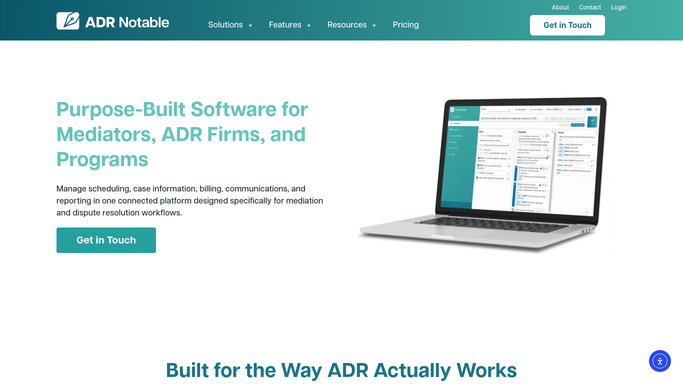
ADR Notable already holds the notes, the fee split and the signatures
The platform takes a great deal of that off the desk, and a neutral still keeping case notes in a word processor should start there.
The Noteboard is the centre of a case: notes taken and organised against evidence, proposals and timestamps. Conflict checking runs automatically during onboarding, and automated onboarding carries an intake through pre-configured workflows, generating forms and sending them for signature. Billing covers flat fees, hourly rates and advance payments, splits a fee between parties, captures time from the case screens, and syncs invoices to QuickBooks Online with Stripe taking the payment. The signature workflow sends, tracks and archives documents. AI Case Summaries write an overview of the parties, issues and developments, and the ADR Coach offers preparation guidance. Outlook, Google Calendar, SignNow and Zoom are connected.
Every one of those acts on the case as the practice recorded it, or on a system ADR Notable has been given a connection to. The two law firms on the other side of the dispute are neither. Nor is the court program that sent the referral, the panel roster that lists the neutral, or the inbox where a position statement was promised for Friday.
The other side of a case can be worked before the session
What holds a mediation up is almost always sitting with somebody who never logs into ADR Notable.
Cases with a session this week checked for what is still outstanding from each party, and written up as one list per case instead of a memory. Position statements that never arrived chased with the request already drafted and the date in it. Agreements to mediate left unsigned in the signature service matched back to their case, so the chase goes out while the date still holds.
Referrals arriving as attachments from a court program read the day they land, the party and company names pulled out and set against every prior matter, with a conflict note drafted for the neutral to rule on. Invoices split between two sides reconciled against what each side has actually paid. A Monday picture of the caseload grouped by stage: scheduled, waiting on a party, gone quiet. The panel and roster listings the practice depends on checked for whether they still say what they should.
Reading, gathering and drafting run unattended. No conflict is cleared, nothing is signed or accepted, and nothing reaches a party until the neutral has read it and decided.
A conflict is cleared by the neutral, not by a checklist
Independence is the whole reason both sides agreed to this neutral, and it survives perfectly well if the names on a referral were set against the practice's own history before anyone opened the file.
WebRun is an AI agent that drives a real Chrome browser, signed in as you. It opens ADR Notable alongside the signature service, the accounting system and your inbox, reads what each one shows, and hands back the chase list, the caseload picture or the conflict note already written.
It runs on your schedule in your own private environment, sessions are not shared between tools, and a workflow can be held to a named list of sites. You can watch a run and stop it.
The workflows below each list the screens they touch.
Questions people ask
Can it clear a conflict or accept a referral on our behalf?
No. Clearing a conflict and taking a case are decisions for the neutral, and both stay that way. It reads the referral, pulls out the party names, sets them against prior matters and drafts the note. Whether that is a conflict is answered by a person.
Will it write anything into a case file?
Only where you ask it to, and only within a policy you set. The usual arrangement is read-only against ADR Notable: it opens the case, takes what it needs and changes nothing. Any step that edits a record or sends a document is scoped explicitly, and can be left out.
Conflict checking already runs at intake, so what does this add?
The half that arrives before intake exists. A referral sitting as a PDF in an inbox is not a case yet, so nothing checks it. This reads it on the day it lands, sets the names against your prior matters, and puts a drafted note in front of you.
10 ready-made ADR Notable workflows
Each one names the apps it touches and the exact steps it takes. Open one to read what it will do, then turn it on.





Want one of these running on your own ADR Notable?
Show WebRun the process once and it will run it on schedule, in your own private browser environment.