How to Automate ScopeTakeoff
ScopeTakeoff automates the bid. PDF plan takeoff measures walls on the drawing, trade assemblies work out unit counts, mortar, grout and labor hours, and one click exports a Schedule of Values and a client-facing proposal. What happens after submission, on permit sites, scaffolding suppliers and contractor portals, is where an agent like WebRun works.
 Written by
Hannah Vogel
Finance operations
Written by
Hannah Vogel
Finance operations
 Reviewed by
Samuel Adeyemi
Integrations writer
Reviewed by
Samuel Adeyemi
Integrations writer
ScopeTakeoff prices masonry the way a mason estimates it
Restoration masonry is priced off a wall that is already standing. An elevation shows a parapet with failed joints, spalled brick over two floors, a cracked lintel above the third window and sealant that gave up years ago. The bid is square feet of repointing, a count of brick to cut out and replace, linear feet of joint, and the access to reach any of it.
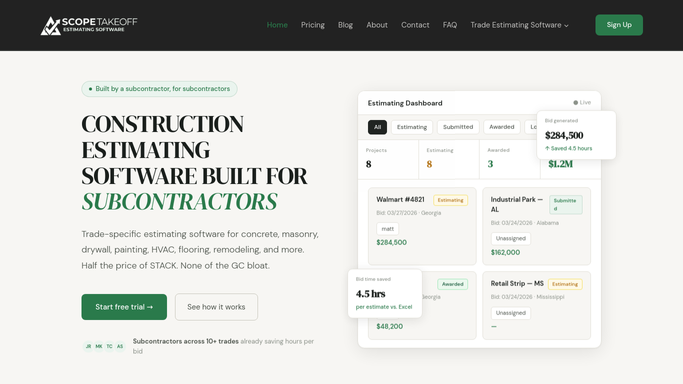
ScopeTakeoff is estimating and takeoff software written for subcontractors doing that kind of work. Plan sheets come in as PDFs, walls are measured on the drawing itself, and the assemblies behind each measurement carry the arithmetic a mason would otherwise do on a pad.
Its masonry library covers what the trade bids: block by thickness and fill, brick veneer in running, stack and Flemish bond, stone veneer, bond beams, lintels and pilasters, and the restoration end of it, repointing, crack injection and cleaning. Each assembly works out its own unit count, mortar volume, grout fill, wall ties and labor hours.
A restoration bid is priced in a day and chased for a season
Pricing the wall takes an afternoon. Everything after that takes months.
The proposal goes to a general contractor, or to a property manager, or to a condominium board that meets once a month. Then it is quiet. Restoration is deferred maintenance, so a facade quoted in April can sit until a piece of terracotta comes off in November, and April's number is still the one they remember.
Access is its own project. A swing stage or a scaffold has to be priced and reserved through a rental company with a phone number and a portal. Over a footway there is a shed permit from the city, on a site that shows a status and nothing else.
Once the job runs, the numbers keep moving. Sand and mortar are bought by the tonne at prices your assembly did not assume, and the hours the crew spends on a difficult parapet sit in a payroll system that has never seen the estimate.
The one-click export is where ScopeTakeoff finishes
ScopeTakeoff is deliberately narrow, and it is very good inside that boundary.
The described run is short: drag in the plan sheets, measure wall lengths and heights on the drawing, choose the assemblies, let it calculate unit count, mortar, grout and labor, override any unit cost to match what your supplier actually charges you, add deducts for openings, lintels and bond beams, and export a formatted Schedule of Values and a proposal ready to submit. Interior and exterior labor rates are held separately, and high-access and scaffolding costs are calculated rather than guessed. Multi-entity profiles let one office bid under more than one company name.
Then it stops, on purpose. The product is described as ending at that export, and everything the bid runs into afterwards belongs to somebody else: the contractor's upload portal, the city's permit page, the rental company's availability, the supplier's price list, the payroll system holding the hours. None of those are things an estimating package was built to open, and none of them will send you anything.
A tuckpointing bid can follow its own job into the field
The moment a proposal is submitted, the estimate stops being a working file and becomes a promise.
It could stay useful instead. Every proposal past a fortnight without an answer surfaced with the building, the amount and the date it went out, and a follow-up drafted that mentions the parapet rather than reading like a form letter. Condominium and board decisions checked on the meeting agendas that are posted publicly, so a bid gets a nudge the week it is being discussed and not a month later.
Access sorted before a crew is committed. Scaffold and swing stage availability read off the rental company's own site for the weeks a job is pencilled in, and the shed permit application followed on the city portal until it says issued.
Then the numbers. Supplier pricing on unit, sand and mortar checked against what the assemblies were costed at, so a bid being priced this week is priced off this week. Actual hours pulled from payroll and set against the labor the assembly allowed, per job, so the difficult parapet teaches you something before the next facade is quoted.
The proposal leaves your hands and still needs watching
Five minutes here and ten there, all of it landing on the estimator who has neither.
WebRun is an AI agent that works a real Chrome browser, signed in as you. It opens the contractor's portal, the city permit page, the rental company's site, the supplier account or the payroll system, reads each the way your office would, and hands back the short list that matters: bids gone quiet, permits issued, staging available, prices that moved.
There is nothing to connect first, which matters when the sites in question are a municipal permit page and a scaffold hire company. It runs on your schedule, restricted to the sites you allow, and every follow-up, booking or submission is drafted and left for you to send.
The workflows below are already built, and each one names what it opens.
Questions people ask
The assemblies already work out mortar and labor. What is missing?
Everything after the export. The assemblies are the reason to buy it, and they do the arithmetic properly. Whether the proposal was ever read, whether the shed permit was issued and whether the scaffold is free that week are facts held on other companies' sites.
Does it hire the scaffolding or send the follow-up on its own?
No. Bookings and messages are drafted and wait for you. Reserving staging commits real money on a date, and a follow-up to a property manager is a sales conversation, so both belong to a person rather than to a schedule.
Eight general contractors, eight upload sites, none of them ours. Then what?
That is the normal case and the reason this works. It signs in to each site as your estimator does and reads what is on the screen, so eight portals with no shared standard between them get checked on one schedule every morning.
10 ready-made ScopeTakeoff workflows
Each one names the apps it touches and the exact steps it takes. Open one to read what it will do, then turn it on.





Want one of these running on your own ScopeTakeoff?
Show WebRun the process once and it will run it on schedule, in your own private browser environment.