How to Automate HelmBot
HelmBot automates the studio's own counter. Marketing Automation pitches offers around appointments, the Auto Waitlist texts customers the moment a slot opens, Memberships bills on a schedule, and Waivers get signed on a tablet. Card declines, gas deliveries and chamber service dates live on other sites, which is where WebRun signs in.
 Written by
Yara Haddad
Data operations
Written by
Yara Haddad
Data operations
 Reviewed by
Owen Hartley
Workflow engineer
Reviewed by
Owen Hartley
Workflow engineer
A recovery studio sells time inside a machine
A cryotherapy studio looks simple from the door. A chamber, maybe a float tank, a sauna, a set of compression boots, a counter with a card reader on it. What it actually sells is three minutes of extreme cold, booked, paid for, waivered and supervised, and then sold again next week to the same person on a membership.
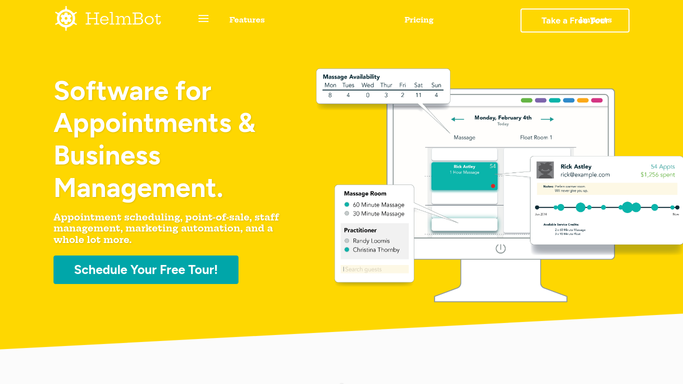
HelmBot is that counter. It describes itself as software for appointments and business management, and it turns up across the recovery and wellness trade: float centres, massage and acupuncture rooms, salons and spas, counselling practices, cryotherapy studios. In one of them it holds the appointment book, the class and event schedule, the point of sale, the customer record with visits, notes and referrals on it, the memberships that bill every month, the waivers and the staff rota.
The person using it hardest is usually the owner, who is also the one wiping down the chamber between clients.
The counter goes quiet and the admin does not
The desk work does not stop when the last client leaves.
A membership that failed to bill failed at the card processor, and finding out means signing in there rather than into HelmBot. The gas for the chamber comes from a supplier with its own ordering page and its own delivery window. The chamber has a service interval, and the history of it lives with the manufacturer.
Then there is the reputation work. A five star review from Saturday and a two star from Sunday are both sitting on a page. A corporate wellness client whose staff have stopped booking has an account manager somewhere expecting a check-in. The studio down the road changed its unlimited price on Monday.
Each of those is a separate login and a separate tab, and they get opened at nine in the evening or they do not get opened at all.
Marketing Automation and the Auto Waitlist fill their own gaps
The software is better than a lot of owners use, and running a fraction of it is the usual state of affairs.
Marketing Automation sends special offers and member pitches before and after appointments, so a recovery add-on gets offered without anyone at the counter remembering. The Auto Waitlist lets customers put themselves on a list and texts them the moment availability appears, which turns a late cancellation into a filled slot rather than a hole in the day. Memberships covers recurring billing, custom discounts and member management. Waivers are sent, tracked and signed on a tablet at the door.
Underneath that, Custom Reports drills into sales and customer detail, Orders & Inventory raises a warning when stock runs low, and Multi-Location shares customers and sales history across sites.
All of it works from something the studio already recorded. The decline at the processor, the supplier's next delivery date, the service due date sitting on the manufacturer's site, the review that went up an hour ago: none of those have reached the counter yet.
The chamber, the gas and the renewals can report themselves
Give the studio something that can open the other tabs and the nine o'clock shift disappears.
Memberships due to rebill this month set against what the card processor actually took, so a dead card becomes a text on Tuesday instead of a member who quietly stopped coming. The supplier's ordering page read against the chamber sessions already booked, so a delivery gets moved before a session runs short.
The manufacturer's service portal checked for the interval that is coming up, so maintenance lands on a quiet Wednesday rather than cancelling a busy Saturday. New reviews collected wherever they land, worst first, each with a reply drafted in the studio's own voice. Session packages down to their last two visits listed next to the members holding them, so the nudge goes out while the credit still matters. The corporate partner's usage pulled together into a check-in note that is already written.
None of that leaves the building on its own. A reply, a renewal reminder and a check-in are drafted with the detail filled in, and somebody at the studio reads them and sends them.
Nobody opened a cryo studio to sign into websites
Wiping down the chamber between clients is the job. Signing into six websites at nine at night is not, and it is the half that quietly eats the evening.
WebRun is an AI agent that sits in a private environment of your own and works a real Chrome browser, signed in the way you already are. It opens the payment console, the supplier page, the service portal or the review site, reads what is there, and leaves the answer somewhere you will see it before the first client arrives. A workflow can be locked to an explicit list of sites, and you can watch a run and stop it.
Each workflow below names what it opens and what it hands back.
Questions people ask
Could a member get a text we never saw?
No. Renewal nudges, win-back notes and review replies are drafted with that member's own detail filled in and held for you to read. Nothing addressed to a customer leaves the studio without a person sending it.
Marketing Automation covers our offers. What is this adding?
Alongside it, not instead of it. Marketing Automation acts on customers HelmBot can already see, and it does that well. This covers the sites HelmBot cannot see: the card processor, the gas supplier, the manufacturer's service portal, the pages your reviews land on.
None of these sites offer an export. Can it still read them?
Not at all. It works the supplier's website the way your staff do, in a real browser with your own login, reading the ordering page on screen. No API, no export and no integration built by anyone else is needed for a site to be readable.
12 ready-made HelmBot workflows
Each one names the apps it touches and the exact steps it takes. Open one to read what it will do, then turn it on.





Want one of these running on your own HelmBot?
Show WebRun the process once and it will run it on schedule, in your own private browser environment.