How to Automate Poster
Poster already automates the kitchen side. Recipes deduct ingredients as each check closes, minimum stock levels raise notifications, ABC analysis ranks the menu and Finances builds a P&L. Supplier price lists, delivery marketplace back offices and the bank sit behind other companies' logins, and reading those is where an agent like WebRun works.
 Written by
Priya Raghavan
Solutions lead
Written by
Priya Raghavan
Solutions lead
 Reviewed by
Aiko Tanabe
Product researcher
Reviewed by
Aiko Tanabe
Product researcher
Poster turns every check into a line of ingredients
Poster is a cloud point of sale for places that serve food and drink: coffee shops, bars, pizzerias, bakeries, food trucks and the retail counters attached to them. It runs on an iPad, an Android tablet, a phone or a browser, which is how a two-person cafe ends up on the same system as a group of six.
What separates it from a till is what happens the moment a check closes. Every dish has a recipe behind it, so closing an order does not just record a sale. It takes the flour, the cheese, the basil and the box out of stock, at the cost the last delivery was booked at.
That is the economics of the whole place, written down one order at a time. The Poster Boss app puts it in the owner's pocket, so whoever is not in the building still gets the shift close and the day's revenue as it lands.
The cheese went up and nobody told the recipe
Poster deducts stock at the price it was given. Nothing tells it when that price changes.
So the prices get corrected by hand, off a delivery note in a plastic wallet, or off the supplier's ordering site where this week's list sits behind a login. The mozzarella went up in March and the pizza carried on being costed at February's number until somebody looked.
The rest of the week has the same shape. Each delivery app keeps its own back office, so the day's real revenue is the terminal figure plus two or three dashboards nobody opened. The cash in the drawer has to be squared against the shift Poster closed, and the card settlement against the bank. Somebody counts the bar to see whether the pour matches the recipes, and somebody writes off what went in the bin, which is the number everyone quietly guesses at.
Each of those is fifteen minutes. Together they are most of a Sunday.
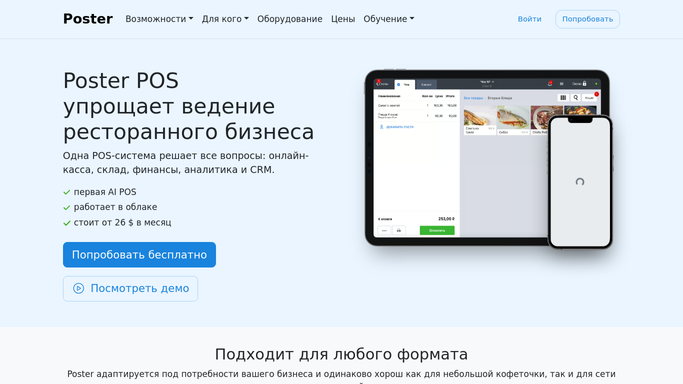
Poster costs a dish from the prices it was given
For a system aimed at small venues, Poster is unusually serious about the back of house, and most cafes use about half of it.
Inventory holds stock levels for any date, with supplies, inventory checks, transfers between locations, manufacturing for anything made in advance, and butcheries for breaking a cut down. Minimum stock levels raise a notification by email and on the POS itself. Analytics reports on sales, products, waiters, tables, receipts and customers, and its ABC analysis ranks dishes by popularity, revenue contribution and profitability, the report that decides what leaves the menu. Finances carries a P&L, cash flow and transactions, with payroll and time tracking. Marketing runs a customer database, loyalty, promotions and cash-back. Postie AI scans receipts and invoices, categorises transactions and suggests where food cost is slipping.
All of it is assembled from what the terminal recorded.
The supplier's ordering site is a different thing entirely, and so are the delivery marketplace back offices, the bank and the wholesaler's price page. Each is a login that belongs to the business, holding a number it needs, on a screen nothing in Poster can reach.
The price that changed can surface before the month does
Every dish in Poster carries a cost, and that cost has a date on it. The only question is how old the date is.
This week's supplier prices, read off each supplier's site and laid against what the ingredients are costed at, turn a rise into a line the week it happens rather than a quarterly discovery. The margin on the pizza gets recalculated before the menu goes to the printer.
The delivery apps get opened and totalled, so a day's real takings become one figure: the terminal, plus each marketplace, minus the refunds that only ever show up in their own dashboards. A payout that came up short is a Tuesday question with the evidence still on screen.
The drawer gets reconciled against the shift Poster closed, so a till that is out on Thursday is a conversation on Friday rather than a pattern spotted in spring. Write-offs get collected into a weekly waste figure with the worst three named. The bar count gets set against what the recipes say should have poured.
Draw the boundary at the guest and at the money. Counting, comparing and drafting an order to a regular supplier runs perfectly well unattended. Anything that speaks to a customer, or commits a real order, is prepared and read by a person first.
A shift that closes at one should end there
In a cafe the person with those logins has been on the counter since breakfast, and the checking waits until the chairs go up.
WebRun is an AI agent that drives a real Chrome browser under your own logins. It opens the supplier's ordering site, the delivery back office or the bank, reads the screen, and sets it next to what Poster recorded, with the gaps named.
Runs happen on a schedule you set, in your own private environment. You can watch one and stop it part-way, and anything that reaches a guest or commits money is drafted and waits.
The workflows below are already built, and each one lists the logins it uses.
Questions people ask
Could it overwrite the ingredient costs we set on our recipes?
No. These workflows read Poster and report against it. What comes back is a list of ingredients whose supplier price no longer matches the cost on the recipe, and the change itself is made by whoever owns the menu.
We already use Postie AI for invoices. Where does this fit?
Alongside it, not instead of it. Postie works on the documents that reach you. These workflows go to the places no document arrives from: the supplier's ordering site, the delivery marketplace back office and the bank, all of which show their numbers only after somebody signs in.
None of our delivery marketplaces connect to Poster. What happens then?
Nothing changes, because none of this depends on a connection. Each marketplace back office opens in a browser, so the orders, refunds and payout adjustments can be read off the screen and totalled beside your own receipts, whether an integration exists or not.
12 ready-made Poster workflows
Each one names the apps it touches and the exact steps it takes. Open one to read what it will do, then turn it on.





Want one of these running on your own Poster?
Show WebRun the process once and it will run it on schedule, in your own private browser environment.