How to Automate Nuvolo
Nuvolo schedules the maintenance itself. HTM Asset Management holds each device's history, plans preventive work and tracks parts, vendors and contracts. What sits outside it is every portal and bulletin it has no feed from, and reading those is the job an agent like WebRun does before a technician starts.
 Written by
Dimitri Vasilev
Logistics analyst
Written by
Dimitri Vasilev
Logistics analyst
 Reviewed by
Rosa Lindqvist
Operations editor
Reviewed by
Rosa Lindqvist
Operations editor
Every pump, scope and scanner in the building has a record in Nuvolo
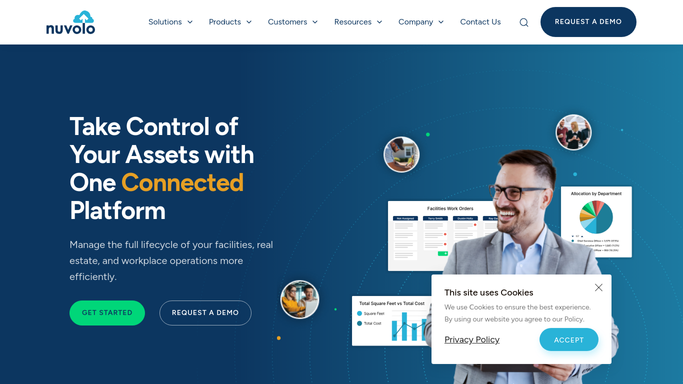
Nuvolo sells Connected Workplace, an integrated workplace management platform built on ServiceNow, covering facilities, real estate and the assets inside them. Hospitals, life sciences companies, retailers and public sector estates all run on it. In healthcare the part that matters most is HTM Asset Management, the modern CMMS for the healthcare technology management team.
That team is the reason an infusion pump can be trusted. Every pump, ventilator, endoscope, ultrasound probe and imaging system in the building has an asset record: model, serial, location, who owns it clinically, what has been done to it and when it is next due.
The record is the proof. When a surveyor asks whether the defibrillators on the third floor were inspected, the answer is not a technician's memory but the history attached to each one. So the HTM team does two jobs at once: keeping equipment working and keeping the account of it defensible. Nuvolo is where both live.
The service report stays in the vendor's portal
A ventilator goes out to a third party for a board replacement. It comes back working. The report that proves what was done is behind that vendor's login, and somebody has to sign in, find it, download it and attach it to the asset.
Multiply that by the number of vendors a hospital uses and the shape of the week appears. A recall notice arrives in a shared mailbox and turns into an afternoon of checking whether any of the affected serial numbers are yours. A part for a job in the queue is on backorder and the only place that date exists is a supplier page. A survey is coming and the evidence has to be gathered from four places, one of which is a filing cabinet.
None of it is technical work. It is a technician with a browser open, and it happens instead of the repairs waiting downstairs.
Nuvolo knows the estate, not the manufacturer's inbox
Nuvolo is good at the part it owns. HTM Asset Management carries a device from onboarding through to retirement in one record. Work order management runs on a phone or tablet in the corridor rather than at a desk. Planned maintenance schedules the recurring work and balances it across technicians. Inventory management covers parts, with an optional ECRI integration, and vendor and contract management keeps the commercial side attached to the asset. There is an OT Security product for the connected devices that now sit on the hospital network, and named connections to PartsSource, GE Service Shop and Siemens Healthineers.
Those connections are real and they help. They also cover a fraction of the vendors in a hospital estate.
For everyone else the wall is the one every asset system hits: it knows what has been entered or fed into it. The manufacturer that emails a safety notice, the third party whose report sits behind a login, the advisory published as a PDF on a vendor's website. All of that is outside, and the only bridge across is a person opening a browser.
Recall bulletins and parts dates can arrive in the work order itself
Change who does that opening, and the paperwork stops trailing the work by a fortnight.
A recall notice published on Tuesday can be checked against the models and serial numbers in your own estate by Tuesday afternoon, arriving as a short list of the devices that match rather than a bulletin somebody has to interpret. The vendor service report for last week's ventilator repair can be filed against the asset without anyone remembering to go and get it.
The parts holding jobs open are the same story. A supplier page that says a board now ships in three weeks is a fact the work order should carry, so the clinical team gets told once instead of asking three times. A firmware advisory for a device family can be matched to what is deployed and where, before anyone asks the question.
All of that is reading and gathering. It is deliberately the safe half of the job: nothing above is a decision about a patient, a device or a repair.
A biomed engineer decides what comes out of service
That gathering has to happen before a technician can do anything useful with it.
WebRun is an AI agent that drives a real Chrome browser, signed in as you. It opens the supplier site, reads the backorder date, downloads the service report, and brings it back into the work order or the list the department reads each morning. Because it works the browser rather than an API, it reaches the vendors that will never build an integration.
What it does not do is judge. It will not close a work order, mark a preventive maintenance complete, alter an asset record or take a device off the floor. Those decisions belong to a qualified engineer, and anything that reaches a clinician drafts and waits for one.
The workflows below are already built. Each names the sites it opens and what it collects.
Questions people ask
Who takes a device off the floor if a recall turns out to match?
A qualified engineer, always. The run produces the matched list and stops there. Nothing it does changes the clinical status of equipment, closes a job or signs off maintenance, because those calls belong to the person accountable for the device.
Nuvolo is built on ServiceNow and our instance is heavily customised. Does that break it?
No, because it works the screens your team works. It signs in as a user and follows the same forms and lists you use, so custom fields and layouts are what it sees anyway. No plugin is installed and no configuration in your instance has to change.
Vendor service reports come as PDFs inside a portal. Can it get those?
Yes, and that is one of the common reasons to use it. The agent signs in, finds the report for the job, downloads it and files it against the asset, so the evidence a surveyor will ask for arrives in the week the work happened rather than the month before an inspection.
12 ready-made Nuvolo workflows
Each one names the apps it touches and the exact steps it takes. Open one to read what it will do, then turn it on.






Want one of these running on your own Nuvolo?
Show WebRun the process once and it will run it on schedule, in your own private browser environment.