How to Automate Goodshuffle Pro
Set up Goodshuffle Pro's payment reminders, Timed Emails and Dispatch first; they cover the work inside each project. The weekend checks come next: a town's tent permit, the wind forecast for each address, a venue's insurance request and a partner company's chairs, which an AI agent like WebRun can check against every project before the trucks load.
 Written by
Grace Okafor
Healthcare operations
Written by
Grace Okafor
Healthcare operations
 Reviewed by
Marta Ellison
Automation strategist
Reviewed by
Marta Ellison
Automation strategist
Goodshuffle Pro knows where every chair is booked, down to the minute
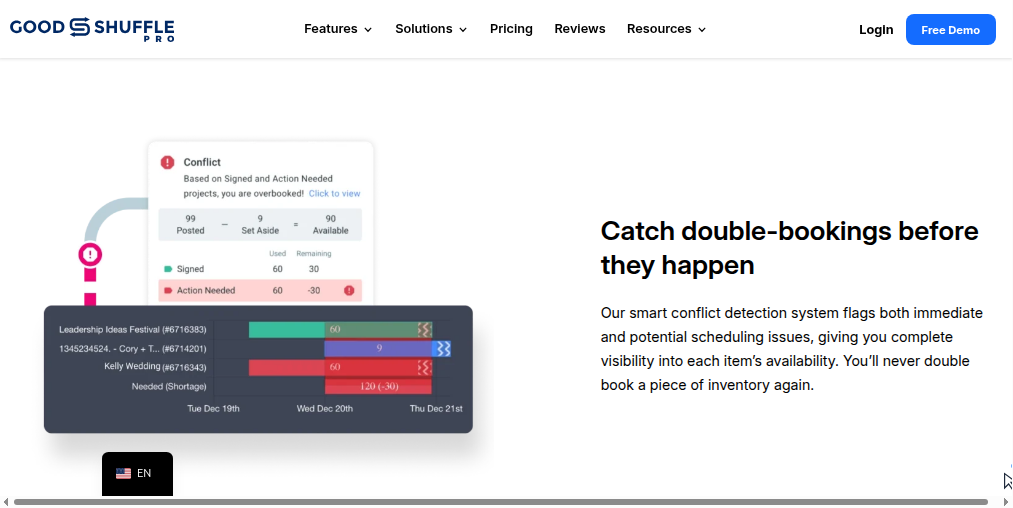
Tents, tables and chairs, linens, lighting, photo booths and decor all have to be in the right place on the right Saturday, and Goodshuffle Pro is the event rental software that keeps count. It holds each item's availability, calculated down to the minute so the same forty chairs are never promised to two weddings, beside the quotes, signed contracts and payments for every project.
The office builds quotes and sends them out to be signed and paid online. On the Standard plan the warehouse crew works from digital pull sheets and checks a job off before it leaves the building, and Dispatch lays out the day's deliveries and pickups on a map.
Goodshuffle sells it to tent companies, AV and lighting outfits, DJs, florists and party rental shops: a Lite plan with a single account owner for the solo operator, and a Standard plan that adds limited logins for the warehouse, drivers and installers.
A Saturday wedding brings a week of small tasks with it
Some towns want a permit for a tent; the office manager checks the town's website by hand to see whether it came through. A venue coordinator emails asking for a certificate of insurance and a load-in time. Saturday's forecast shows gusts in the afternoon, and the crew lead has to decide whether a 40 by 60 frame tent goes up. Then the final count adds forty chairs, conflict detection says the company is short, and the owner rings a friendly rental company to borrow them.
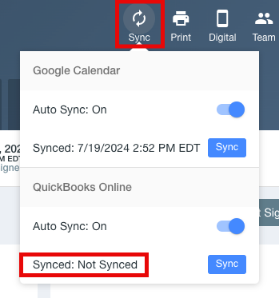
Linens come back two short, and the owner decides whether to bill the client or reorder. Each signed project also needs a press of its Sync button before its invoice reaches QuickBooks Online, and after a busy weekend the bookkeeper has to work out which projects nobody synced.
Goodshuffle Pro times its client emails from dates in the project
Every Goodshuffle Pro plan sends Automatic Payment Reminders on a balance that falls due and lets a quote carry an expiration date. The reminders only go out on a signed project, so a project waiting on unsigned changes sends none.
Timed Emails, added in April 2026, send a template on a date anchored to the event. Goodshuffle's own examples are a confirmation two days before delivery, a thank-you the day after and a review request a week after the event.
On Standard, Dispatch with AI Auto Route builds the most efficient route for the day's stops in one click, and the office can mark a shortfall as a subrental on the project's Fulfillment tab, with a note of where it is coming from. The QuickBooks Online add-on turns a signed project into a QuickBooks invoice, with card payments, refunds and transfers following it, once someone presses Sync in the project header.
A town's permit status sits on the town's website, the forecast with a weather service and a partner company's stock on its own site, and a venue coordinator's questions arrive in whichever inbox the venue has on file. Conflict detection tells the owner the company is forty chairs short; finding forty spare is a call to a partner company.
The weekend's tent installs get a wind check on Thursday
The crew lead re-plans any tent install whose address faces gusts that weekend, working from the hourly forecast for that address. One email on Thursday gives the office manager three answers for each weekend project: whether the town has issued the tent permit, whether the venue still wants a certificate of insurance, and whether anyone has confirmed the load-in window.
When conflict detection flags forty chairs short, the owner gets the partner company's availability for that date and a subrental request drafted for approval.
The office manager also sees, every day, which projects have unsigned changes holding back their payment reminders, so someone can chase the signature. The bookkeeper presses Sync on Monday for each weekend project nobody synced, from an email that names them.
The owner sends every subrental request
A delivery address and a date from a Goodshuffle Pro project are what the forecast site, the town's permit page and the partner's stock list each ask for. WebRun is an AI agent that works a real Chrome browser, signed in as you. For every project on the weekend's schedule the agent makes those lookups and writes what it found into that Thursday email for the office manager.
A subrental request commits the company to a partner's price, so the owner sends each one personally, starting from the agent's draft. In Goodshuffle Pro the agent reads projects and quotes, leaves every Dispatch route as the dispatcher set it, and does not press Sync.
Most of these checks run on Thursday, ahead of Friday's loading.
Questions people ask
Why didn't a client get a payment reminder?
Usually because the project is not in a signed state. Payment Due Reminders fire only for an open project (not archived) with reminders enabled and a due balance in a signed state. If the project has unsigned changes, they wait until it is signed and the changes are approved.
Is a Read-Only User enough for the agent?
For reading, yes. Standard accounts can add Read-Only Users, who see the details of the jobs assigned to them and cannot change anything. Assign the weekend's jobs to the agent's user, or give it a full user if it should read every project.
Which checks work on the Lite plan?
All of them. The checks start from projects, dates and delivery addresses, which every plan has. Read-Only Users and Dispatch come only with Standard.
Sources
- Event Rental Software Pricing | Goodshuffle Pro Goodshuffle Pro's own plan list: Automatic Payment Reminders, Quote Expiration, Automated Emails, conflict detection calculated to the minute, Digital Pull Sheets, Dispatch with AI Auto-Route, read-only users and the QuickBooks Online add-on.
- When will Payment Due Reminders send? Reminders fire only for an open project with reminders enabled and a due balance in a signed state, and wait while changes are unsigned.
- QuickBooks Integration: How it Works What the QuickBooks Online integration syncs from a project: customers, invoices from signed contracts, card charges as payments, refunds and transfers. Signed-contract projects show a Sync button in the project header.
- New in Apr '26: Email automation, project list search & multi-language Goodshuffle Pro's April 2026 release of timed emails on a date anchor, with its examples: two days before delivery, one day after the event, one week out for a review request.
- How Can I Add Subrentals to a Project? On Standard or above, an item is marked as a subrental from the project's Fulfillment tab, with a note of where it is subrented from.
9 ready-made Goodshuffle Pro workflows
Each one names the apps it touches and the exact steps it takes. Open one to read what it will do, then turn it on.





Want one of these running on your own Goodshuffle Pro?
Show WebRun the process once and it will run it on schedule, in your own private browser environment.