How to Automate GlassBiller
Automate the work around each GlassBiller work order: unanswered quotes, calibration bookings and the Monday numbers, which the office still does by hand. GlassBiller's templates, supplier ordering, QuickBooks sync and LYNX EDI cover the rest. A browser-based AI agent such as WebRun can read GlassBiller and draft that follow-up for the front desk to approve.
 Written by
Julian Adeniyi
Retail operations
 Reviewed by
Yara Haddad
Data operations
Auto glass shops order the glass and bill LYNX from GlassBiller
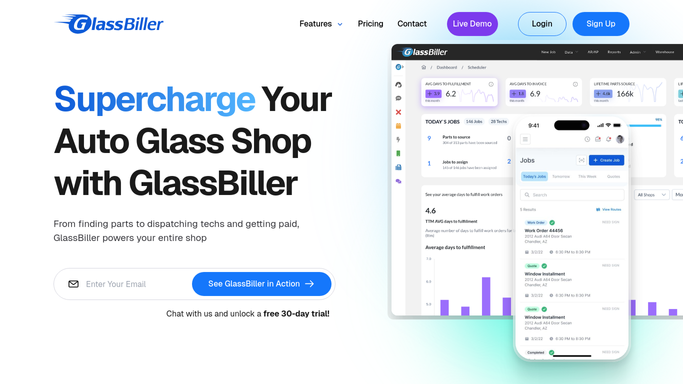
GlassBiller, which some shops write as Glass Biller, is point-of-sale software built for auto glass replacement and repair shops, and it runs in any web browser. GlassBiller pitches its Basic plan at chip-only techs and techs who work without NAGS.
A windshield job usually starts from the VIN. Right Part, an optional search at $1 a time, finds the glass that fits it, and a user on the Pro plan prices the part against US or Canadian NAGS. The office drags the install onto a scheduler that updates live on every screen. Out on the job, the tech works from a phone in TechSide, and the customer signs digitally instead of on paper.
On the Pro plan the office sends invoices for insurance work to LYNX by EDI, at $1 per submission. A shop waiting on an insurance payout can take an advance against the invoice through Lightning Capital, which GlassBiller's FAQ calls its sister company.
Open quotes and late vans keep an auto glass front desk on the phone
A customer quoted on Tuesday for a windshield has not called back by Friday. Nobody at the desk has had a spare minute to try again. This afternoon's glass came in with the wrong bracket, so it returns to the supplier and the office waits on the credit. One mobile tech is running an hour behind, and the next three customers on the route need a text before they give up their afternoon.
A windshield with a forward-facing camera behind it needs that camera recalibrated after the install. When the shop sends the calibration to a partner, the booking is easy to lose once the customer has driven off. The owner wants last week's installs and takings by Monday, and whoever is free runs the report and types the totals into a message.
GlassBiller's templates and reports wait for someone at the desk
Customizable text and email templates put a scheduling confirmation one click away, and the $49-a-month texting package lets the office send and receive unlimited texts inside GlassBiller. For five suppliers, Mygrant, PGW, Pilkington, Import Glass Corp and American Glass, the office checks the price and orders the part from the job screen.
Parts Procurement keeps outstanding returns in view until each credit arrives. GlassBiller syncs invoices and payments to QuickBooks by itself. The analytics suite breaks installs and sales down by date, type and employee, and its reports download as PDF or CSV.
The front desk still chooses which customers get today's template and which quotes deserve a second try. Last week's totals stay in the analytics suite until a manager runs the report and passes it on.
A supplier outside the five, a fleet customer's vendor portal where invoices have to be uploaded, the shop's Google Business Profile and a calibration partner's booking calendar are other companies' websites, and someone at the desk signs in to each one.
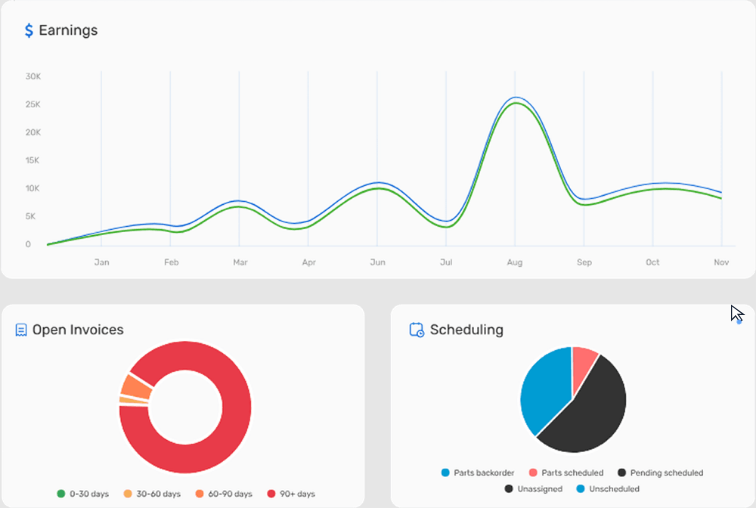
A GlassBiller quote already names the car and the price
Every quote and job in GlassBiller carries the customer, the vehicle, the part and the price. The front desk approves a short text to each customer quoted last week who never booked, naming the car and the figure they were given, without scrolling the open quotes to find them. Whoever orders glass sees what a supplier outside the five charges for the part on a job, and whether it is in stock, before choosing where to buy.
Each tech knows the evening before which installs are on tomorrow's route, in order, with the part for every stop and whether it has come in. A customer whose new windshield sits in front of a camera leaves with a calibration slot already offered.
On Monday morning the shop's Slack channel shows the owner last week's windshield and chip-repair totals, and nobody at the desk opened the analytics suite for it. A fleet manager who pays through a vendor portal sees each invoice there the day the job closes.
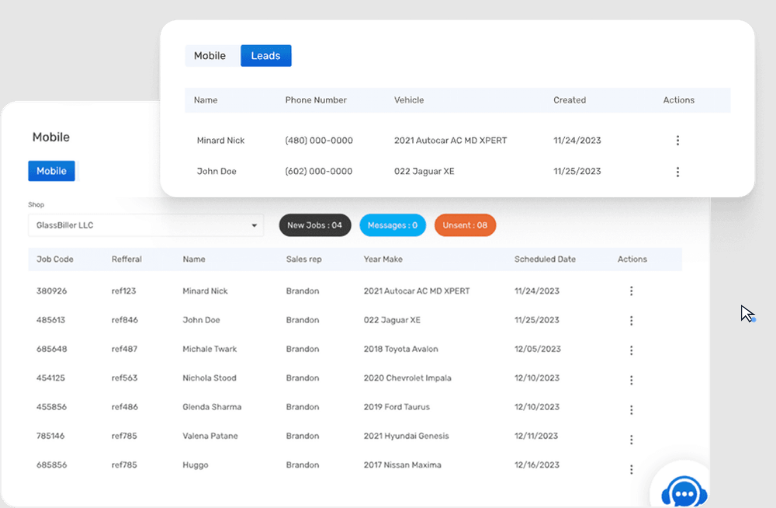
The front desk approves what the agent drafts from GlassBiller
GlassBiller is web-based, so its open quotes and tomorrow's schedule are pages any browser can open with an ordinary user login, and no integration has to be built to read them. WebRun is an AI agent that works a real Chrome browser, signed in as you.
Given its own GlassBiller user, it checks the open quotes and the schedule each morning and drafts the texts and calibration reminders that follow.
The front desk reads each customer text in full, name, car and price, and decides whether it goes. The office alone handles invoices and glass orders, and an administrator can narrow what the agent's GlassBiller user sees with the same permission settings the shop uses for staff. Quote follow-ups, calibration reminders and the Monday revenue report are set up as separate jobs further down, each starting from a GlassBiller screen.
Questions people ask
What about glass suppliers outside GlassBiller's five?
Yes, if the supplier has a website you sign in to. The price and stock for the part on the job come back to whoever orders glass, and that person places the order. GlassBiller's own ordering from the job screen covers only its five integrated suppliers.
Should the agent get its own GlassBiller login?
Yes, give it one. GlassBiller allows as many user logins as a shop needs and bills each user according to its NAGS access, currently $19 a month on Basic and $199 on Pro.
Can one agent cover several GlassBiller shops?
Yes. GlassBiller lets you create as many shops as you like, with no fee for the extra shop profiles, and group them under one organization. The owner can have the shops reported together or one at a time.
Will it text my customers without anyone checking?
No. The front desk reads every text the agent writes and chooses which ones go. A wrong car or price in a quote follow-up reaches a customer who is still deciding where to book.
Can I get my data out of GlassBiller without an agent?
Yes, while the subscription is active. GlassBiller lets you export jobs, customers and vendor data whenever you like.
Sources
- GlassBiller: Manage Payments, Track Receivables Like a Pro GlassBiller's home page lists one-click scheduling confirmations, digital signatures, customizable text and email templates, automated invoice synchronization with QuickBooks and a drag-and-drop scheduler with live updates.
- GlassBiller pricing Sets out the Basic plan ($19 per user per month, aimed at non-NAGS and chip-only techs) and the Pro plan ($199 per user per month), which adds US or Canadian NAGS access, the TechSide scheduling and routing app and LYNX EDI; texting is a separate $49 monthly package.
- GlassBiller FAQs Says GlassBiller is 100 percent web-based; names the five integrated suppliers and pricing and ordering from the job screen; the Right Part VIN search at $1 a search; the $1 LYNX charge per EDI invoice submission; users billed by NAGS access; user permission controls; unlimited shops with no fee for shop profiles; export of jobs, customers and vendor data; and early payment on insurance work through sister company Lightning Capital.
- GlassBiller Analytics Suite Describes reports that break jobs down by date, type and employee performance, payment reports, and downloads in PDF or CSV.
- GlassBiller Parts Procurement Describes tracking of outstanding part returns to secure each credit, purchase order details and will-call pickups by technicians.
8 ready-made GlassBiller workflows
Each one names the apps it touches and the exact steps it takes. Open one to read what it will do, then turn it on.
Want one of these running on your own GlassBiller?
Show WebRun the process once and it will run it on schedule, in your own private browser environment.