How to Automate Cognota
Cognota automates the department's own record: intake forms standardise every request, project stages move accepted work along, and capacity planning holds committed hours against the team you really have. The evidence that a project stalled or a course worked sits in other systems, which is where a browser agent like WebRun reads.
 Written by
Ben Kirkwood
Solutions engineer
Written by
Ben Kirkwood
Solutions engineer
 Reviewed by
Owen Hartley
Workflow engineer
Reviewed by
Owen Hartley
Workflow engineer
Every training request in the company lands in one queue
Cognota runs the learning department itself, not the courses it puts out. Its own site draws the line clearly: a learning operations platform rather than an LMS, and plenty of teams still find it under the old name Synapse. The LMS holds the finished module. Cognota holds everything that had to happen first.
So it is where the work starts. A regional manager wants onboarding rebuilt around the new CRM. Compliance needs the annual refresher out before the audit. A sales director wants something on the pricing change. Each arrives as a request on an intake form, then picks up a stage, a designer and a share of somebody's week.
The people in it are not learners. They are instructional designers, an L&D manager or two, the experts who check the content, and the stakeholders who asked for the training and want to know when it lands.
The design team spends a day a week reporting on itself
Almost none of the load around a learning team is design work. It is telling people where things are.
A storyboard has been with a subject matter expert since a week last Tuesday, and somebody has to decide whether to nudge again. Three stakeholders want to know when their training goes live, and the answer is in Cognota, where none of them look. Completion figures for the course that shipped in March are in the LMS, and the person who needs them is building a slide about impact. A designer's committed hours say thirty and their calendar says forty-five. A request came in by email because the sender did not know the form existed, so it is nowhere until someone retypes it.
None of it takes long on its own, which is why it never gets fixed. The Thursday it eats becomes visible only when the person who does it is on leave.
Intake forms only know what somebody typed into them
Cognota covers more of the department than most teams switch on, and a team not using it properly should start there.
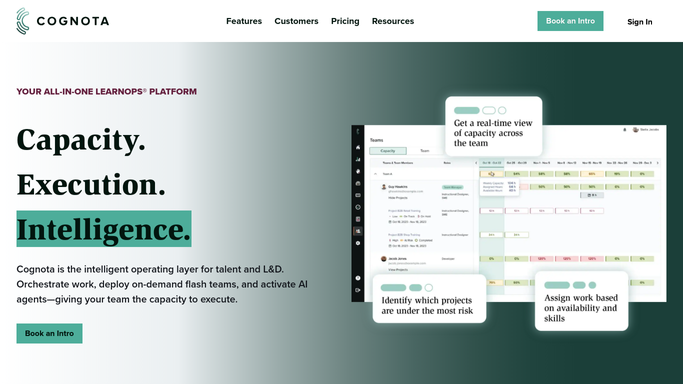
Training intake standardises the ask, with request forms shaped per department that capture audience, business impact and success criteria, so total demand sits in one place instead of six inboxes. Accepted projects move through stages you define, in a kanban or a table view. Capacity planning and resource allocation estimate who is needed and for how long, hold that against what the team has, and account for time off and regional holidays. Insights reports on the demand behind all of it. Cognota has begun shipping agents of its own too, with a reporting agent live and intake and capacity agents listed as coming.
Every one of those reasons over what is already inside Cognota. The evidence that a course worked is not: a completion rate in the LMS, a score in the survey tool, a support queue that was supposed to get shorter. The proof that a project has stalled sits in a calendar or a shared drive where the reviewer never opened the file. What Cognota holds is the record your team remembered to update.
A project record that goes and checks its own evidence
Put those other logins to work overnight, and a project record stops being a self-report.
The course that shipped in March starts carrying its own numbers: completions, pass rates and where people dropped out, read off the LMS and set beside the success criteria on the intake form, so the impact slide is assembled rather than reconstructed.
A storyboard stuck at review explains itself too: not just that eleven days have gone by, but whether the reviewer opened the file at all, which is a different conversation from the one where they read it and went quiet.
Then the things nobody has time to check. Post-course survey scores next to the request that promised them. A compliance deadline read off the regulator's own published page, not a note made last year. Training requests that arrived in an inbox instead of the form, gathered up for whoever triages intake on Monday.
One line holds across all of it. Collecting can run unattended; deciding cannot. A capacity picture that assembles itself overnight is a gift. A mail telling a stakeholder their training slipped should never leave without a person reading it.
Status reporting stops eating the design week
The completion rate does not walk itself from the LMS into the report. Somebody opens one, reads it and types it into the other, and the only question is whether that somebody is an instructional designer.
WebRun is an AI agent that works a real Chrome browser, signed in as you. It opens the LMS, the survey tool or the shared drive, reads what is on the screen, and lines it up against the projects Cognota already holds. Because it works the browser rather than an API, it reaches whatever your team has a login for.
It runs on your schedule in your own private environment, held to a named list of sites, and you can watch a run and stop it. Anything going to a stakeholder is drafted and waits for you. Each workflow below names the systems it opens.
Questions people ask
Cognota already reports on our intake and capacity. Why add this?
Because Insights covers what Cognota can see, which is your intake, your projects and your capacity. This adds the numbers from outside: completions in the LMS, scores in the survey tool, a date on a regulator's page, put next to the project that produced them.
Will it start nudging our subject matter experts without us knowing?
No. Reminders and stakeholder updates are drafted and left for you. A nudge to a busy expert or an executive sponsor is a relationship rather than a task, so nothing leaves until a person has read it and sent it in their own name.
The completion figures only exist on an LMS dashboard. Can they be lifted?
Yes. The agent signs in through the browser the way your team does and reads the figure off the screen, so a reporting page with no export button is still readable. There is no key to request from IT and no change to the LMS itself.
10 ready-made Cognota workflows
Each one names the apps it touches and the exact steps it takes. Open one to read what it will do, then turn it on.




Want one of these running on your own Cognota?
Show WebRun the process once and it will run it on schedule, in your own private browser environment.