How to Automate ScrapRight
ScrapRight automates the transaction: its Compliance Engine applies state and local rules as each ticket is written, and inventory follows material from the scale to the sale. Mill settlements, published buying prices and export bookings live on other companies' sites, which is the layer a browser agent like WebRun covers.
 Written by
Yara Haddad
Data operations
Written by
Yara Haddad
Data operations
 Reviewed by
Devon Ruiz
Workflow engineer
Reviewed by
Devon Ruiz
Workflow engineer
The ticket is where scrap turns into money
Scrap arrives on a truck and leaves as a payment, and ScrapRight sits between the two. It is purchasing and inventory software for metal recyclers: ferrous and non-ferrous yards, auto recyclers and multi-site operations, running in a browser at the scale house with iOS and Android apps for the yard.
The ticket is the middle of everything. A seller pulls onto the scale, the material is graded and weighed, the ticket records who they are and what they brought, and money changes hands, often in cash or through the yard's own ATM. That one record then does four more jobs: inventory receipt, cost basis for the load that ships to a mill, entry in that seller's history, and compliance record for a transaction several layers of government take an interest in.
Everybody touches it: the buyer on the scale, the yard manager watching margin, the office reconciling the day, and the owner setting tomorrow's copper price.
Every ticket has a second life in somebody's spreadsheet
The scale house is quick. What happens after it is not.
The load ships to a mill and comes back weeks later as a settlement: their weight, their grade, their deductions, in a PDF or on their vendor portal. Somebody opens it, finds the shipment it belongs to, and works out whether the yard got paid for what it actually sent. Somebody else keeps a sheet of what each consumer is paying this week for shred, busheling and number one copper, rebuilt by hand out of emails and price lists.
Then there is the calendar nobody enjoys. Reporting deadlines to hit, seller documents that expired without anyone noticing, staff certifications with renewal dates, contracts quietly rolling over. None of it is difficult, and all of it gets noticed only once it has been missed.
The Compliance Engine covers the ticket, not the market
ScrapRight automates the hardest part to get right, and a yard not leaning on it does the work twice.
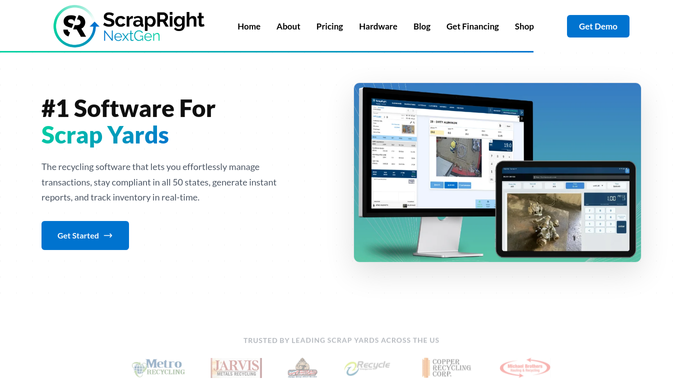
Its Compliance Engine applies state and local recycling rules as the ticket is written: it captures seller identification, enforces hold periods on material that needs them, and generates the state reports, uploading them to the authorities that require it, with on-screen cues showing whether a ticket is in or out of compliance. Purchasing prints a receipt in seconds. Inventory management follows material from purchase to sale, with cost and margin visible rather than reconstructed later. Accounting integrations push the day into QuickBooks or Sage instead of somebody re-keying it.
That covers the transaction thoroughly. What it cannot cover is what the transaction depends on, because those facts belong to other companies.
The price you should have paid this morning is published by the consumers who buy from you, on their own sites or their own emailed sheets. What the mill actually paid for the last load is on its portal. Whether the container booked for an export load is still sailing on the day promised is on the carrier's site. Every one is a login your buyer has no time to open before the next truck pulls onto the scale.
Settlement weights checked while they can still be argued
A settlement posts on the consumer's portal and gets read a week later, if anyone gets to it. It can just as easily be read the day it lands.
Every settlement read off the consumer's portal as it posts, matched to the shipment it came from, with a short list of where their weight and grade differ from yours by more than your tolerance. A couple of percent on one grade is invisible in a monthly total and obvious per load, and only worth raising while the load is recent.
Buying prices gathered from the sites and sheets your consumers publish, so the numbers going on the board are set against what the market is paying rather than what it paid on Tuesday. Container bookings for export loads checked on the carrier's site, so a rolled sailing is known before the trucks are ordered. Seller documents, contracts and staff certifications carried with real expiry dates, counted down instead of remembered.
One boundary matters more here than anywhere else. Gathering, comparing and drafting is safe to leave running. Anything that amounts to a report to a regulator or to law enforcement is not automation work at all: those obligations stay with the people who carry them, done the way your jurisdiction requires.
Comparing a mill sheet to a ticket is not judgement
Deciding what to pay for a load is judgement, and it belongs to the buyer who knows the material. Finding out what the mill paid for the last one is not.
WebRun is an AI agent that works a real Chrome browser, signed in as you. It opens the consumer's settlement portal, the price sheet, the carrier's booking page or ScrapRight itself, reads what is on the screen, and turns it into the comparison your office would have built by hand.
It runs on your schedule in a private environment of your own, and a run can be watched and stopped. Anything that pays money, submits a form or contacts a seller is drafted for a person.
The workflows below are already built, and each one names the systems it opens.
Questions people ask
Will this file our compliance reports for us?
No, and it should not. Reporting obligations to state agencies or to law enforcement stay with the people who hold them, submitted the way your jurisdiction requires. What this covers is the reminder, the missing document and the deadline list, so nothing is missed by accident.
Every consumer posts settlements differently. Can it cope with that?
Yes, and that is the reason to use it rather than wait for an integration. Each portal is read on its own terms, the way your office reads it, so a dozen different settlement layouts end up as one comparable list of weights, grades and deductions.
Can it change prices or tickets inside ScrapRight?
Only what you allow. Most yards run it read-only against ScrapRight and let it write the comparison into a sheet instead. Anything that alters a ticket, a price or a payment is prepared for review rather than applied on its own.
12 ready-made ScrapRight workflows
Each one names the apps it touches and the exact steps it takes. Open one to read what it will do, then turn it on.





Want one of these running on your own ScrapRight?
Show WebRun the process once and it will run it on schedule, in your own private browser environment.