How to Automate RFMS
Flooring stores automate part of RFMS inside it, through B2B eCommerce with B2B-enabled vendors and batch processing of pick tickets, work orders and job costing. Telling customers what changed, a backorder, tomorrow's install, a deposit or a final balance, is the part an AI agent like WebRun can draft each morning for the office to approve.
 Written by
Ben Kirkwood
Solutions engineer
Written by
Ben Kirkwood
Solutions engineer
 Reviewed by
Julian Adeniyi
Retail operations
Reviewed by
Julian Adeniyi
Retail operations
Every flooring order in RFMS ties a customer to a roll in the warehouse
In a flooring business, the order is where the money and the material meet: square yards of carpet cut from one particular roll, cartons of luxury vinyl, pad, trims and the installer's labor.
RFMS is the flooring ERP that builder, multi-family and retail flooring businesses run all of that on. It covers purchasing, barcode inventory from receiving to sample checkout, quoting and orders, invoicing and accounting. Measure Mobile captures the rooms on site, RFMS Mobile lets a salesperson quote and order away from the counter, Mobile Work Order gives installers the job file to add notes and photos to, and Schedule Pro lays out each crew's week as a grid.
The initials come from Resource and Financial Management Systems, the company Compusoft + 2020 bought in 2022. RFMS is now part of Cyncly, and the rfms.com address leads to Cyncly's pages.
Install week depends on material the store does not control
Once an order is written, the store waits on the mill, the distributor and the freight company. A carpet roll goes on backorder and the install booked for Thursday is no longer real, though the customer has already taken the day off work. A delivery lands in the warehouse, someone scans the roll tags and the bill of lading into the Warehouse Management app, and three installs can finally be confirmed.
Each morning the install coordinator reads the schedule and texts each crew its addresses. The installer finishes on Friday, and the final balance, the review request and the warranty reminder all wait for the office on Monday. A customer rings to ask whether their tile has arrived, and the answer means looking the order up while they hold.
Shipping notices flow in automatically only from B2B-enabled vendors
With a B2B-enabled vendor, RFMS sends the purchase order directly and downloads the price list, the invoice and the ship notice, so nobody in purchasing retypes them. Cyncly Payments takes card payments at the counter or through the RFMS Customer Web Payment Portal.
Batch processing runs pick tickets, work orders and job costing in bulk, with pick tickets sorted by bin location. Sales reporting gives live figures with customizable notifications for the pipeline. Every tier comes with prebuilt integrations, Zapier among them, and an API that grows with the tier, from creating customers and leads on RFMS Core up to creating and editing quotes and orders on Enterprise.
The exchange works only with vendors in the B2B network. A distributor outside it still means a portal login or a phone call to learn when the roll ships, and a manufacturer's warranty registration happens on the manufacturer's own site. RFMS's own tier sheet leaves B2B E-Commerce out of RFMS Core entirely: it starts at Professional, along with RFMS Mobile and Measure Mobile for named users.
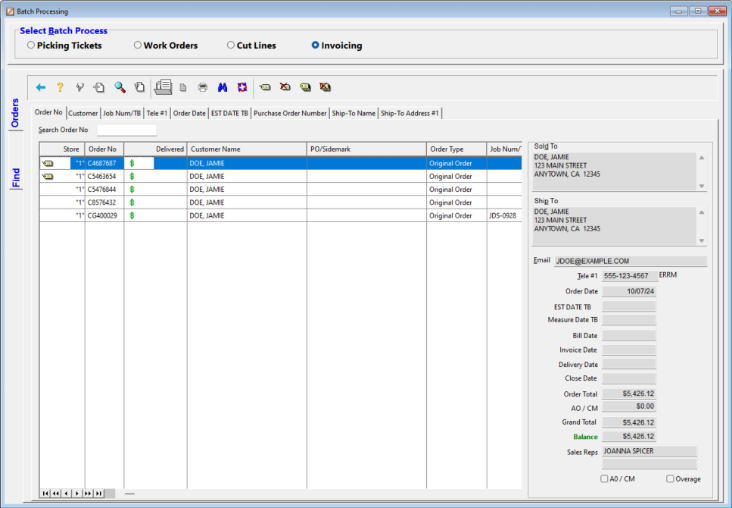
The customer hears about a backorder days before the install date
The morning a roll is flagged backordered in RFMS, the office has an update for each affected customer queued for review, with the new expected date, days before the crew would have arrived. The same happens when an order's material status changes overnight.
The day before each install, the office reviews a confirmation for each customer with the time window and a reminder to clear the room. Each morning's Slack post gives the crews their jobs, with every address and start time.
A confirmed job brings a written deposit request for the office manager to send, and a completed one the final invoice email, both with a payment link. A week after the install, customers who have not registered their flooring warranty get a reminder with the manufacturer's registration link, drafted for the showroom to send.
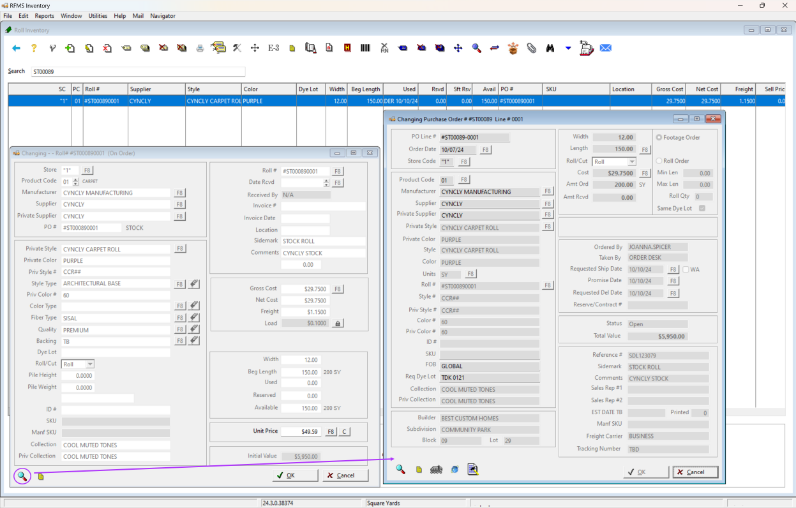
Each backordered line in RFMS comes with its customer update drafted
The showroom manager opens RFMS each morning to look for backordered lines and changed material status, then writes to the customers they affect. WebRun is an AI agent that works a real Chrome browser, signed in as you. It checks the orders, the material status and the install schedule before the showroom opens, and for a distributor outside the B2B network it signs in to that distributor's portal to read the ship date. The messages it prepares go to the office to review.
It changes nothing in RFMS and never places an order on a distributor's portal. Backorder updates, install confirmations and payment requests sit in the review queue until the office manager releases each one.
Questions people ask
Our main distributor is not B2B-enabled. Can it check their site?
Yes, with your buyer's login for that portal. It looks up the order there and notes the ship date beside the RFMS order for someone in purchasing to update.
Which RFMS tier do we need for this?
Any. The order screens it reads come with every tier. In RFMS's own tier sheet, B2B E-Commerce, which removes the retyping of vendor documents, starts at Professional, and Mobile Work Orders come with Enterprise.
Can it register warranties for our customers?
No. It can find last week's installs whose customers have not registered and draft a reminder with the manufacturer's registration link from your records. The customer registers for themselves.
Does it touch orders or payments in RFMS?
No. It reads orders, material status and the install schedule. Changing an order line, posting a payment or closing a job stays with your staff.
Sources
- RFMS Core: Unified Flooring Operations & ERP Software | Cyncly Where rfms.com now leads: Cyncly's RFMS Core page, with its capabilities, mobile apps and add-ons, and flooring solutions for builder, commercial and residential dealers and installers.
- RFMS Core ERP Capabilities | Cyncly Describes B2B eCommerce with B2B-enabled vendors for price catalogs, invoices and shipping notices, batch processing of pick tickets, work orders and job costing, sales reporting notifications, Cyncly Payments and the REST API.
- RFMS Mobile Apps | Flooring Management & Sales Software | Cyncly Lists Measure Mobile, RFMS Mobile, CRM, Warehouse Management and Mobile Work Order, which lets installers upload notes, attachments and photos to the RFMS job file.
- RFMS Core ERP add-ons | Cyncly Shows Schedule Pro, a weekly grid of scheduled jobs for each crew with customer details, locations and times.
- RFMS subscription tiers (Business management software for the flooring industry) RFMS's own tier sheet (June 2024): B2B E-Commerce and Batch Job Costing from RFMS Professional, RFMS Mobile and Measure Mobile for named users on Professional, Mobile Work Orders on Enterprise, an API on every tier from Basic (create customers, leads) to Enterprise (creating and editing quotes and orders), and prebuilt integrations such as Zapier on every tier.
- Compusoft + 2020 acquires RFMS Floor Covering News, 12 July 2022: Compusoft + 2020 acquired Resource and Financial Management Systems Inc. (RFMS), a business management software provider for the flooring market.
9 ready-made RFMS workflows
Each one names the apps it touches and the exact steps it takes. Open one to read what it will do, then turn it on.




Want one of these running on your own RFMS?
Show WebRun the process once and it will run it on schedule, in your own private browser environment.