How to Automate My Music Staff
A teacher on My Music Staff can leave the billing to the calendar, with auto-invoicing, Auto Pay, late fees, email and SMS reminders and open make-up slots. The teacher still turns a month of lesson notes and practice logs into word for parents and chases unused make-up credits and exam deadlines, which an agent like WebRun can draft.
 Written by
Nikhil Bhatt
Automation strategist
Written by
Nikhil Bhatt
Automation strategist
 Reviewed by
Aiko Tanabe
Product researcher
Reviewed by
Aiko Tanabe
Product researcher
Every lesson in My Music Staff leaves a note, a charge and an attendance mark
Between the four o'clock and the five o'clock lesson there is just enough time to type the note: the scale to fix, the two bars to take slowly, the piece to start next week.
My Music Staff is where that note goes. It is studio management software for private music teachers and music studios, travelling teachers among them. The teacher marks attendance on the calendar, and calendar-based billing turns the lessons into charges, per lesson, monthly or hourly.
Families see their side in the Student Portal: the lesson notes, a practice log with a timer, their invoices and balance, and open make-up slots to register for.
In a studio with several teachers, each one signs in to their own schedule and lesson notes, and the owner sets their permissions and pays them hourly or as a share of revenue.
Parents who never open the Student Portal still ask how lessons are going
A parent pays every month, has never opened the Student Portal, and asks at the door in June whether their son is making progress. The answer is in a term of lesson notes, and turning them into a paragraph means reading them back one by one.
Practice time shows up student by student, so seeing who managed ten minutes all week means opening each student's record in turn. Three families are carrying make-up credits into the last month of term while open make-up slots sit unbooked, and if the studio's policy expires credits some days after the absence, theirs are close to going.
The spring recital needs sign-ups by Friday, and most families have not replied. Exam entries close on the exam board's site, and results appear there weeks later for the teacher to copy into each student's notes. In a school with several teachers, each wants tomorrow's students and the last lesson note for each before leaving home.
Auto Pay and open make-up slots run without the teacher
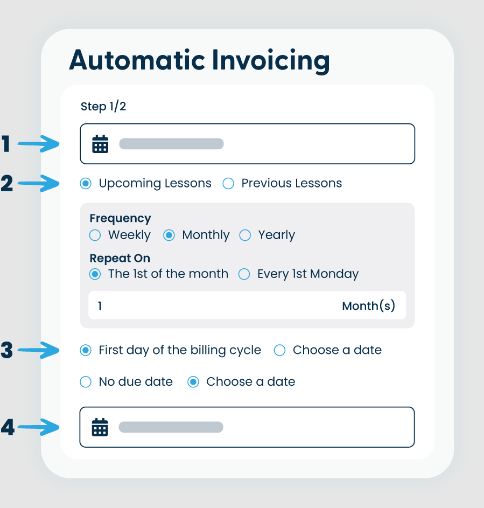
Auto-invoicing creates invoices on the dates the studio sets, sends the teacher a summary four days before and emails them to families, and Auto Pay charges the card or account on file as each invoice goes out. Invoice reminders and late fees can run on their own as well.
Email and SMS lesson reminders go out as far ahead as the teacher chooses. A cancelled lesson can turn into an open make-up slot that other students register for in the Student Portal, and the studio can set make-up credits to expire a chosen number of days after the absence.
On the teaching side, a teacher can write a lesson note from a template and email it to the student and parents at the end of the lesson in a couple of clicks, and a student logging practice can tick Email Teacher to send the entry straight over.
Each of those works one lesson or one entry at a time. A progress update that draws on a month of notes and practice logs is still the teacher's to write, and matching the families who hold credits to the slots still open is the teacher's job too. Exam entries and results live on the exam board's own site, outside the account.
A term's lesson notes already hold the report parents want
A monthly update for each family, built on that month's lesson notes and practice log, goes out once the teacher has edited it: what the student worked on, and what to practise next.
A month before the end of term, each family still holding make-up credits gets the open slots that remain by email, while the credits are still good. A family that has not signed up for the recital by Tuesday gets a reminder with Friday's deadline in it. Before each lesson, the teacher can see in Slack which of the day's students have logged no practice for three weeks.
Well before the board's closing date, the teacher has the planned exam entries that are still missing, and each student's private notes carry the result once the board publishes it. In a school with several teachers, each teacher's Slack message for tomorrow names every student with their last lesson note underneath, and the owner knows which teachers still have lesson notes to write.
Parent updates reuse the words the teacher typed between lessons
To write those updates by hand, the teacher would reread four lesson notes and a month of practice entries for every student.
WebRun is an AI agent that works a real Chrome browser, signed in as you. Four things in My Music Staff are what it reads late in the week: the calendar, lesson notes, practice logs and make-up credits. It leaves a draft per family in Gmail, plus a message in Slack for anything the teacher should see first. With your exam board login it checks that site as well.
The teacher reads every update in Gmail before a parent sees it. The agent leaves invoices, Auto Pay and attendance to My Music Staff's own settings. Each job below reads the same calendar and lesson notes.
Questions people ask
Is a monthly update different from emailing each lesson note?
Yes. The lesson note email covers one lesson and goes when the teacher sends it. The monthly update reads four weeks of notes and practice entries together, so it can say that practice doubled since the recital or that the same passage keeps coming back, which no single note shows.
Does it read the practice log students fill in?
Yes, as far as your login can see it. Practice time and the notes students leave with each entry sit on their record in My Music Staff, which is where the agent picks them up, so nothing extra has to be switched on.
Can each teacher in a multi-teacher studio see only their own students?
Yes. Each teacher who signs in to My Music Staff works from their own schedule, attendance and lesson notes, so a run under a teacher's login covers only that teacher's students, and a run under the owner's login can split the results by teacher.
Do I need to write lesson notes differently?
No. It works from whatever you already write, including notes built from your lesson note templates. Notes that say what was covered and what to practise make the best drafts, but the format stays yours.
Can it follow exam entries on the exam board's website?
With your login for that site, yes. It reads entry deadlines and published results and brings them back to a sheet or to each student's notes. Entering students and paying the fees stay with you.
Sources
- Getting Started Guide - Automate It - My Music Staff Lists the built-in automations: email and SMS lesson reminders, auto-invoicing with a summary four days before the invoice date, invoices emailed automatically, Auto Pay, cancelled lessons turned into open make-up slots, and website sign-ups with a welcome email.
- Invoices & Payments - My Music Staff Describes calendar-based billing per lesson, monthly or hourly, Stripe and PayPal payments, and automatic invoice reminders and late fees.
- Calendar & Attendance - My Music Staff Establishes make-up credits for missed lessons, lesson notes for students and parents alongside private notes, custom lesson note templates emailed to students and parents at the end of a lesson in a couple of clicks, and reminders set days or hours in advance.
- Student Portal - My Music Staff Shows what families see in the portal: lesson notes, attendance, balance and invoices, lesson booking and cancelling, make-up registration and the practice log with its timer.
- Great Form! - My Music Staff Announces (6 February 2017) that make-up credits can be set, on the Policies tab of Studio Settings, to expire automatically a certain number of days after the absent event.
- Feature Spotlight: Practice Log Communication - My Music Staff Describes students ticking Email Teacher when saving a practice entry, and teachers reviewing each student's entries on the Practice Log tab of their Student Details page.
- Multi-Teacher - My Music Staff Covers per-teacher permissions, payroll as a flat hourly rate or a percentage of revenue, and teachers signing in to their own schedule, attendance and lesson notes.
7 ready-made My Music Staff workflows
Each one names the apps it touches and the exact steps it takes. Open one to read what it will do, then turn it on.



Want one of these running on your own My Music Staff?
Show WebRun the process once and it will run it on schedule, in your own private browser environment.