How to Automate Lucidchart
Lucidchart's automation mostly happens while drawing: data linking fills shapes from Google Sheets, Excel or CSV, and Lucid AI turns a prompt into a diagram. An AI agent like WebRun can make the weekly pass over share settings, comments and statuses that keeps diagrams current, answered and safely shared afterwards.
 Written by
Julian Adeniyi
Retail operations
Written by
Julian Adeniyi
Retail operations
 Reviewed by
Nikhil Bhatt
Automation strategist
Reviewed by
Nikhil Bhatt
Automation strategist
Lucidchart diagrams end up as the written record of how work is done
Lucidchart, which plenty of its users just call Lucid, is where a company's diagrams get drawn and edited together in real time at lucid.app. Operations draws its process maps there and IT its network and cloud architecture, while HR keeps the org chart.
Diagrams rarely stay inside Lucid. Teams embed them in Confluence and Notion pages or share them into Microsoft Teams and Slack, and from then on the embedded diagram is the version of the process new staff follow.
Each diagram has an owner, a folder, a share setting and a thread of comments from the people who reviewed it. A diagram can also start from Lucid AI, which draws a first version from a prompt.
Process maps keep showing steps the team stopped doing
The expenses flowchart still sends approvals through a tool the company dropped in the spring. The org chart in the handbook shows last year's managers, and the network diagram predates the new firewall.
Comments go quiet too. A reviewer @mentions the owner about step four, the email lands under forty others, and the question sits in the Comments panel for three weeks while people follow the diagram as drawn. A new process map waiting for review stays that way until its author chases the reviewer.
Share settings outlive the work. A link set to Can edit for an outside consultant stays on after the project ends, and a system diagram sent over for a vendor call is still open twelve months on. The security lead usually finds out in an audit, opening documents one at a time to check.
Lucid governs who can open a diagram and leaves the follow-up to people
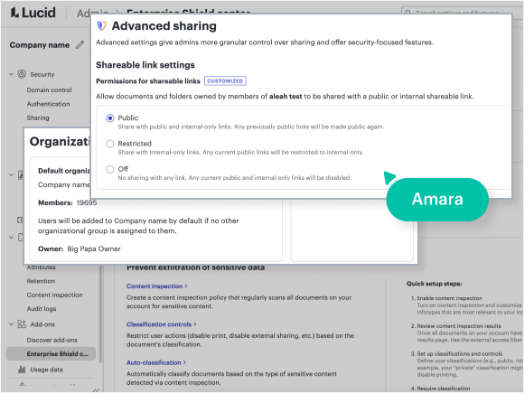
Sharing in Lucid has four levels: Can edit and share, Can edit, Can comment and Can view. On Team and Enterprise accounts an admin can set shareable links to Public, Restricted to the account, or Off, and warn about or block sharing by email outside approved domains. Enterprise adds Discovery, a search across the documents the account owns that filters to those with external access, and the Enterprise Shield add-on can revoke external shares of selected documents or for all external collaborators, with audit logs and classification labels besides. Data linking fills shapes from Google Sheets, Excel or CSV.
Discovery is a search an admin has to run, and it sees only documents the account owns. An expiring link, also an Enterprise feature, still leaves everyone who opened the document before it expired with access until someone unshares them. An @mention sends one email, and if that email is missed the thread waits. Data linking keeps shapes in step with a spreadsheet, but nothing links a diagram to the expense tool or HR system the process actually runs through.
Open share links land in the security channel every Monday
The person who drew a diagram could hear each morning about comments and tasks on it older than two days, with who is waiting and on which page. A reviewer could get a message with the link, and a review card, as soon as an author marks a process map ready for them.
Each Monday the security lead could read, in the security channel, every document with a link open beyond the account or a collaborator from outside it, each with its owner, plus the documents whose share link has expired, since everyone who opened those before the expiry keeps access.
Owners of diagrams untouched for six months could get a short nudge, sent only after you approve the batch, and the documentation index in Notion could carry each week's edit dates from a Friday revision log.
The check runs document by document across every shared team folder
The weekly check means opening each document's share dialog and Comments panel in turn, across every team folder. WebRun is an AI agent that works a real Chrome browser, signed in as you. At lucid.app it opens each document the account can reach, reads the share settings, the comments and the last edit, and records the result in the sheet, on the review card or in the owner's message.
Switching off a link, removing a collaborator or restoring an old version stays with the owner or an admin, and the nudges to owners go out as one batch after you approve it. If a security review is coming, the weekly sharing check below is the card to set up first.
Questions people ask
Doesn't Discovery already find external shares?
It finds them for an admin on Enterprise. The weekly check sends each owner the findings that concern them, and it looks at comments and reviews as well as sharing.
Can it see documents that were never shared with it?
No. It sees what the account it signs in with can open, so for a folder-wide check, share the team folders with that account or connect one that already has them.
Is linked data exposed when a diagram is shared?
It can be. Lucid's help centre notes that collaborators can reach data linked to a Lucidchart document by default, so diagrams with linked data are the ones to check first.
Sources
- Share with collaborators in Lucid Sets out the four sharing levels, says link passcodes and expiration are Enterprise-only and that an expired link leaves earlier collaborators with access, and notes collaborators can reach linked data by default.
- Lucid admin panel: Security settings On Team and Enterprise accounts, shareable links can be set to Public, Restricted or Off, and sharing by email can be warned about or restricted outside approved domains.
- Lucid admin panel: Compliance settings Discovery is only available to Enterprise accounts, returns only documents the account owns, filters by external access, and with the Enterprise Shield add-on can revoke external sharing in bulk.
- Add comments and assign tasks to collaborators An @mention or an assigned task notifies the collaborator by email, and comments can be reviewed and resolved from the Comments panel.
- Lucidchart Lucid's product page: intelligent diagramming, Lucid AI diagram generation, data linking to Google Sheets, Excel or CSV, and connections to Confluence, Notion, Microsoft Teams and Slack.
- Enterprise Shield Lucid's security add-on, which can revoke external shares of selected documents or for all external collaborators.
6 ready-made Lucidchart workflows
Each one names the apps it touches and the exact steps it takes. Open one to read what it will do, then turn it on.





Want one of these running on your own Lucidchart?
Show WebRun the process once and it will run it on schedule, in your own private browser environment.