How to Automate Jira
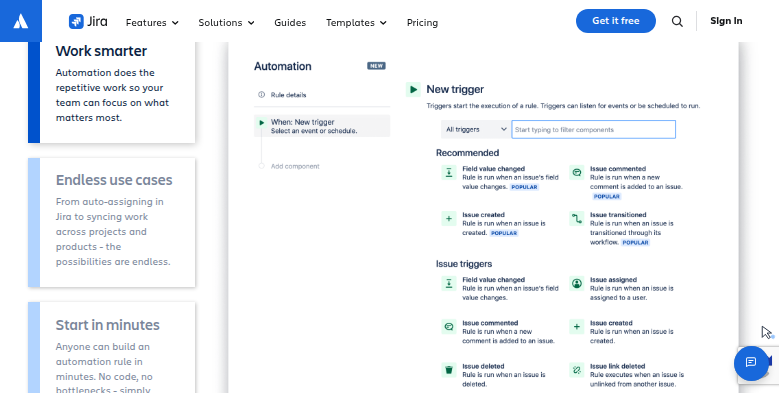
Jira's no-code automation rules run when a work item is created or moved, on a schedule, or when a connected GitHub, Bitbucket or GitLab reports a merge or deployment. Rules cannot start from unconnected tools; an AI agent such as WebRun can read those and file what they show in Jira.
 Written by
Clara Bennett
Revenue operations
 Reviewed by
Marta Ellison
Automation strategist
Jira is the record of what the team said it would ship
Jira is where a software team writes down the work it has agreed to do and who holds each piece of it. Plenty of people still call it Jira Software, but Atlassian merged Jira Work Management into it in May 2024, so a marketing team can track its launches in the same Jira where the engineers run their sprints.
Atlassian has since renamed two of its basic nouns: issues are now work items, and in February 2026 projects became spaces. A bug still waits in the backlog until the team pulls it into a sprint, and the engineer who takes it drags it across the board to Done.
Engineers update their own work items between pull requests, and support escalates customer faults into the backlog. The product manager plans each sprint from that backlog and writes the release notes from the work items that closed in it.
Every bug gets retyped before anyone fixes it
Very little of what lands in Jira starts there. On a team with a mobile app, a new crash shows up first in the app store's console, and the developer who spots it copies the build number and the stack trace into a new bug by hand. At an agency, clients post change requests in their own portal, and the account manager reads each one and rewrites it as a story.
Status leaves Jira by hand too. The engineering manager builds the Monday update by reading the board and typing a summary for people who will never log in. A blocker can sit unassigned all weekend because nobody ran the filter that would have shown it. Work items stay In Progress for weeks after the code shipped, so the sprint report is wrong and the retro spends ten minutes on why.
Jira automation needs the other tool connected first
Jira's automation rules, which Atlassian's documentation now calls flows, are built without code. A flow can start when a work item is created or transitioned, or run on a schedule against a JQL search, and then post to Slack or Microsoft Teams. With GitHub, Bitbucket or GitLab connected, a flow can also fire on a merged pull request or a failed deployment, though Atlassian says these development triggers do not support self-hosted tools such as Bitbucket Server. Each plan includes a monthly allowance of automation steps, pooled across the organisation, and every part of a flow that runs, down to each condition, uses one. From 3 December 2026 Atlassian bills the steps beyond it.
Every flow starts from something Jira can see: a change inside Jira, the clock, a connected code host, or an HTTP POST to the flow's incoming webhook URL. A store console or a client's portal has no Jira connection and posts to no webhook, so nothing that happens there can start a flow.
Getting information out meets the same wall. Send web request, the action for notifying another system, needs the receiving system to have an API. A filter subscription emails the first 200 results of a saved search to you or a group you belong to, as a list of work items rather than an update a client would read.
Bugs arrive filled in, and the sprint call reaches people outside Jira
The engineer on triage for a mobile app could work from bugs that already hold the build number and the first-seen date from the store console, instead of from a screenshot pasted into a chat. When a crash comes back more often, the triage engineer reads the new count in a comment on the existing bug rather than in a duplicate.
An agency's account manager could review each change request a client posts in their portal as a story already under that client's epic, in the client's own wording, and nobody would have to connect the portal to an incoming webhook first.
People who never open Jira can have its status too. The on-call lead hears within the hour about any blocker left unassigned or untouched, with a link to the work item. Before standup, the founder already knows from WhatsApp which work items will not close by Friday and who holds each one. The engineering manager can prune the backlog every Monday, working down the work items nobody has touched in six weeks, oldest first.
People still close the work items the agent files
Copying a crash from the store console into a bug takes no engineering judgment, and neither does reading the sprint board to write Friday's call. WebRun is an AI agent that works a real Chrome browser, signed in as you. In the console or the client's portal it reads what changed, and before filing anything it searches the space for an open work item with the same error or request, so a repeat gets a comment instead of a second bug.
When a bug looks fixed, it comments on the work item and mentions the assignee instead of moving it to Done, and only the release manager presses Release on a version. The cards below start from these jobs, among them the sprint readiness call and the hourly blocker check.
Questions people ask
Does it use our monthly automation allowance?
No. WebRun edits work items through the browser as its signed-in user, so its own work never runs as an automation flow or uses automation steps. An edit it makes can still trigger one of your flows, and the steps that flow runs count as usual. From 3 December 2026 Atlassian bills steps beyond the allowance.
Should we move our Jira automation rules over to it?
No. Anything Jira can see, such as a transition, a merged pull request or a schedule, is better handled by a flow that runs inside Jira. Use WebRun for what no flow can start from: a request in a client's portal, or a crash in a store console.
Which Jira account should it sign in as?
One made for it, with access to only the spaces it works in. Through the browser it has exactly that account's permissions in each space, and it needs no API token and no admin rights.
Did anything break when issues became work items and projects became spaces?
No. Atlassian describes the spaces change of February 2026 as terminology and icons only, so boards, filters and automation carry on as before. A team that prefers the old word can keep Issue as a work type.
Sources
- Jira automation Atlassian's automation page: rules are built without code, automation is included at no extra cost with monthly execution limits set by plan, and rules connect to Slack, Microsoft Teams, Bitbucket and GitHub.
- Jira automation triggers Lists the Scheduled and Incoming webhook triggers, and the branch, commit, pull request, build and deployment triggers that need a connected GitHub, Bitbucket or GitLab; self-hosted tools such as Bitbucket Server are not supported.
- Manage filters Filter subscriptions email a saved search's results on a schedule, and only the first 200 results are sent.
- Jira Spaces: a new name that matches how you work Atlassian's announcement that Jira projects are now called spaces, described as a terminology and icon update only.
- How is your automation usage calculated Automation usage is counted in steps (every trigger, condition, action, branch and loop that runs), pooled at the organisation level with an allowance by plan; extra usage billing takes effect on 3 December 2026.
- Use automation steps in a flow Atlassian's automation documentation, which now describes rules as flows made of triggers, conditions, actions and branches.
- 'Work,' your way: Jira's language is evolving to better represent all teams Atlassian, November 2024: in navigation and help, issues are referred to as work items, and a team can keep Issue as a work type.
- Welcome to the next era of Jira Atlassian, May 2024: Jira Software and Jira Work Management combined into a single Jira.
7 ready-made Jira workflows
Each one names the apps it touches and the exact steps it takes. Open one to read what it will do, then turn it on.




Want one of these running on your own Jira?
Show WebRun the process once and it will run it on schedule, in your own private browser environment.