How to Automate Intercom
In Intercom, Fin and Workflows take the customer side, so what is left to automate is the team's: grouping bug conversations into Jira issues, telling a free teammate when a first-response target has passed, and queuing Help Center rewrites. Data connectors reach systems with an API, while an AI agent like WebRun reaches the rest through a browser.
 Written by
Rosa Lindqvist
Operations editor
Written by
Rosa Lindqvist
Operations editor
 Reviewed by
Devon Ruiz
Workflow engineer
Reviewed by
Devon Ruiz
Workflow engineer
Intercom puts Fin on the front line and people behind it
Intercom is a customer service platform built around an AI agent called Fin. Fin answers customers across chat, email, voice, Slack and social channels, and hands a conversation to a person when it should, with the context kept. It answers from the Knowledge Hub, where the Help Center's public articles sit beside internal articles and snippets.
Behind Fin sits the Helpdesk: a shared Inbox, Tickets for longer problems, Outbound messages, reporting, and Copilot, an assistant for the human teammates. Jira and Salesforce are among the apps that connect straight into it.
At a software company it stays open all day for the support lead, the teammates who take what Fin hands over, the product manager reading conversations to understand a fault, and the success manager watching new accounts. With Fin taking routine questions, the conversations that reach people are the hard ones.
The support lead spends the day watching the queue and the clock
The support lead watches for conversations nearing their first-response target and passes each to someone who is free, which means checking the calendar or the rota as well as who shows as online.
Bug reports arrive as a dozen conversations in different words. A support engineer reads them, decides they describe the same fault, finds or opens the Jira issue and links each conversation, so those customers hear when it is fixed. By the time engineering picks the issue up, nobody has counted how many customers reported it.
After each release, parts of the Help Center go out of date, such as a renamed setting or an old screenshot, and the writer usually hears about it from a customer. The lead also pulls the week together for a manager every Monday: what Fin resolved, what it handed over and which topics grew.
Fin reaches any system with an API, once someone connects it
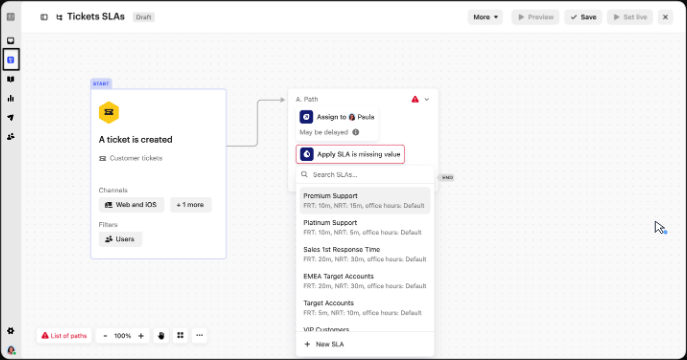
Fin reads from other systems and acts in them through Data connectors or MCP, updating an account or processing a refund. Workflows route and prioritise conversations and apply SLAs, and Intercom's help centre now documents a trigger that starts a Workflow before or when an SLA target is missed. In the Knowledge Hub the team can see which content performs best and fill gaps from past conversations.
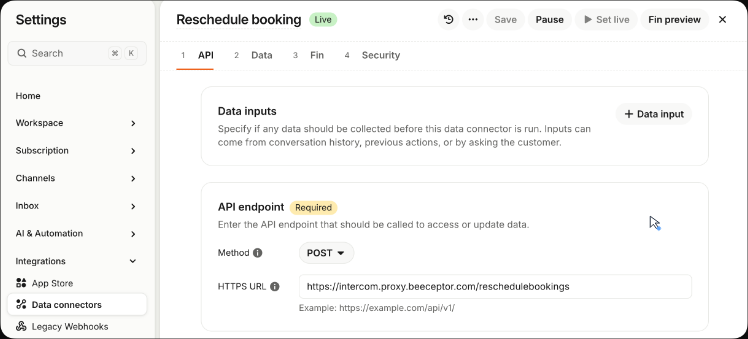
For a team whose systems all have APIs, and someone to connect them, that covers the customer side well. Each Data connector is an API call that somebody configures, and creating one or setting it live needs developer hub access; the same connectors serve Workflows as well as Fin. A system with no API stays out of reach: a partner portal, a carrier site you only have a login for, an old admin panel, the rota kept in a spreadsheet.
Engineering sees each bug once, with its customer count
Bug conversations that describe one symptom could become one Jira issue by morning, with the number of affected customers in its description and a priority set from that count, and engineers could read the list in the #engineering channel in Slack. When two issues turn out to be one bug, an engineer merges them, and the next morning's count lands on the one that survives.
Once a conversation has waited past its first-response target, the teammate the shared Google Calendar shows as free could get a WhatsApp message naming the customer and the wait, rather than whoever merely shows as online.
The Help Center writer could find a Trello card each Monday for every article that is old, barely read or contradicted by what teammates answered in that week's conversations, with the reason logged beside it in Airtable. For a new customer stuck on the same onboarding step in HubSpot for three days, the success manager could open that customer's Intercom conversation to a short nudge already drafted, naming the step.
Every customer-facing word still comes from Fin or a teammate
Fin works inside the conversation with the customer, while those jobs sit in Jira, Google Calendar, Trello and HubSpot. WebRun is an AI agent that works a real Chrome browser, signed in as you. A teammate's Intercom login lets it read the Inbox and the Help Center, and it does its part in those other tools.
Nothing it writes reaches a customer. The success manager sends each onboarding nudge from the Intercom conversation it was drafted in, or deletes it. Help Center articles are never edited, only queued as Trello cards, and in Jira it creates and updates issues while closing one stays with engineering.
Questions people ask
What does Fin already automate in Intercom?
The customer side. Fin answers across chat, email, voice, Slack and social channels, hands a conversation to a person with the context kept, and reads or acts in other systems through Data connectors or MCP, for example to process a refund. It also runs on other helpdesks, including Salesforce, HubSpot and Freshdesk.
Does Intercom have alerts before an SLA is breached?
Intercom's help centre now documents a Workflow trigger that runs before or when an SLA target is missed, so check whether your workspace has it. On top of that, WebRun can check who is free in the shared Google Calendar and message that person on WhatsApp.
Can it bring answers from a system with no API into a conversation?
Yes, as an internal note. The teammate on the conversation finds the portal's answer already written there, looked up with the login your team uses for that portal. Fin's Data connectors need an API to call, so a login-only system is where this helps.
Sources
- Fin, the AI agent by Intercom States that Fin connects to other systems through API, Data Connectors or MCP, can update accounts and process refunds, works across voice, chat, email, Slack and social, hands off to people with context, and works with Salesforce, HubSpot and Freshdesk as well as Intercom.
- Intercom Helpdesk Lists the Inbox, Tickets, Copilot, Help Center, Knowledge Hub, reporting, Outbound messages and integrations such as Slack, Jira and Salesforce.
- Set SLAs for conversations and tickets Intercom's SLA article, applied through Workflows; the same help collection lists a separate article, Trigger a Workflow before or when an SLA breaches.
- How to set up Data connectors Explains that each Data connector is an API call you configure, that any system with an API can be connected, and that creating one needs the developer hub permission.
- Knowledge Hub Intercom's central knowledge system: public Help Center articles, internal articles, snippets, past conversations and synced sources in one place, with reporting on which content performs best and gap filling from past conversations.
4 ready-made Intercom workflows
Each one names the apps it touches and the exact steps it takes. Open one to read what it will do, then turn it on.


Want one of these running on your own Intercom?
Show WebRun the process once and it will run it on schedule, in your own private browser environment.