How to Automate Jane
Jane automates the clinic's own calendar. Online Booking, appointment reminders, Smart Waitlists, Intake Forms and Jane Payments all run without staff. The follow-up that starts from the schedule, rebooking, superbills, unpaid balances and review requests, is still done by hand between patients, and that is the part worth handing to an agent like WebRun.
 Written by
Hannah Vogel
Finance operations
Written by
Hannah Vogel
Finance operations
 Reviewed by
Devon Ruiz
Workflow engineer
Reviewed by
Devon Ruiz
Workflow engineer
The schedule is the clinic, and Jane holds the schedule
Health and wellness clinics run on Jane, the practice management software most of their staff simply call Jane App. Physiotherapy, chiropractic, massage therapy, acupuncture, naturopathy and mental health practices all use it, from a single practitioner with one room to a fifteen-person clinic across three locations.
Everything in that business hangs off the calendar. The booking a patient made at eleven at night, the treatment room, the chart from the last visit, the package of six sessions somebody paid for in March, the balance an insurer has not settled. Open the schedule and you are looking at the whole clinic at once.
So it is the first thing anyone opens in the morning and the last thing they check at night. It is not a diary. It is the clinic's capacity, its revenue and its clinical record, arranged by time of day.
Practitioners end up doing their own admin
In a clinic this size there is rarely anyone whose only job is the office. There is a receptionist for part of the week, and the rest lands on whoever is between patients.
The massage therapist with a forty-minute gap is emailing someone who did not rebook. The acupuncturist is putting together a superbill for a patient who needs it for their insurer. The owner is going through balances that were never collected at the desk, working out who to chase and how politely. Somebody is checking which intake forms are still blank for tomorrow's new patients, then phoning the ones who never filled them in. Somebody else is asking last week's happy patients for a review, one message at a time.
None of it is difficult. All of it happens in the gaps, which is why it is the first thing to slip in a busy week.
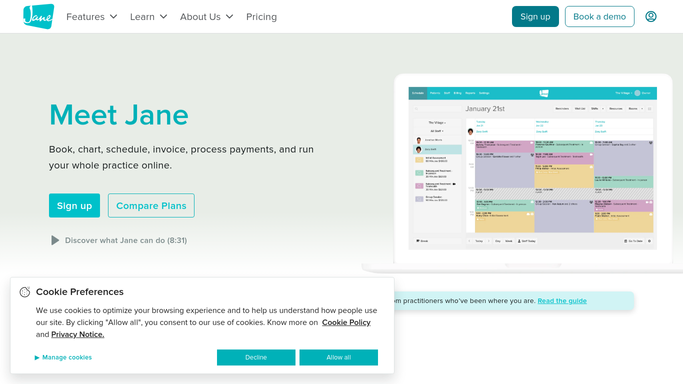
Reminders, waitlists and intake forms already run themselves
Jane covers a good deal of this already, and it is worth knowing how far that reaches before adding anything to it.
Online Booking lets patients book, cancel and rebook without phoning the desk. Appointment reminders go out on their own. Smart Waitlists fill a cancellation by alerting the people waiting, so a gap that opens at nine can be taken by ten. Intake Forms go out ahead of a first visit and land in the chart. Jane Payments takes the money, Packages & Memberships tracks what a patient has left to use, and AI Scribe drafts the note from the session. Ratings & Reviews gathers feedback afterwards, and Billing & Insurance connects out to Claim.MD and TELUS eClaims.
All of that works on what Jane already knows about, and that is the boundary. A patient in Jane can be reminded. A claim Jane submitted can be tracked.
The insurer's own portal is not in Jane. Neither is the referring clinic's system, the review that appeared on Google last night, or the bank statement showing what actually cleared. Those are other people's screens, and there is no route into them from the schedule.
A treatment plan is a promise somebody has to keep
Every one of those small jobs starts with a list Jane could produce on its own and ends somewhere outside it.
The patient whose plan said six visits and who stopped at three. That is a list, and it can be a short one on a Monday morning with a message drafted beside each name, ready for the practitioner to read and send.
Package credits expiring at the end of the month, so the person who paid for ten sessions and used four hears about it with six visits left to use. Patients last seen in February who simply drifted, offered a slot instead of being left to remember on their own. The card payment that failed overnight, caught before it becomes an awkward conversation at the desk. The superbill somebody requests every month, drafted and waiting rather than built from scratch each time. Tomorrow's schedule, with the missing forms, the unpaid balances and the new patients marked, sitting in the clinic's group chat before the first appointment.
None of that needs an integration to exist first. It needs somebody to work through the list, and the list is already there.
The admin can be done before the first patient arrives
The list is already in Jane. Writing the messages that go with it is what slips, and neither job is clinical work. In most clinics both jobs land on a practitioner in a gap between patients, the most expensive time in the building to spend on admin.
WebRun is an AI agent that works a real Chrome browser, signed in as your staff are. It opens Jane the way a person does, reads the schedule, the balances and the treatment plans, and brings the list back with the work already drafted.
The line in a clinical setting is firm. Gathering and preparing can run unattended. Anything that reaches a patient, or that changes a clinical or billing record, is drafted and waits for a qualified person to send. It runs on your schedule in your own private environment.
The workflows below are already built, and each one names what it opens.
Questions people ask
Will it message patients without a person checking first?
No. Anything that reaches a patient is drafted and held for review. A rebooking nudge, a balance reminder or a review request is written with the patient's details filled in, and a person in the clinic decides whether it goes.
Do we need a Jane integration or an API key?
Neither. It signs into Jane in a browser the way your staff do, so it works with the access those staff already have. There is nothing to install in Jane and no developer involved.
Can we limit what it is allowed to see in Jane?
Yes. A workflow can be locked to an explicit list of sites and pointed at the screens it needs, such as the schedule and the account balances. It sees what the person signing in can see, and sessions are not shared between tools.
30 ready-made Jane workflows
Each one names the apps it touches and the exact steps it takes. Open one to read what it will do, then turn it on.

Want one of these running on your own Jane?
Show WebRun the process once and it will run it on schedule, in your own private browser environment.