How to Automate Inspect Point
Inspect Point creates deficiencies from failed answers, chases proposals and invoices, delivers reports to owners and to AHJs through TCE, IROL and LivSafe, and sends Visit Reminders for booked visits. Inspections due but not yet booked, re-inspections and AHJ filing dates still need the office to look; WebRun, an AI agent, reads them and drafts the emails.
 Written by
Nora Whitfield
Editorial lead
Written by
Nora Whitfield
Editorial lead
 Reviewed by
Julian Adeniyi
Retail operations
Reviewed by
Julian Adeniyi
Retail operations
In Inspect Point, a failed answer becomes a deficiency, a proposal and an invoice
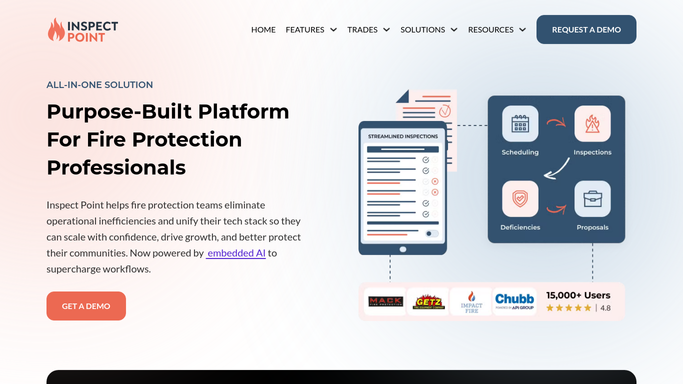
Inspect Point is built on the idea that a fire protection company's revenue starts at the inspection. A technician works through NFPA question sets on an iPad, loaded by system type and code year, and when an answer fails a device, the deficiency is created on the spot with the photo and the code reference attached. That finding carries into a proposal, then a work order, then an invoice, and stays on the building's record until it is resolved.
Sprinkler, fire alarm, extinguisher and backflow contractors use it, from a single territory to companies growing by acquisition. The office manager keeps each building's inspection series, the sales coordinator sends proposals priced from the Price Book, and the service manager watches deficiencies turn into approved work. Customers open their reports through Inspect Point's Customer Portal.
An annual inspection falls due whether or not anyone has booked it
The series knows when each building is due. Booking the visit is still a phone call or an email to the building's contact, and in a busy month a few due dates pass with nothing on the calendar.
A failed inspection starts its own chain. The property contact needs the failed items in plain words and a date for the re-inspection, and dispatch needs to know which failures touch life safety before it plans the week.
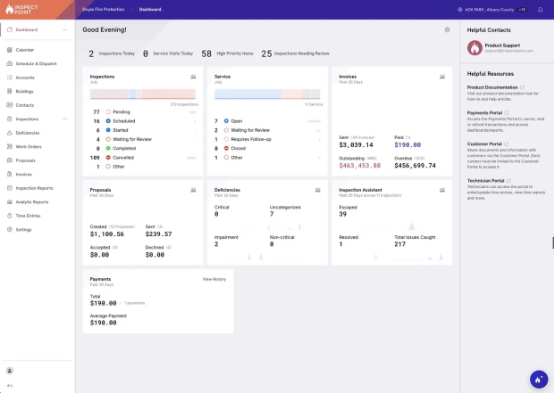
Reports have deadlines too. A jurisdiction expects each completed inspection within its window, and the compliance coordinator keeps a list of what has gone in and what has not. Open deficiencies sit for weeks, some with a proposal sent and some with nothing, and nobody asks the facilities manager who was pleased with a same-week repair for a review.
Visit Reminders email the building contact once a visit is booked
Visit Reminders, turned on under Settings, email every scheduling contact on an account or building before a visit in Scheduled status, a week, 48 hours, two weeks or 30 days ahead. Reports are generated in one click from the inspection and go to the owner and to the AHJ through The Compliance Engine, IROL or LivSafe, and a deficiency marked complete in Inspect Point can resolve in those platforms too. Inspect Point chases pending proposals automatically until someone answers, and sends invoice reminders on the cadence the office sets.
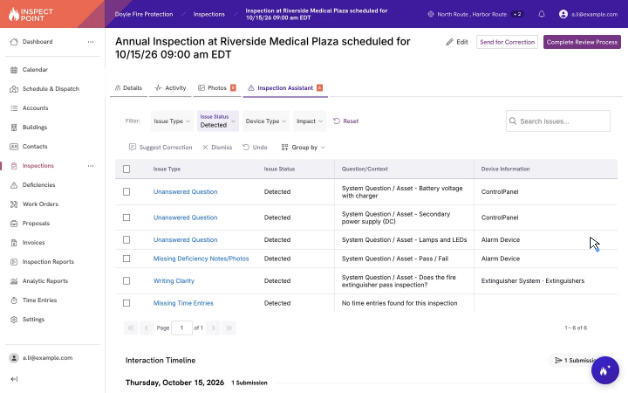
The AI Suite adds two assistants. The Inspection Assistant reviews an inspection while the technician is still on site, flagging missing photos, signatures and unanswered questions. The Inspect Point Assistant answers from live records, such as which inspections are overdue this week, and runs bulk changes with a preview first and an undo for 30 minutes after.
Visit Reminders wait for a booked visit, and the Assistant answers only when someone types a question. An inspection that is due but has nothing on the calendar gets no reminder, and a jurisdiction outside the three connected platforms takes its report on its own terms.
Dispatch hears about a life-safety failure before planning the week
When an inspection fails, dispatch gets the failed items and the re-inspection window in Slack, critical life-safety deficiencies first, with the property contact's details for a call. An email to that contact listing the failures and proposing two or three times waits in Gmail for the coordinator to send.
For every inspection falling due within a month with no visit booked, the office manager has a reminder to the customer drafted each morning, with overdue and within-a-week ones listed first in Slack. Each Monday, the compliance coordinator sees which completed inspections are still not submitted to the AHJ, due within 14 days or already overdue, with the technician or account manager for each.
The service manager's Monday sheet carries every open deficiency with its age and whether a quote went out, was accepted or has a job booked, the five oldest posted to Slack and anything past 90 days flagged. After a passing inspection, the facility contact gets a review request drafted, never twice inside 90 days, and every completed report has a distribution email drafted to each contact on the record.
No workflow here edits an inspection or files with an AHJ
Technicians answer the questions and the Inspection Assistant checks them, and nothing in these workflows changes either. WebRun is an AI agent that works a real Chrome browser, signed in as you. Inspect Point's web app gives it the series and each result to read, and everything it writes goes to Google Sheets, Slack or Gmail drafts. Review requests skip any inspection with open deficiencies or failed items.
The coordinator books every re-inspection, a qualified person files with each jurisdiction, and every customer email leaves from Gmail when the office manager or the coordinator sends it.
Questions people ask
Does the report distribution email duplicate Inspect Point's own?
Partly. Inspect Point sends each finished report to the owner and the AHJ. The workflow drafts an email to every contact on the record, facility manager and compliance contacts included, and logs it in a sheet until someone confirms it went out.
How do the due-date reminders fit with Visit Reminders?
They cover the weeks before a visit is booked. Visit Reminders email scheduling contacts about visits already in Scheduled status; the workflow drafts reminders for inspections due within 30 days that have nothing on the calendar yet.
Could the Inspect Point Assistant give us the deficiency list instead?
For a question asked on the day, yes: it answers from live records, and the deficiency database filters open items by age. The weekly workflow writes the list into a Google Sheet every Monday and posts the oldest five to Slack without anyone asking.
Who files reports with the AHJ?
Your team, as now. Reports reach The Compliance Engine, IROL and LivSafe from inside Inspect Point; for other jurisdictions the Monday tracker shows what is due and overdue, and a qualified person files it.
Sources
- Deficiency Management Software | Inspect Point States that deficiencies are created automatically from failed answers, carry into proposals with photos and code references, can auto-resolve in The Compliance Engine, IROL and LivSafe, and can be filtered by status and age.
- Fire Protection Proposal Software | Inspect Point Describes proposals built from deficiencies, automated reminders on pending proposals, down payments and signatures at acceptance.
- AI Suite for Fire Protection | Inspect Point Describes the Inspection Assistant that reviews inspections before they are finalized and the Inspect Point Assistant, which answers from live data and runs bulk actions that are previewed first and reversible for 30 minutes.
- Materials & Services Overview | Inspect Point Help Center Explains that the Price Book's materials and services are added manually or by import and used on proposals, work orders and invoices.
- Inspections | Inspect Point NFPA question sets loaded by system type and code year, one-click branded reports sent to the owner and to AHJs through TCE, IROL and LivSafe, and the Customer Portal.
- Platform Features | Inspect Point The inspection series engine, proposals chased automatically and invoice reminders on the office's cadence.
6 ready-made Inspect Point workflows
Each one names the apps it touches and the exact steps it takes. Open one to read what it will do, then turn it on.


Want one of these running on your own Inspect Point?
Show WebRun the process once and it will run it on schedule, in your own private browser environment.