How to Automate Experity
Experity automates the urgent care visit itself. Patient flow is visible in real time, AI Scribe cuts the documentation load, eligibility and payer matching head off denials, and coded claims go out from the chart. Reference labs, employer accounts and payer portals sit outside it, which an agent like WebRun reads.
 Written by
Rosa Lindqvist
Operations editor
Written by
Rosa Lindqvist
Operations editor
 Reviewed by
Devon Ruiz
Workflow engineer
Reviewed by
Devon Ruiz
Workflow engineer
Two urgent care systems merged and became Experity
In 2019 DocuTAP and Practice Velocity, two of the biggest names in urgent care software, merged into one company under the name Experity. Both old names are still in circulation, and both still appear in the login list, along with Clockwise and Calibrater, which came in on the patient engagement side.
What it is now is an EMR and practice management system built for urgent care specifically, which is a different problem from a primary care panel. Nobody has an appointment. The queue is the day. A clinic is judged on how quickly somebody who walked in with a wrist injury is seen, treated and gone, and on whether the claim behind that visit was clean enough to pay first time.
So Experity runs the whole thing: registration, the chart, the coding, the claim, the x-ray read, the follow-up message. Around the core sit Teleradiology, Revenue Cycle Management, Patient Engagement and Business Intelligence.
The chasing starts after the patient has gone home
The visit closes in twenty minutes. What it generates can take a fortnight to finish, and most of it lands on somebody who is also covering the front desk.
The wrist film needs an overread, and the radiologist's report comes back to a portal. The throat culture sent to the reference lab turns positive on Thursday, and somebody has to see that, reach the patient and possibly change the antibiotic. The plant down the road sent nine people in for pre-employment screens and wants results plus its own forms, on its own account. A claim rejected with a code that means one thing at one payer and something else at another, and the explanation is only on that payer's website. The patient referred to orthopaedics may or may not have gone. The recheck advised in forty-eight hours was never called about.
None of it is clinically hard. All of it is somebody signing into something.
Charting, coding and the clean claim are Experity's own ground
Experity covers the visit thoroughly, and a clinic not using all of it should start there rather than here.
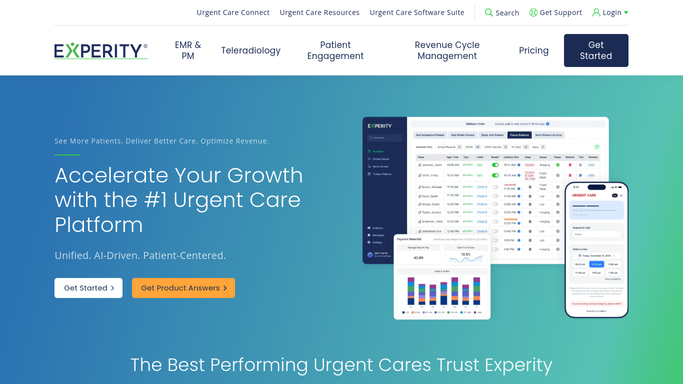
Patient flow is visible in real time, so the board shows where every patient is and what is holding them up. AI Scribe takes documentation load off the provider while the visit is happening, and the system gives real-time guidance towards accurate charting and coding. Eligibility and payer matching run up front, heading off denials before a claim exists. On the revenue side, claims are scrubbed, coded and submitted, exceptions and denials get worked, and A/R is prioritised by how each payer behaves.
Every one of those hangs off a visit Experity created. A patient registers, a chart opens, a code is assigned, a claim goes out.
The reference lab's portal is not one of those things. Neither is the employer that sent nine people for screens, the payer's own website, the orthopaedic practice you referred to, or the directory listing that tells a stranger at nine at night whether you are open.
Employer accounts, lab portals and payer rejections gathered by morning
Urgent care work originates in Experity and then has to be squared against a set of systems that have never heard of your clinic. All of that squaring is reading, and reading can happen overnight.
Reference lab and radiology portals checked against the visits that ordered the test, so a result nobody collected is a line on a list a clinician reads with their coffee, not something found three weeks later. Payer portals read for rejection reasons, claim status and remittance detail, so the billing team opens a worked list rather than eleven browser tabs.
Occupational health accounts assembled per employer: which screens and physicals are outstanding, which results that employer is still owed, which authorisations have lapsed. That relationship is worth real money, and it is usually run out of one person's inbox.
Referral partners' portals checked for whether the patient actually attended. The clinic's own hours and wait times on the maps and directories patients search at nine at night, because a stale listing sends people to the competitor. Reviews collected each morning with the visit they refer to.
Everything above is gathering. Nothing above is a clinical decision.
Nothing lands in a chart without a clinician saying so
That line matters more here than anywhere else, so it is worth being blunt about where the boundary sits.
WebRun signs into those portals in a real browser, as a user account you create and can revoke, on a schedule, inside a policy naming the sites it may open. It gathers, matches and lists. It does not write to the chart, it does not message a patient, and it does not close a referral loop on its own. A result notice, a recheck reminder or an appeal letter comes back as a draft with the source attached, and a qualified person decides what happens next.
That split is what makes it usable in a clinic. The unattended half is clerical: opening sites, reading pages, matching them against your own list. The half that touches a patient or a record waits for a human.
The cards below are where urgent care teams usually begin.
Questions people ask
What is it allowed to do without a clinician watching?
Gathering, and nothing beyond it. Opening portals, reading pages and matching what it finds against your visit list all run unattended. Anything that would change a clinical record or reach a patient stops there and comes back as a draft with the source attached, for a qualified person to act on.
Can it call or message patients about a result?
It drafts, a person sends. A recheck reminder or a result notice is written with the visit details filled in and left for review, because a message about a lab result is a clinical communication. Where your clinic already sends reminders through Experity, that stays exactly as it is.
Our payer portals hold patient data. How is that handled?
The same way your billing team handles it. It signs in as an account you create, under a policy listing the sites it may reach, with file uploads and shell access blocked, and it works inside your own systems rather than exporting anything. You can scope a login to read-only where the payer allows it.
10 ready-made Experity workflows
Each one names the apps it touches and the exact steps it takes. Open one to read what it will do, then turn it on.



Want one of these running on your own Experity?
Show WebRun the process once and it will run it on schedule, in your own private browser environment.